

How to Pair a DualShock 4 or Xbox Wireless Controller With iPhone and Apple TV - MacRumorsOpen MenuShow RoundupsShow Forums menuVisit ForumsOpen Sidebar
Skip to Content

How to Pair a DualShock 4 or Xbox Wireless Controller With iPhone and Apple TV

by

With iOS 13 and tvOS 13, Apple users are now able to connect their favorite console controllers to an iPhone or Apple TV. In this guide, we've provided a quick rundown of how to go about pairing the DualShock 4 Wireless Controller and Xbox Wireless Controller to both iOS and tvOS devices.
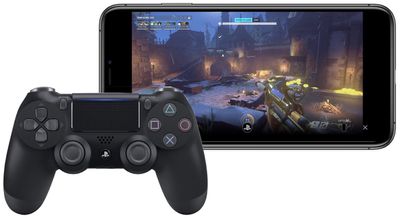
how to controller 5
Previously, MFi controllers were the only solution to playing games on iPhone, iPad, and ‌Apple TV‌. With the new update, console players don't need to spend extra money on another controller to play iOS and tvOS games. PS4 players also have a reason to look into DualShock 4 pairing since Sony's Remote Play iOS app provides streaming of compatible games to the iPhone or ‌iPad‌, which can now be controlled by a DualShock 4.

How to connect the DualShock 4 Wireless Controller to iPhone or iPad

  1. Press and hold the PS logo and Share buttons simultaneously on your DualShock 4 controller until the light bar flashes.
  2. Open your iOS device's Settings app and navigate to Bluetooth.
  3. Under "Other Devices," tap on your DualShock 4 wireless controller.

How to connect the Xbox Wireless Controller to iPhone or iPad

  1. Press the Xbox button to turn on the Xbox Wireless Controller.
  2. Press and hold the Connect button for a few seconds.
  3. Open your iOS device's Settings app and navigate to Bluetooth.
  4. Under "Other Devices," tap on your Xbox Wireless Controller.
how to controller 3

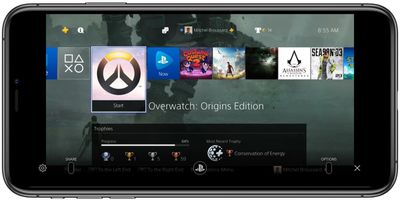
Sony's Remote Play iOS app controlled via DualShock 4

The steps for pairing controllers with an ‌Apple TV‌ are largely similar to the ones for iOS devices. You can find this information below.

How to connect the DualShock 4 Wireless Controller to Apple TV

  1. Press and hold the PS logo and Share buttons simultaneously on your DualShock 4 controller until the light bar flashes.
  2. Open the Settings app on ‌Apple TV‌ > click Remotes and Devices > Bluetooth.
  3. Select the DualShock 4 Wireless Controller to pair it, which will be confirmed with a notification on tvOS.

How to connect the Xbox Wireless Controller to Apple TV

  1. Press the Xbox button to turn on the Xbox Wireless Controller.
  2. Press and hold the Connect button for a few seconds.
  3. Open the Settings app on ‌Apple TV‌ > click Remotes and Devices > Bluetooth.
  4. Select the Xbox Wireless Controller to pair it, which will be confirmed with a notification on tvOS.

It should be noted that for the DualShock 4, some controller functions will not be functional while connected to an iPhone, ‌iPad‌, or ‌Apple TV‌. These include the touchpad, the central PS button, rumble, motion sensor, and the headphone jack. The light bar will also remain one color and can not be changed.

Both the PS4 and Xbox controllers will stay connected to the iOS/tvOS device you've paired them with until you re-pair them with your console. To reconnect a DualShock 4 with a PS4, you'll need to manually connect the controller with the console via the micro-USB to USB cable each controller comes with. For Xbox, you can press the connect button on the controller and the console at the same time, or use a micro-USB to USB cable.


Related Forum: iOS 13

Top Rated Comments

MisterSavage Avatar
82 months ago

Has anyone successfully paired a PS4 controller to an iPad Pro 11 (2018)?
Yep, I've gamed a lot on mine. Did you hold down the PS button and the share button at the same time before pairing the controller?
Score: 2 Votes (Like | Disagree)
star-affinity Avatar
87 months ago

That hasn't been a big deal for me. I plug it in to the console to charge it anyway.
Aha. I put them on the DualShock 4 Charging Station. The console is hidden behind a wooden frame with a piece of fabric around it – which is what we have to hide all the electronics underneath the TV in the living room – so never really need to connect a controller to the console, plus it's a bit of a hassle in my case.
Score: 2 Votes (Like | Disagree)
87 months ago

A bit sad the connecting the controller back to the console can't be achieved without connecting a cable between them. But maybe good for Sony and Microsoft since it makes me consider getting more controllers just for iOS/tvOS/macOS play. 🤓 Not so good for the environment... 🤔
But you can connect an Xbox controller back easily without a cable....... you press the sync button on the controller until it flashes and then the sync button on the Xbox intil it flashes and boom it’s done. Who says that you need a cable?
Score: 2 Votes (Like | Disagree)
MisterSavage Avatar
87 months ago

It is true you can run it off a USB cable, but I'm not sure how many people have a USB cable running to the sofa.
I bought a really long USB cable on Amazon for that exact scenario but I can see that being the exception and not the norm!
Score: 2 Votes (Like | Disagree)
CaptMarvel Avatar
88 months ago

So... before shelling out $50... any noted differences between controllers? I've heard Microsoft controllers have better battery life?

For me what makes the XBox controller a better choice for this is it has replaceable AA batteries, where the PS4 controller has to be recharged over USB. So if the PS4 battery runs down, you are done playing, where with the XBox you can just swap in some new AAs. I used Eneloop rechargeables and it worked out well for me.
This is false.
The PS4 controller can be used to play while charging via charging cable. Environmentally conscious, this is better than buying batteries to use then discard.


How do I switch from an iPad to an Apple TV for example? Do I have to re-pair every time I switch devices?

My controller automatically connects to the last device it was paired to and if I try to switch devices it fails to connect unless I de enter pairing mode.
Yes. For now, you have to unpair from one device and pair to each time you want to use it on with different device.

Imagine in the next generation systems, Sony, Microsoft and even Nintendo had the W1 chip via Apple...then, I’m sure switching from system to system would be a breeze and be linked to your Apple ID.

One can dream right?
Score: 2 Votes (Like | Disagree)
MisterSavage Avatar
88 months ago
This works remarkably well and is a huge "game" changer. One of my favorite additions with iOS 13.
Score: 2 Votes (Like | Disagree)

Popular Stories

iCloud iPhone 17 Pro

iPhone Users Who Pay for iCloud Storage Get Two New Perks on iOS 27

Thursday July 2, 2026 6:10 am PDT by
If you pay for certain iCloud+ storage plans beyond the 5GB that Apple offers for free, you will receive two more perks on iOS 27 at no additional cost. A summary of the two new iCloud+ perks on iOS 27:Increased daily usage limits for some new Apple Intelligence features, including image generation in the revamped Image Playground app. HomeKit Secure Video cameras receive generated video...
American Express Gold Apple Pay Feature

American Express Announces New Apple Pay Feature

Tuesday June 30, 2026 10:27 am PDT by
American Express today announced that you can now redeem Membership Rewards points when checking out with Apple Pay on the web and in apps on the iPhone and iPad. When checking out with Apple Pay on iOS 18 or iPadOS 18 or later, tap on your eligible American Express card (Platinum, Gold, Green, and others) and select the Membership Rewards points option. You can use points to cover all or...
series 10 apple watch titanium digital crown

Report: Apple Watch Redesign Coming Next Year With New Band System

Tuesday June 30, 2026 8:45 am PDT by
A "major overhaul" of the Apple Watch's design is due to arrive next year with a new system for connecting bands, according to a known Weibo leaker. In a set of recent posts, the leaker known as "Instant Digital" linked the new claim to older rumors about an "Apple Watch X" model, which was said to introduce a fresh design and break compatibility with the existing watch band system. Citing...















