

iOS 11 and macOS High Sierra bring new features to several apps, and some of the biggest changes have been made to the Notes app. Along with a new Document Scanning feature outlined in a prior how to (iOS only), the Notes app also includes support for pinning and tables.
How to Pin a Note in iOS 11
- Open the Notes app.
- Open an existing note or created a new one.
- In the list of note titles, swipe to the right on the note that you want to pin.
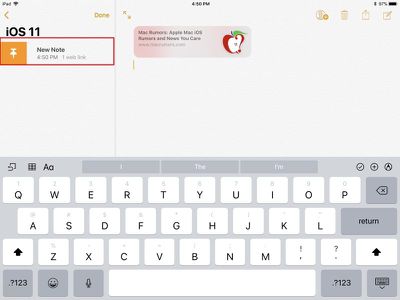
- The swipe will bring up an orange push pin. Tap it to pin the note to the top of the list of notes.

How to Pin a Note in macOS High Sierra
- Open the Notes app.
- On the left of the app, there's a bar that lists all of the notes in a particular folder.
- With the trackpad, swipe right on one of the notes to bring up an orange push pin icon.
- To pin the note, click on the push pin.
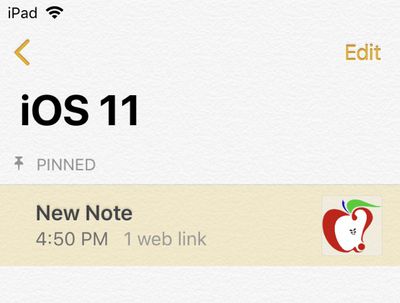
- The note will now be listed at the top of the app in a new "Pinned" section.

How to Add a Table to a Note in iOS 11
- Open the Notes app.
- Open an existing note or create a new one.
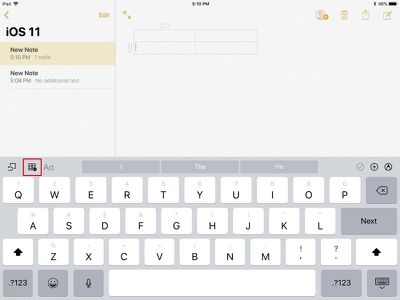
- On the keyboard in the Notes app, tap the icon on the left side of the app that looks like a set of boxes.
- This adds a table to the note.
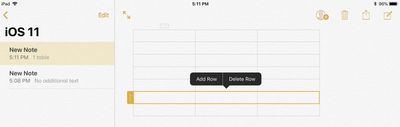
- To add more columns or rows, tap on the little gray bar next to an active row or column. The same method deletes them.
- To rearrange columns and and rows, tap the same little gray bar to highlight a row or column and then drag it into a new position.
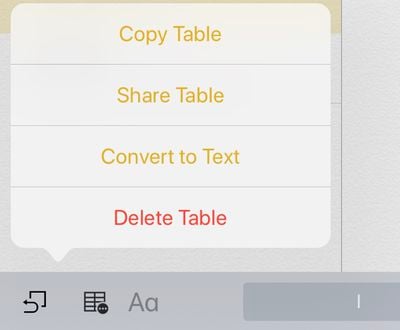
- To copy a table, share a table, covert a table to text or delete a table, hold a finger down on the table icon in the Notes app to bring up additional options.
How to Add a Table to a Note in macOS High Sierra
- Open the Notes app.
- Open an existing note or create a new one.
- At the top of the Notes app, click on the menu icon that looks like a table.
- Clicking that icon automatically inserts a table into the Note.
- To add, delete, or rearrange rows and columns, click on the little gray handles that are located at the top and side of the table.


Compatibility
All of the new features in Notes are available on the iPhone, the iPad, and Macs, so long as the devices are running iOS 11 or macOS High Sierra.
Related Forums: iOS 11, macOS High Sierra




















Top Rated Comments