

How to Scan Documents in the Notes App on iPhone - MacRumorsOpen MenuShow RoundupsShow Forums menuVisit ForumsOpen Sidebar
Skip to Content

How to Scan Documents in the Notes App on iPhone

by

In iOS and iPadOS, Apple includes a feature in Notes that allows you to quickly scan all kinds of documents so you can keep track of everything from receipts to recipes and photos.
iOS 17 General Notes Feature
The Document Scanner detects the edges of a document, aligns things properly, and removes all glare and tilt so you get a clean scan every time. Apple's document scanning tools are well engineered and impressive, with excellent performance on everything from photos to documents.

The feature is available on both iPhone and iPad. Here's how to use it:

  1. Open the Notes app and create a new note.
  2. Tap the Camera icon, then choose Scan Documents.
  3. Once the document scanning interface is open, you can optionally tap the three circles at the top to choose color, grayscale, black and white, or photo for your scan. The default option is color.
  4. Tap on the flash icon if you need to adjust the flash options. The default is auto, which will cause the flash to go off if you're in a room with low light.
  5. Focus the camera on your document, making sure the yellow box is lined up with the edges of your document.
  6. When it's aligned, press on the camera button to snap a photo. The Notes app will automatically correct for any tilting. If you don't press the camera button and the Auto shutter option is on, after a few moments the document will be automatically scanned.
  7. If the scan is to your liking, tap Done. If you want to try again, choose Retake.
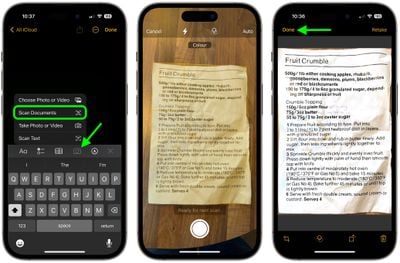
notes

The Document Scanner is set up to take multiple scans in a row, so once you tap "Keep Scan," it returns to the scanning interface. To get back to Notes after you've scanned all of your documents, you'll need to tap on "Save."

Your scanned document is inserted into the current note, where it can be edited. To edit, simply tap on the scan. Editing tools include adding an additional scan, cropping, changing the color, changing the orientation, and opening up the Share sheet to send it to Messages, Mail, social networks, and other apps.


Tag: Notes

Top Rated Comments

hank moody Avatar
113 months ago
I love it but it LACKS “save as pdf”.
I am still using Scanbot because i need this.
Score: 10 Votes (Like | Disagree)
AstroRob Avatar
113 months ago
I love it but it LACKS “save as pdf”.
I am still using Scanbot because i need this.
Actually if you hit the share option when you click on the scanned doc, one of the option is to make PDF, which I assume also lets you combine multiple pages from a single scan session.
Score: 5 Votes (Like | Disagree)
gwhizkids Avatar
113 months ago
It does a great job, especially at an angle. I wish, though, that this were a standalone capability. Don't want to create (and then delete) a note, just to get a scanned document. Relatively minor nit, but a nit, nonetheless.
Score: 4 Votes (Like | Disagree)
Weaselboy Avatar
113 months ago
Really? Scanner Pro is still way better. the scan itself is darker and easier to read, it scans text (OCR) automatically so it is easily searchable and it saves as .pdf in any location you want.
I agree. I just used Notes to do a couple tests and Scanner Pro gets a PDF scanned and in my ~/Documents folder with fewer steps.

I think using Notes for this will be okay for the occasional user who does not have something like Scanner Pro, but Scanner Pro seems more streamlined for this purpose.
Score: 3 Votes (Like | Disagree)
iapplelove Avatar
113 months ago
Forgive me cause I’m slow lol but what’s the difference between this and taking a photo?
Score: 3 Votes (Like | Disagree)
113 months ago
I thought this was only on iPads for some reason. Great news.

Goodbye, Scanner Pro!
Really? Scanner Pro is still way better. the scan itself is darker and easier to read, it scans text (OCR) automatically so it is easily searchable and it saves as .pdf in any location you want.

This Notes version is ok if you don't have a better alternative but if you already have Scanner Pro, I wouldn't give it up. It's not even close to being half as good.
Score: 2 Votes (Like | Disagree)

Popular Stories

Apple Card iPhone 16 Pro Feature

Apple Card Promo to Offer Free AirPods Pro 3

Friday May 15, 2026 8:59 am PDT by
Starting as early as next week, customers who sign up for an Apple Card at Apple's retail stores in the U.S. will receive $249 cash back when they purchase AirPods Pro 3, according to Bloomberg's Mark Gurman. The promotion has yet to be officially announced by Apple, so exact terms and conditions are not available at this time. AirPods Pro 3 are priced at $249 in the U.S., so customers who...
Apple WWDC25 iOS 26 CarPlay Light mode 250609

Six Popular iPhone Apps Now Available on CarPlay

Thursday May 14, 2026 9:10 am PDT by
Apple's CarPlay system for accessing iPhone apps on a vehicle's dashboard screen has received six popular apps in recent weeks: ChatGPT, Perplexity, Grok, Google Meet, WhatsApp, and the indie artist streaming platform Audiomack. Make sure you have the latest version of each app and they will automatically appear on CarPlay. ChatGPT Starting with iOS 26.4, CarPlay supports voice-based...
ipad mini 7 blue

OLED iPad Mini: Release Date, Pricing, and What to Expect

Thursday May 14, 2026 5:08 am PDT by
According to the latest rumors, Apple is close to launching its next-generation iPad mini. So what should we expect from the successor to the iPad mini 7 that Apple released over a year ago? Read on to find out. Processor and Performance Apple is working on a next-generation version of the iPad mini (codename J510/J511) that features the A19 Pro chip, according to information found in code...















