Apple's Music app in macOS Sonoma now includes an option to prevent favorited songs from being automatically added to your library. Here's how to use it.

In macOS Sonoma 14.2, a new option included in the Music app enables you to stop favorited songs (and in many cases whole albums) from being automatically added to your music library.
It gives you more control over your music collection by ensuring that only the songs you choose to add are saved. Here's where you can find the new setting.
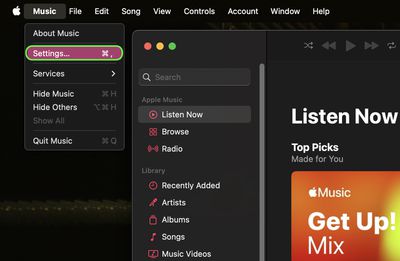
- Open the Music app on your Mac.
- Select Music ➝ Settings... in the menu bar.

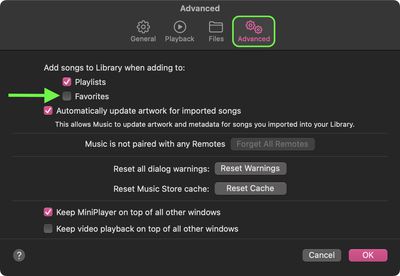
- Click the Advanced tab.
- Under "Add songs to Library when adding to," uncheck the box next to Favorites, then click OK.
If you do turn off the option, favorited songs will still populate the Music app's new Favorites playlist, which was also added in macOS 14.2.
Tag: Apple Music Guide