

How to Take a Slow-mo Selfie or 'Slofie' on iPhone 11, iPhone 11 Pro, and iPhone 11 Pro Max - MacRumorsOpen MenuShow RoundupsShow Forums menuVisit ForumsOpen Sidebar
Skip to Content

How to Take a Slow-mo Selfie or 'Slofie' on iPhone 11, iPhone 11 Pro, and iPhone 11 Pro Max

by

Apple's iPhone 11, iPhone 11 Pro, and iPhone 11 Pro Max all feature an updated 12-megapixel front-facing camera, along with a couple of notable additional shooting options that selfie fans should love.

appleslofies
The first addition is that you can now turn your iPhone to landscape mode to capture a wider shot, which is great for group selfies. The second is a new option that lets you take slow motion videos at 120 frames per second.

To market the latter feature exclusive to its 2019 iPhones, Apple invented a new word for it, combining slo-mo (the name long used for the 120fps function on the rear-facing camera) and selfie to form the word "Slofie."

Don't worry, though – "Slofie" isn't used to describe the feature in the iPhone 11's redesigned Camera app, where it's still referred to using the more sober term "Slo-mo." Follow the steps below to create your first Slofie.

  1. Launch the Camera app on your iPhone.
  2. Tap the perspective flip button below the viewfinder to activate the front-facing camera.
    camera app

  3. Swipe rightwards along the shooting mode options directly below the viewfinder until Slo-mo is highlighted in yellow.
  4. Take your slo-mo recording by tapping the red shutter button, then tap again to end it.
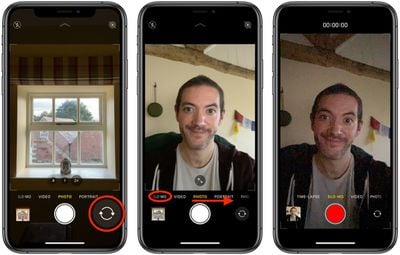
To view your Slofie, simply select it in the Photos app and it will play automatically. If you want, you can share it straight away using the Share button (the square with an arrow pointing out) and selecting one of several options from the Share Sheet.


Related Forum: iPhone

Popular Stories

iCloud iPhone 17 Pro

iPhone Users Who Pay for iCloud Storage Get Two New Perks on iOS 27

Thursday July 2, 2026 6:10 am PDT by
If you pay for certain iCloud+ storage plans beyond the 5GB that Apple offers for free, you will receive two more perks on iOS 27 at no additional cost. A summary of the two new iCloud+ perks on iOS 27:Increased daily usage limits for some new Apple Intelligence features, including image generation in the revamped Image Playground app. HomeKit Secure Video cameras receive generated video...
American Express Gold Apple Pay Feature

American Express Announces New Apple Pay Feature

Tuesday June 30, 2026 10:27 am PDT by
American Express today announced that you can now redeem Membership Rewards points when checking out with Apple Pay on the web and in apps on the iPhone and iPad. When checking out with Apple Pay on iOS 18 or iPadOS 18 or later, tap on your eligible American Express card (Platinum, Gold, Green, and others) and select the Membership Rewards points option. You can use points to cover all or...
series 10 apple watch titanium digital crown

Report: Apple Watch Redesign Coming Next Year With New Band System

Tuesday June 30, 2026 8:45 am PDT by
A "major overhaul" of the Apple Watch's design is due to arrive next year with a new system for connecting bands, according to a known Weibo leaker. In a set of recent posts, the leaker known as "Instant Digital" linked the new claim to older rumors about an "Apple Watch X" model, which was said to introduce a fresh design and break compatibility with the existing watch band system. Citing...













