Use Emoji as Stickers in iPhone Messages - MacRumorsOpen MenuShow RoundupsShow Forums menuVisit ForumsOpen Sidebar
Skip to Content

Use Emoji as Stickers in iPhone Messages

by

In iOS 17, Apple has added several new features to its Messages app to make communicating with other Apple users more creative and fun. One such feature is the ability to use emoji as stickers. This article shows you how it's done.
iOS 17 Messages Feature
Stickers have been in the Messages app for years now, but not much has changed about them - until now. That's because in iOS 17 Apple treats all standard emoji as stickers, allowing them to be used in just the same way as actual stickers.

What that essentially means is that you are no longer limited to inserting them in a conversation. Now you can also drag them anywhere on a message bubble. You can even layer them on top of one another to create little emoji scenes.

The following steps show you how it works in iOS 17.

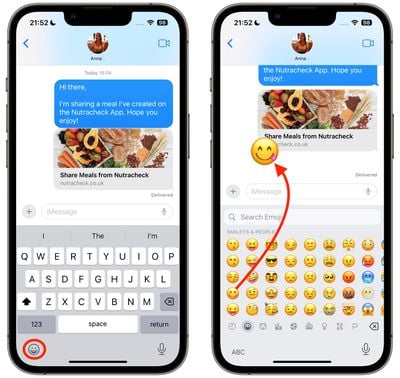
  1. In a Messages conversation, tap the Emoji button in the bottom-left corner of the screen.
  2. Press and hold on an emoji in the list, then drag it up onto the message bubble that you want to react to and release your finger. (Note that you can drag more emoji onto the same message bubble with the same action.)
    2use emojis as stickers messages

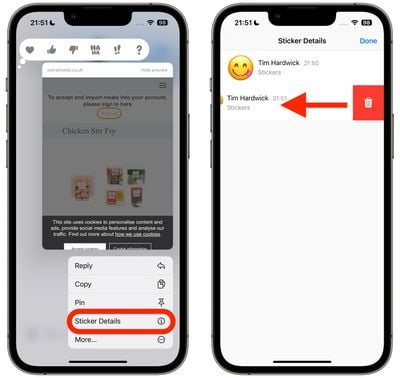
  3. To edit emoji stickers on a message bubble, press and hold the emoji, then tap Sticker Details in the popup menu.
  4. To delete an emoji sticker, swipe left on it, then tap the red Trash button that appears.
  5. Tap Done to return to the conversation.
    1use emojis as stickers messages

That's all there is to it. Did you know that another new feature is the ability to turn Live Photos into Live Stickers? Click the link to learn how it's done.


Popular Stories

macOS 27 on MacBook Pro

Apple Says macOS 27 Won't Be Compatible With These Macs

Wednesday June 3, 2026 8:29 am PDT by
During WWDC 2025, Apple revealed that macOS 26 Tahoe would be the final major macOS version for Intel-based Macs. macOS 27 will be compatible with Apple silicon Macs only, meaning that you will need a Mac with an M-series chip or a MacBook Neo with an A18 Pro chip in order to install the software update. Apple will unveil macOS 27 during its WWDC 2026 keynote this Monday, June 8, and the...
MacBook Neo on Yellow Feature

MacBook Neo is So Popular That Apple Reportedly Doubled Production

Wednesday June 3, 2026 9:24 am PDT by
On an earnings call in late April, Apple's CEO Tim Cook said that customer response to the MacBook Neo was "off the charts," and the popularity of the laptop has reportedly led the company to significantly boost production. Apple supply chain analyst Ming-Chi Kuo this week said he believes that MacBook Neo shipments to Apple were doubled from an initial target of 5 million units to 10...
iphone 18 pro blue%402x

iPhone 18 Pro: Dark Cherry, Light Blue, and Dark Gray Chassis Leaked [Update]

Thursday June 4, 2026 5:18 am PDT by
Update: Since publication, new information has come to light suggesting the images have been AI-manipulated and are not in fact iPhone 18 Pro chassis parts. The original article follows. The color options Apple is reportedly planning for the upcoming iPhone 18 Pro and ‌iPhone 18 Pro‌ Max have appeared online today in the form of images of chassis parts of unknown authenticity....