Turn Live Photos into Animated Messages Stickers on iPhone - MacRumorsOpen MenuShow RoundupsShow Forums menuVisit ForumsOpen Sidebar
Skip to Content

Turn Live Photos into Animated Messages Stickers on iPhone

by

In iOS 17 and iPadOS 17, Apple added several new features to its Messages app to make communicating with other Apple users more creative and fun. One of these new features is the ability to turn Live Photos into Live Stickers. Keep reading to learn how it works.
iOS 17 Messages Feature
If you're a long-time iPhone or iPad user, you'll likely be familiar with ‌Live Photos‌ – photos that capture 1.5 seconds of video before and after you take a picture, with the aim of adding a little bit of life and movement to still images.

In iOS 17 and iPadOS 17, you can now take subjects in your ‌Live Photos‌ and turn them into Live Stickers for use in Messages and elsewhere. As the name suggests, Live Stickers are basically looping animated stickers that you can share with family, friends, and the wider world.

Creating Live Stickers couldn't be simpler. Here's how to create them in the Messages app for instant use in your conversations.

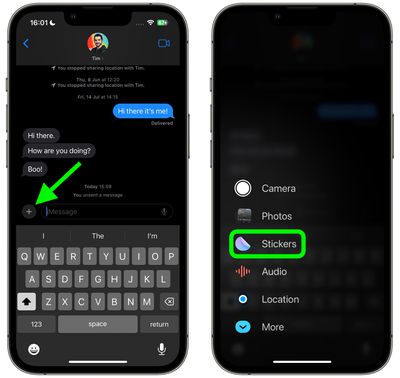
  1. In Messages, tap on an existing conversation or tap the Compose button in the top right and select a contact to send your message to.
  2. Tap the + button to the left of the text input field.
  3. Tap Stickers in the column of options.
    messages

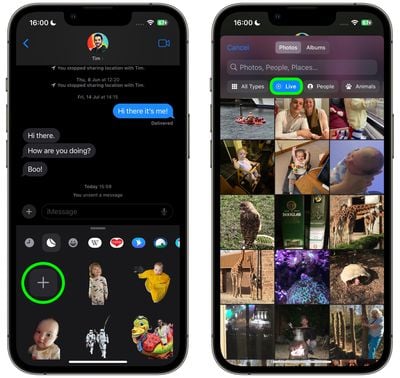
  4. Tap the big + button below the row of sticker apps.
  5. Next, tap Live below the image search bar, then select a Live Photo.
    messages

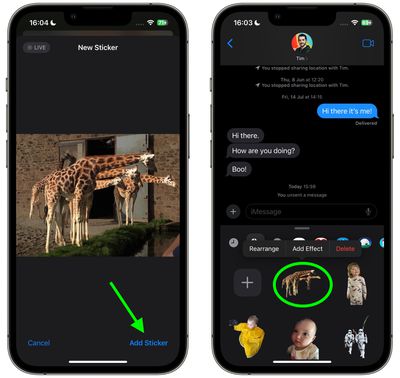
  6. Tap Add Sticker at the bottom of the screen.
  7. Now tap the sticker you just made to select it, then hit the Send button. Alternatively, press and hold the sticker, then drag it to an earlier part of the conversation.
    messages

That's all there is to it. Note that if you add an effect to your creation with the Add Effect option, it will cease to be a Live Sticker and instead become a standard static sticker.


Popular Stories

Apple Card iPhone 16 Pro Feature

Apple Card Promo to Offer Free AirPods Pro 3

Friday May 15, 2026 8:59 am PDT by
Starting as early as next week, customers who sign up for an Apple Card at Apple's retail stores in the U.S. will receive $249 cash back when they purchase AirPods Pro 3, according to Bloomberg's Mark Gurman. The promotion has yet to be officially announced by Apple, so exact terms and conditions are not available at this time. AirPods Pro 3 are priced at $249 in the U.S., so customers who...
Apple WWDC25 iOS 26 CarPlay Light mode 250609

Six Popular iPhone Apps Now Available on CarPlay

Thursday May 14, 2026 9:10 am PDT by
Apple's CarPlay system for accessing iPhone apps on a vehicle's dashboard screen has received six popular apps in recent weeks: ChatGPT, Perplexity, Grok, Google Meet, WhatsApp, and the indie artist streaming platform Audiomack. Make sure you have the latest version of each app and they will automatically appear on CarPlay. ChatGPT Starting with iOS 26.4, CarPlay supports voice-based...
ipad mini 7 blue

OLED iPad Mini: Release Date, Pricing, and What to Expect

Thursday May 14, 2026 5:08 am PDT by
According to the latest rumors, Apple is close to launching its next-generation iPad mini. So what should we expect from the successor to the iPad mini 7 that Apple released over a year ago? Read on to find out. Processor and Performance Apple is working on a next-generation version of the iPad mini (codename J510/J511) that features the A19 Pro chip, according to information found in code...