New 'MACDefender' Malware Threat for Mac OS X - MacRumorsOpen MenuShow RoundupsShow Forums menuVisit ForumsOpen Sidebar
Skip to Content

New 'MACDefender' Malware Threat for Mac OS X

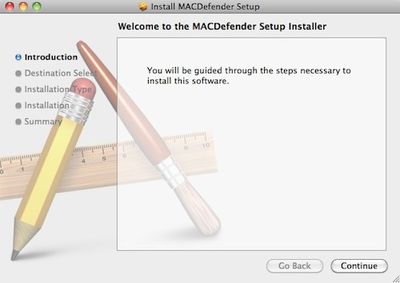
094840 macdefender

Antivirus firm Intego today noted the discovery of new malware known as "MACDefender" targeting Mac OS X users via Safari. According to the report, the malware appears to be being deployed via JavaScript as a compressed ZIP file reached through Google searches.

When a user clicks on a link after performing a search on a search engine such as Google, this takes them to a web site whose page contains JavaScript that automatically downloads a file. In this case, the file downloaded is a compressed ZIP archive, which, if a specific option in a web browser is checked (Open "safe" files after downloading in Safari, for example), will open.

More information is available in Apple's support communities (1, 2), where users report that the malware is popping up directly in Google image searches.

Users running administrator accounts and with the Safari option to open "safe" files automatically checked appear to be most at risk, with some claiming that no notification of installation was seen or password required. Only when a screen popped up asking for a credit card number to sign up for virus protection did they realize that malware had been installed on their systems.

For those infected with the MACDefender malware, the following steps are recommended:

1. Open Applications > Utilities > Activity Monitor and quit any processes linked to MACDefender.

2. Delete MACDefender from the Applications folder.

3. Check System Preferences > Accounts > Login Items for suspicious entries

4. Run a Spotlight search for "MACDefender" to check for any associated files that might still be lingering.

Full details on the malware and the simplest steps needed for its complete removal are still being investigated.

Users are of course reminded that day-to-day system usage with standard accounts rather than administrator ones, as well as unchecking the Safari option for automatically opening "safe" files, are two of the simplest ways users can enhance their online security, adding extra layers of confirmation and passwords in the way of anything being installed on their systems.


Popular Stories

iOS 27 Next to iPhone

Here's When iOS 27 Rolls Out Today in Every Time Zone [Update: It's Out]

Sunday September 13, 2026 3:00 am PDT by
Update 10:04 a.m.: iOS 27 is rolling out now, though it may take a bit for all users to see it, so keep checking! Apple is about to release iOS 27, which will finally deliver more advanced Siri AI capabilities as well as a variety of other refinements, improvements, and new features to iPhones. It's Apple's biggest software update of the year, and Apple announced at Wednesday's iPhone event...
iOS 27 Icon iPhone

iOS 27 Available Now With These 8 New Features

Monday September 14, 2026 9:00 am PDT by
Update — 10 a.m. Pacific Time: Apple has released iOS 27. During its iPhone 18 Pro and iPhone Duo event last week, Apple announced that iOS 27 will be released widely on Monday, September 14. iOS 27 should be available around 10 a.m. Pacific Time / 1 p.m. Eastern Time today via the Settings app, under General → Software Update. Below, we have highlighted eight new features and...
Apple iCloud Plus expansion hero

iCloud+ Now Includes Apple TV, Apple Arcade, and Curated Apple Music Stations in Over 100 Countries

Tuesday September 15, 2026 1:43 am PDT by
Apple today announced a new subscription initiative that turns paid iCloud+ subscriptions into a broader services bundle in more than 100 countries. In select countries, Apple says every paid iCloud+ plan, including the cheapest 50GB tier, now includes Apple TV and Apple Arcade "at no additional cost," while family sharing extends the storage, TV and Arcade access to up to five people....

Top Rated Comments

miles01110 Avatar
201 months ago
lol

10 years and finally a malware attack.

Still unreal.

:D

Actually there's been malware for OS X since it was introduced. There is malware for every operating system.

Nothing can defend against user stupidity.
Score: 8 Votes (Like | Disagree)
KnightWRX Avatar
201 months ago
WOW! Malware that requires the user to do a Google search, then download, and install. For all of this, it asks for your credit card number.

How can we ever defend our computers against such a diabolical threat?!
Hum, download and install are automatic. Good thing I don't use Safari.


As I understand it, Safari will open the zip file since it's a "safe" download. But that doesn't mean it'll execute the code within that zip file, so how is this malware executing without user permission?
I haven't seen this malware first hand, but a zip file can be made with absolute paths, making "unzipping" the file put everything where it needs to be to start up automatically on next log in/reboot.

Who's the brainiac who made zip files "safe" ?

so much for the no malware on macs myth :D
funny how the apple fanboys are getting all defensive :rolleyes:
No viruses on the Mac. There's been malware for OS X for quite a while now.
Score: 8 Votes (Like | Disagree)
*LTD* Avatar
201 months ago
Mac OS X fanboys really need to stop clinging to the mentality that "viruses" don't exist for OS X

They don't.
Score: 6 Votes (Like | Disagree)
GGJstudios Avatar
201 months ago
4. Run a Spotlight search for "MACDefender" to check for any associated files that might still be lingering

That's a sure way *not* to find any related files.
The only effective method for complete app removal is manual deletion:
Best way to FULLY DELETE a program (https://forums.macrumors.com/showpost.php?p=11171082&postcount=16)
One thing Macs need anti-virus is to scan mails for Windows viruses, so that those doesn't to you PC. That is all.
That doesn't protect Windows PCs from malware from other sources, which is a far greater threat than receiving files from a Mac. Each Windows user should be running their own anti-virus, to protect them from malware from all sources.
Yes so much. Because Malware can copy itself and infect a computer.
No, only a virus can do that. A trojan requires user involvement to spread.
So few virus for MAC than when one appears it is news... :)
This isn't a virus.
Mac OS X fanboys really need to stop clinging to the mentality that "viruses" don't exist for OS X and that "malware" is a Windows-only problem.
I agree. While no Mac OS X viruses exist at this time, that doesn't mean they won't in the future. And malware has always been a threat. What's important is to understand the kinds of threats and the most effective methods for protection.

The fact is, the days of viruses are long gone.
I wouldn't go so far as to say that. Just when you do, someone will release a new virus into the wild. While they may not be as prevalent as they once were, they're by no means extinct.

The fact is, understanding the proper terminology and different payloads and impacts of the different types of malware prevents unnecessary panic and promotes a proper security strategy.

I'd say it's people that try to just lump all malware together in the same category, making a trojan that relies on social engineering sound as bad as a self-replicating worm that spreads using a remote execution/privilege escalation bug that are quite ignorant of general computer security.
The best defense a Mac user has against current malware threats is education and common sense. Understanding the basic differences between a virus, trojan, worm, and other types of malware will help a user defend against them. Doing simple things like unchecking the "Open "safe" files after downloading" option is quite effective.

I despise the "X is a file downloaded from the Internet" dialog introduced in SL. Really wish you could disable it.
That's one of the simple lines of defense for a user, as it lets them know they're about to open a newly-downloaded app. It only does that the first time you launch the app, so why bother disabling such a helpful reminder?
To the end user it makes no difference. It's fine if you know, but to a novice quickly correcting them on the difference between a virus, a trojan, or whatever else contributes approximately zero percent towards solving the problem.
Actually, it helps a user to have some understanding about malware. Part of the problem is a novice user is likely to engage in dangerous activities, such as installing pirated software, unless they know what a trojan is and how it infects a system. Also, understanding what a virus is, how it spreads, and the fact that none exist for Mac OS X will prevent them from instantly assuming that everything unexpected that happens on their Mac is the result of a virus. Also, understanding that antivirus apps can't detect a virus that doesn't yet exist will prevent them from installing AV and having a false sense of security, thinking they're immune to threats. Educating a user goes a very long way in protecting them, by teaching them to practice safe computing habits.

Mac Virus/Malware Info (https://forums.macrumors.com/showpost.php?p=9400648&postcount=4)
Score: 5 Votes (Like | Disagree)
201 months ago
unbiased as opposed to a Mac site.... yeah right!


Mac users tend to be a better target for old fashioned phishing/vishing because...well, 'nothing bad happens on a Mac..' right?

Now from google pointing 'sources', you are consistently jumping on to mac users, eh?

Good going.

Yup nothing happens to my mac except for what I do it. It's that simple. Why don't you just ask Google why they decided to abandon Windows?
Score: 4 Votes (Like | Disagree)
201 months ago
unbiased as opposed to a Mac site.... yeah right!


Mac users tend to be a better target for old fashioned phishing/vishing because...well, 'nothing bad happens on a Mac..' right?

Sure it can, but it's the percentage and the variables of these "bad" incidents that are key as you are generalizing without specifics.

How about unbiased studies, and percentages of viruses and malware between the two? Those would be facts (again, from an impartial party/experiment).

Also, you're on a Mac based website, so of course there are OS X defenders. Go to Engadget, et al if you don't wish to be here, you're free to decide :)
Score: 4 Votes (Like | Disagree)