'Fantastical' Natural Language Calendar App for Mac Launches - MacRumorsOpen MenuShow RoundupsShow Forums menuVisit ForumsOpen Sidebar
Skip to Content

'Fantastical' Natural Language Calendar App for Mac Launches

by

fancal

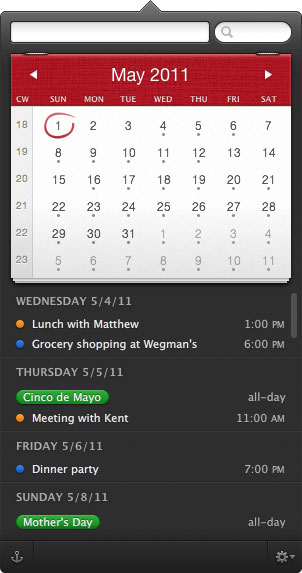
Flexibits has released their new calendar app for the Mac called Fantastical. This natural language calendar assistant allows you to create events by typing in your plans:

Using an advanced natural language engine, Fantastical is extremely expressive, allowing users enter event text in their own style. For example, enter a sentence such as "Lunch with John at 123 Main Street on Tuesday" and Fantastical will translate the sentence into an event and add it to their calendar.


The pre-release previews were very positive, commenting on the quick-access as a menu-bar item that lets you quickly enter new items.

What I like most about Fantastical is how quick and accessible it is. It lives in your Menu Bar and you invoke it via a global hotkey (I use command+option+c), or by clicking on the Menu Bar icon, and it appears instantaneously. It is both keyboard and mouse friendly. The power users in the room will be glad to know you can navigate and operate the app without leaving the keyboard — if it were not so then I certainly would not find the same amount of utility from the app.

And what blows me away every time I use it is the entry panel for an event — Fantastical uses a natural language parser in addition to the standard new-event, iCal interface. So far, in my usage, the natural language parsing has been superb; the best I’ve ever used.

Fantastical is available now through the Flexibits Store or the Mac App Store for an introductory price of $14.99 with a free trial on their website.


Top Rated Comments

202 months ago
After using Fantastical for a few hours I'm happy to say that this is the menu bar calendar app I've been waiting for! For those wondering why anyone would choose this over the much cheaper QuickCal, I'll explain my personal reasoning...

1) First and foremost, it has a full calendar above the events list. The calendar provides visual context for the month and helps me comprehend much more quickly when events are in relation to today. This also helps when planning ahead since I can visually see when days fall in the month.
2) It shows the current date in the menu bar icon. I always disliked having the date written out long form like it is in the official OS X clock, so I'm happy to have this feature.

3) Great implementation of the events list. Hovering over an event highlights the date(s) on the calendar. Multi-day events appear on each of the days they are scheduled for as opposed to just the beginning date, something I've always wished iCal would do.

4) You can search your entire calendar, either manually or by keyword, without opening iCal.
5) The dark theme and great design choices are a nice alternative to the minimalistic, but still pretty, QuickCal. I guess this one comes down to personal choice.

There are some downsides to Fantastical at the moment... like no "To-Do" integration, you can't add notes to new events, you can't delete events, there is no option to have the calendar automatically return to the current date when the menu is opened, etc... so hopefully they will add this missing functionality in future updates.
Score: 5 Votes (Like | Disagree)
Weaselboy Avatar
202 months ago
Quickcal (http://smellypuppy.com/quickcal-desktop/) does much more than this and is $1.99. Quickcal also handles adding tasks with natural language.
Score: 4 Votes (Like | Disagree)
arn Avatar
202 months ago
Can Arn or somebody respond to this?
People always go on about paid reviews and stuff. It's an easy "go to" accusation when you don't like a product being talked about. We don't do paid reviews or posts. Neither do any of the other sites you've probably seen this on (unless it's clearly marked). Sometimes we do have promotions/affiliate items (the mac software bundles, for example), but those are all disclaimed in the post.

I don't generally respond to these accusations because it's pointless to respond to conspiracy theorists, as they never believe you.

It seems like today every Mac themed web site I read has a glowing recommendation of this app, and I just don't see what is so earth shattering about it. Even Daring Fireball is going on about it. :confused: It does look suspicious.
It would look more suspicious if most websites said it sucked and one said it was recommended.

arn
Score: 3 Votes (Like | Disagree)
202 months ago
Quickcal (http://smellypuppy.com/quickcal-desktop/) does much more than this and is Quickcal also handles adding tasks with natural language.
2nd that. QuickCal seems to provide everything (minus some "eyecandy" in the menubar-menu) this (much more expensive) app offers.
Score: 2 Votes (Like | Disagree)
Weaselboy Avatar
202 months ago
Can Arn or somebody respond to this? It seems like today every Mac themed web site I read has a glowing recommendation of this app, and I just don't see what is so earth shattering about it. Even Daring Fireball is going on about it. :confused: It does look suspicious.
People always go on about paid reviews and stuff. It's an easy "go to" accusation when you don't like a product being talked about. We don't do paid reviews or posts. Neither do any of the other sites you've probably seen this on (unless it's clearly marked). Sometimes we do have promotions/affiliate items (the mac software bundles, for example), but those are all disclaimed in the post.

I don't generally respond to these accusations because it's pointless to respond to conspiracy theorists, as they never believe you.


It would look more suspicious if most websites said it sucked and one said it was recommended.

arn
Appreciate the response Arn. Thanks
Score: 1 Votes (Like | Disagree)
andi242 Avatar
202 months ago
I tried to extend FC with a small Applescript to provide a local URL handler.
You may type e.g. "fcal://Meeting with Bob at 12" into your favorite app launcher (or create a custom search like in Alfred.app).

I'm no good at apple scripting, but I hope this might work for you guys as well.

http://www.cl.ly/6s8v

This will be added in future releases of FC, though.
https://twitter.com/flexibits/status/70558665807101952

starting the .app will generate an error, but this may be necessary for registering the url handler.
Score: 1 Votes (Like | Disagree)

Popular Stories

duo aquarium

More Fun iPhone Duo Apps: 30 New Picks to Try

Friday November 6, 2026 3:27 pm PST by
When the iPhone Duo launched, we shared a list of some of the fun apps developers created for the new form factor. Two weeks out, developers are continuing to come up with fresh ideas, so we thought we'd share some of our favorites. Games Marbles Unhinged ($2.99) - Marbles Unhinged is a marble maze designed for the Duo. When you fold it, the floor turns into a ramp. If you stand the top...
apple pro tell logo

Apple Launching Five New Products Today

Thursday November 5, 2026 12:59 am PST by
Apple is launching five new products on Friday, November 6, following pre-orders that opened last week, including its first touchscreen MacBook Pro models. The following new products will be available from today: iPad mini with OLED display and A20 Pro chip iMac with M6 chip 14-inch MacBook Pro with M6 chip 14-inch MacBook Pro with OLED touchscreen 16-inch MacBook Pro with OLED...
silver iphone 18 pro

Apple Rumored to Drop the iPhone's Action Button Next Year

Friday November 6, 2026 6:07 am PST by
Apple plans to merge the iPhone's Action button with the Camera Control starting next year, according to the leaker known as "Instant Digital." In a new post on Weibo, the leaker claimed that a single press of the combined button would open the camera, while a long press would trigger the function assigned to the Action button. They explicitly clarified that the dedicated Action button would ...
Latest Stories
Siri AI Rumored to Become 'More Like an Agent' as Early as Next Year
7 hours ago
Apple Taking New Approach to Developing iOS 28 and macOS 28
9 hours ago
Early Apple Black Friday Deals on Apple Watch, MacBook Air, and More
1 day ago
'Backglow' Lets You Customize New MacBook Pro's Glowing Apple Logo
1 day ago
Top Stories: Apple Product Launches, iOS 27.3 Beta, and More
1 day ago
More Fun iPhone Duo Apps: 30 New Picks to Try
2 days ago
Hands-On With Apple's New OLED Touchscreen MacBook Pro
2 days ago
Apple Store With All-New Design Opening Soon in Southern California
2 days ago
Control the Glowing Apple Logo on Your New MacBook Pro
2 days ago
Apple Shares New 'Apple Card: Apply and Use in Minutes' Ad
2 days ago
Apple Says More Than 100,000 Apps Optimized for iPhone Duo, Here's What's Still Missing
2 days ago
Early Black Friday Deals Kickoff With Steep Discounts on Apple Watch Ultras and More
2 days ago
The MacRumors Show: iOS 27.3 Looks Like a Huge Update
2 days ago
Best Buy's Black Friday Event Begins With Sitewide Savings on Apple, TVs, More
2 days ago
Apple Releasing Yet Another Two New Products Next Week
2 days ago
MacBook Air Drops to Lowest Price in Months With Amazon's $250 Discount
2 days ago
Apple Rumored to Drop the iPhone's Action Button Next Year
2 days ago
Apple's Extended Return Policy Now in Effect for 2026 Holiday Season
2 days ago
Apple Music Classical Updated With New Icon and Refreshed Design
2 days ago
OLED iPad Mini, M6 iMac, and New MacBook Pros Available From Today
3 days ago
Apple Surveys iPhone Duo Buyers About Crease and Camera
3 days ago
Apple's First Touchscreen Mac is Now Arriving to Customers
3 days ago
Claude Gets Personal Finance Feature With Bank Account Linking
3 days ago
Apple Arcade Adds Crossy Road Rush and NBA 2K27
3 days ago
Apple's New HomeView Smart Home Hub: Here's How Much RAM It Has
3 days ago
iPad Mini vs. iPad Air Buyer's Guide: Now Just $50 Apart
3 days ago
First iOS 27.3 and macOS Golden Gate 27.3 Public Betas Now Available
3 days ago
Apple Announces a New Mac Sales Record
3 days ago
Paid $200 for Logic Pro? Apple Says You Won't Get This New Feature
3 days ago
Instagram's Edits Video Editor is Now Available on Mac
3 days ago








































