

Restoring Your iOS Device with Folder Organization Intact - MacRumorsOpen MenuShow RoundupsShow Forums menuVisit ForumsOpen Sidebar
Skip to Content

Restoring Your iOS Device with Folder Organization Intact

by

foldersIMG 0975ios4 5Image via ThinkMac

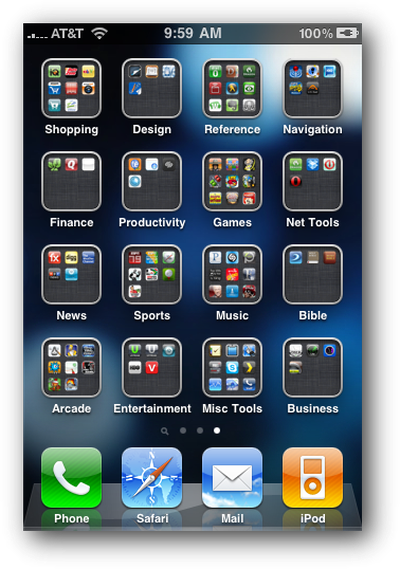
Macworld writer Dan Frakes details his frustration at losing his iPhone's folder organization one night. All his iPhone's organized apps had been strewn about folderless. In his attempt to restore the process, he figured out the right way to restore from iTunes to ensure his folder organization remains intact.

It turns out that iTunes actually offers two kinds of restores. The first is the one described above, accessed by clicking the Restore button in iTunes' Summary view for your iOS device. The other one is less obvious--you access it by right-clicking (Control-clicking) your iOS device in iTunes' sidebar and choosing Restore from Backup. As the dialog that appears explains, the latter procedure restores only your data and settings, not the iPhone’s firmware or OS. What the dialog doesn't note is that your third-party apps apparently remain on the phone, as well. In other words, it gives iTunes that “second pass” at restoring your Home-screen app organization.

Frakes details the multi-step process to avoid losing hours of tidying work.

Top Rated Comments

cleggster83 Avatar
196 months ago
And if you have a jailbroken iphone and have infinifolders installed, When you restore the phone and install all the apps, reinstall infinifolders and when it resprings it will automatic rearrange all the apps back to the original state.
Score: 2 Votes (Like | Disagree)
196 months ago
I've restored probably 4 times and had this problem half the time.

The problem for me was that it would apply firmware, restore the apps, then start syncing all my music/video/photos back on which took forever (or the phone would ring during that time!). So I would cancel it at that stage, and all the apps would be alphabetical all over the place.

If you can make sure you don't touch the phone until it's fully completed it's restore and sync, the apps are fine. It must do that as the very last thing.

Your note though will be very useful next time I stuff up. I can then do this shorter restore like you describe to get the apps back in their right place!
Score: 1 Votes (Like | Disagree)

Popular Stories

airpods pro 3 pink

New Apple Card Holders Can Get Free AirPods Pro 3, But There's a Catch

Monday May 18, 2026 8:11 am PDT by
Apple today launched a new promotion offering new Apple Card holders the chance to earn back the cost of AirPods Pro 3 through monthly cash rebates, but there is a recurring spend requirement attached. Customers who open a new Apple Card account and purchase AirPods Pro 3 directly from Apple by June 15 will qualify. Starting July 1 and running through April 30, 2027, cardholders can earn $25 ...
Foldable iPhone 2023 Feature 1

Foldable iPhone Production Stalls Amid Hinge Issues

Monday May 18, 2026 7:29 am PDT by
Trial production of Apple's long-anticipated foldable iPhone, likely called the "iPhone Ultra," has run into a significant engineering hurdle centered on hinge reliability, according to a known leaker. The leaker known as "Instant Digital" posted on Weibo that the foldable device's hinge is consistently failing to meet Apple's quality control standards under conditions of prolonged,...
wwdc apple park in person

Apple Announces WWDC 2026 Schedule, Sends Media Invites

Monday May 18, 2026 10:23 am PDT by
Apple today provided a schedule for its 2026 Worldwide Developers Conference, which starts on June 8 and ends on June 12. Apple also sent out invites to members of the media who have been invited to attend an in-person keynote viewing at Apple Park. Both the invites and schedule confirm that the keynote will begin at the standard time, 10:00 a.m. Pacific Time or 1:00 p.m Eastern Time....














