Use Your iPhone Headset As Shutter Release in iOS 5 - MacRumorsOpen MenuShow RoundupsShow Forums menuVisit ForumsOpen Sidebar
Skip to Content

Use Your iPhone Headset As Shutter Release in iOS 5

by

A few of the hundreds of "new" features in iOS 5 were "appropriated" from other developers. One, the ability to trip the iPhone camera shutter by pressing the Volume Up button instead of pressing a soft-button on-screen, came from a hidden feature that iOS developer tap tap tap included in a version of Camera+, an iPhone camera replacement app.


As an added bonus, if you press the Volume Up button on the Apple Earphones with Remote and Mic that comes with every iPhone that will trip the shutter as well.

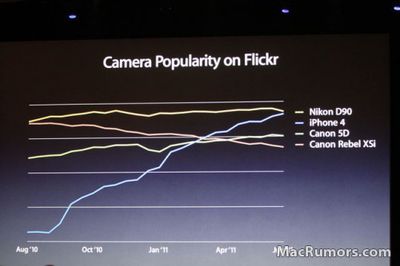
It's a pretty clever trick, and for those who use the iPhone to take pictures -- of which there are many (see below) -- it might come in handy. Combine the iPhone and headphone remote with a simple tripod/stand like the Glif, and you've got a cheap-and-functional camera rig.
camerapopularityflickr

Hat tip to Cult of Mac, and Charles for the video.

Related Forum: iPhone

Top Rated Comments

201 months ago
A few of the hundreds of "new" features in iOS 5 were "appropriated (http://www.9to5mac.com/71850/ios-features-apple-borrowed-from-jailbreakers/)" from other developers. One, the ability to trip the iPhone camera shutter by pressing the Volume Up button instead of pressing a soft-button on-screen, came from a hidden feature (http://www.tuaw.com/2010/08/10/how-to-use-your-iphones-volume-buttons-for-shutter-control-in-c/) that iOS developer tap tap tap (http://taptaptap.com/) included in a version of Camera+ (http://itunes.apple.com/us/app/id329670577), an iPhone camera replacement app.


What's with the attitude from MacRumors all of a sudden regarding iOS 5 features? Both this and the Wi-Fi sync article had very unprofessional tones, and the accusations that Apple plagiarized from developers seems particularly unjustified in both these cases.

Phones have been using volume buttons as shutter releases for a decade. It was never really that novel; tap tap tap was just the only developer ballsy enough to sneak it into an app, and they were punished for it.


So why did Apple ban the functionality in the first place?

With iOS devices, the rationale has always been that an app gets full and exclusive control of what's happening on the screen, and any touch events, while hardware buttons are the sole domain of the operating system. Any app that tried to use a hardware button for a non-standard purpose was rejected on principle -- Apple didn't want to allow for the consequential possibility of user confusion, etc. Home button is for home, Volume buttons control volume, period, no exceptions.

Generally, it seemed like a sound policy, but taking photos is one of the few exceptions where a physical button would be really handy, and the volume buttons are in just the right spot to do it.

In July or August of 2010, tap tap tap proudly talked about adding that feature, and submitted a new version of Camera+ which included it (among other things). It was rejected by reviewers, based on the above policy.

So, tap tap tap said "ok" and resubmitted a version with that 'removed'. But what they'd really done is disabled the feature and added a hidden cheat code that would turn it feature. Knowledge of this went viral. Apple was not pleased at being tricked, and the banhammer came down: Camera+ was pulled from the app store, and tap tap tap went almost entirely silent for 4 months -- no blog posts, no updates to other apps, nothing. One might speculate Apple put them in the time out corner to think about what they did.

Then, in December, tap tap tap suddenly came back to life and released a brand new 2.0 version of Camera+, with lots of new features (and no presence or mention of the ill-fated volume-button-shutter feature, or discussion of the long absence).


Now, as to why Apple seems to have had a change of heart on this issue, there's a couple things to note:

-As mentioned in the keynote, over the past year since the iPhone 4's release, it's become abundantly clear how much serious photography is being done using iPhones. And tapping the on-screen button to take the photo is extremely awkward/clumsy in a wide variety of scenarios. Apple finally realized this point. (Or rather, the people inside Apple who were probably arguing for something like this all along were finally able to garner enough support or evidence to justify the change.)

-The boundaries of that split between "apps own the screen" and "iOS owns the buttons" are visibly eroding from the other side, especially in light of other iOS 5 features: Notification Center is adding a system-wide gesture, and frequent little notes on the top of the screen, and the 4-5 finger multitasking gestures are finally becoming an official preference option on the iPad. This is on top of the growing rainbow of multitasking items that add another line to the status bar (and steal taps to the area), such as phone calls, voice recording, VoIP calls, and Wi-Fi tethering.

Clearly, Apple is less beholden to that principle now than it was a year ago. I've not yet heard if they intend to allow 3rd party camera apps to also use the volume as a shutter button, but I don't see why they wouldn't. *Not* allowing it would *reduce* platform consistency.
Score: 5 Votes (Like | Disagree)
201 months ago
A little known existing feature of iOS4 is that the remote button starts/stops video recording...
Score: 2 Votes (Like | Disagree)
AdeFowler Avatar
201 months ago
What's with the attitude from MacRumors all of a sudden regarding iOS 5 features?

I sensed the same attitude during MacRumor's WWDC Live Feed; at times it bordered on immature.
Score: 1 Votes (Like | Disagree)
201 months ago
I wonder if this means that other apps (like Camera+) will be able to access this and use the volume button and remote as the shutter within their app? I would think and hope so.
Score: 1 Votes (Like | Disagree)
Compile 'em all Avatar
201 months ago
So why did Apple ban the functionality in the first place?

They didn't ban anything. They simply felt that an "app" that "some might have and some might not" shouldn't define hardware behavior. And well, a new feature should be released in an all new feature release.
Score: 1 Votes (Like | Disagree)
spillproof Avatar
201 months ago
A little known existing feature of iOS4 is that the remote button starts/stops video recording...
And I was always annoyed that it didn't work for photos. Now I don't have to be!
Score: 1 Votes (Like | Disagree)

Popular Stories

duo aquarium

More Fun iPhone Duo Apps: 30 New Picks to Try

Friday November 6, 2026 3:27 pm PST by
When the iPhone Duo launched, we shared a list of some of the fun apps developers created for the new form factor. Two weeks out, developers are continuing to come up with fresh ideas, so we thought we'd share some of our favorites. Games Marbles Unhinged ($2.99) - Marbles Unhinged is a marble maze designed for the Duo. When you fold it, the floor turns into a ramp. If you stand the top...


apple pro tell logo

Apple Launching Five New Products Today

Thursday November 5, 2026 12:59 am PST by
Apple is launching five new products on Friday, November 6, following pre-orders that opened last week, including its first touchscreen MacBook Pro models. The following new products will be available from today: iPad mini with OLED display and A20 Pro chip iMac with M6 chip 14-inch MacBook Pro with M6 chip 14-inch MacBook Pro with OLED touchscreen 16-inch MacBook Pro with OLED...
silver iphone 18 pro

Apple Rumored to Drop the iPhone's Action Button Next Year

Friday November 6, 2026 6:07 am PST by
Apple plans to merge the iPhone's Action button with the Camera Control starting next year, according to the leaker known as "Instant Digital." In a new post on Weibo, the leaker claimed that a single press of the combined button would open the camera, while a long press would trigger the function assigned to the Action button. They explicitly clarified that the dedicated Action button would ...
Latest Stories
Siri AI Rumored to Become 'More Like an Agent' as Early as Next Year
7 hours ago
Apple Taking New Approach to Developing iOS 28 and macOS 28
9 hours ago
Early Apple Black Friday Deals on Apple Watch, MacBook Air, and More
1 day ago
'Backglow' Lets You Customize New MacBook Pro's Glowing Apple Logo
1 day ago
Top Stories: Apple Product Launches, iOS 27.3 Beta, and More
1 day ago
More Fun iPhone Duo Apps: 30 New Picks to Try
2 days ago
Hands-On With Apple's New OLED Touchscreen MacBook Pro
2 days ago
Apple Store With All-New Design Opening Soon in Southern California
2 days ago
Control the Glowing Apple Logo on Your New MacBook Pro
2 days ago
Apple Shares New 'Apple Card: Apply and Use in Minutes' Ad
2 days ago
Apple Says More Than 100,000 Apps Optimized for iPhone Duo, Here's What's Still Missing
2 days ago
Early Black Friday Deals Kickoff With Steep Discounts on Apple Watch Ultras and More
2 days ago
The MacRumors Show: iOS 27.3 Looks Like a Huge Update
2 days ago
Best Buy's Black Friday Event Begins With Sitewide Savings on Apple, TVs, More
2 days ago
Apple Releasing Yet Another Two New Products Next Week
2 days ago
MacBook Air Drops to Lowest Price in Months With Amazon's $250 Discount
2 days ago
Apple Rumored to Drop the iPhone's Action Button Next Year
2 days ago
Apple's Extended Return Policy Now in Effect for 2026 Holiday Season
2 days ago
Apple Music Classical Updated With New Icon and Refreshed Design
2 days ago
OLED iPad Mini, M6 iMac, and New MacBook Pros Available From Today
3 days ago
Apple Surveys iPhone Duo Buyers About Crease and Camera
3 days ago
Apple's First Touchscreen Mac is Now Arriving to Customers
3 days ago
Claude Gets Personal Finance Feature With Bank Account Linking
3 days ago
Apple Arcade Adds Crossy Road Rush and NBA 2K27
3 days ago
Apple's New HomeView Smart Home Hub: Here's How Much RAM It Has
3 days ago
iPad Mini vs. iPad Air Buyer's Guide: Now Just $50 Apart
3 days ago
First iOS 27.3 and macOS Golden Gate 27.3 Public Betas Now Available
3 days ago
Apple Announces a New Mac Sales Record
3 days ago
Paid $200 for Logic Pro? Apple Says You Won't Get This New Feature
3 days ago
Instagram's Edits Video Editor is Now Available on Mac
3 days ago




































