

iWork Details, Video Walkthrough and Document Uploading - MacRumorsOpen MenuShow RoundupsShow Forums menuVisit ForumsOpen Sidebar
Skip to Content

iWork Details, Video Walkthrough and Document Uploading

2011 08 02 23 post
Engadget publishes a hands on with iCloud.com and the iWork beta. iCloud works as we described, acting as a replacement for MobileMe with Mail, Contacts, Calendar and Find My iPhone interfaces.

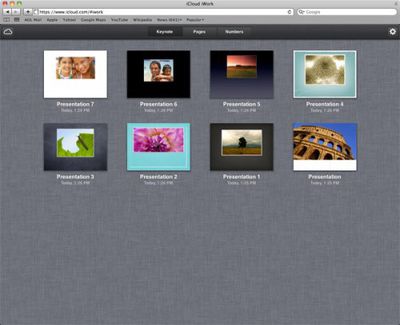
They go into a little more detail about how the iWork interface works on the web. iWork in iCloud is primarily a sync and download service, rather than an editing service:

You can't create iWork files using the iCloud web interface, but if you've enabled sync on your iOS device, documents you create will appear almost instantly on each app's respective webpage. From the Keynote tab, you can view and download each presentation as a Keynote file, PDF, or in PowerPoint format. Pages documents can be downloaded as Pages files, PDFs, or in Word format, and Numbers spreadsheets can be exported to the desktop version of Numbers, PDF, and Excel.

The following video show iWork editing and creation between the iOS apps and the iCloud web interface:


One interesting addition, however, is that users can upload documents to iCloud/iWork. This lets you quickly upload documents that will instantly sync back via iCloud to your iOS apps.

AppleInsider also notes that Apple is actively recruiting for an iWork web developer which could indicate they are working to further expand their web support for the iWork suite.


Popular Stories

Aston Martin CarPlay Ultra Screen

Apple Says CarPlay Ultra is Coming to These Vehicle Brands

Thursday May 21, 2026 11:53 am PDT by
Last year, Apple launched CarPlay Ultra, the long-awaited next-generation version of its CarPlay software system for vehicles. Nearly a year later, CarPlay Ultra is still limited to Aston Martin's latest luxury vehicles, but that should change fairly soon. In May 2025, Apple said many other vehicle brands planned to offer CarPlay Ultra, including Hyundai, Kia, and Genesis. CarPlay Ultra...
iphone 18 pro blue%402x

iPhone 18 Pro: Dark Cherry, Light Blue, and Dark Gray Chassis Leaked [Update]

Thursday June 4, 2026 5:18 am PDT by
Update: Since publication, new information has come to light suggesting the images have been AI-manipulated and are not in fact iPhone 18 Pro chassis parts. The original article follows. The color options Apple is reportedly planning for the upcoming iPhone 18 Pro and ‌iPhone 18 Pro‌ Max have appeared online today in the form of images of chassis parts of unknown authenticity....
iOS 27 All the New App Features

iOS 27: All the Rumored App Features

Wednesday June 3, 2026 3:48 pm PDT by
Siri is getting a major overhaul in iOS 27, but Apple also has some big updates planned for apps like Camera, Photos, and Wallet. There are multiple new AI features in the works, plus some non-AI upgrades. Camera Apple is moving Visual Intelligence from the Camera Control button to the Camera app in iOS 27, according to Bloomberg. There will be a Siri mode that will be available alongside...

Top Rated Comments

mrgraff Avatar
194 months ago
Why is the guy in the video so focused on how fast things show up in iCloud and transfer to other devices? It all depends on one's bandwidth.

Is it just bandwidth? I got the impression that he was impressed by how quickly the iCloud server was keeping up with his iPhone.
Score: 5 Votes (Like | Disagree)
194 months ago

Given these features, I hope some kind of “guest access” is available, to help share in both directions with other (non-Apple) users/systems.

They have this already with iWork.com (https://www.iwork.com/signin/). Hopefully they'll merge it with iCloud and finally bring it out of beta.
Score: 4 Votes (Like | Disagree)
koobcamuk Avatar
194 months ago
I really wish I could edit the documents on the icloud site similar to google docs or other variants.

Nothing to neg at all. You are completely right. It would be excellent if iOS and Lion were all in sync with my pages and keynote documents, which could then also be edited online, even with less functionality.
Score: 4 Votes (Like | Disagree)
nagromme Avatar
194 months ago
That’s great, being able to download (or let others download?) all those other formats of your work, AS you work, with no manual conversion/export command needed.

And being able to upload (or let others upload?) to your iCloud from any old computer’s browser, and instantly have the file on your iPad/iPhone/Mac sounds great as well!

Given these features, I hope some kind of “guest access” is available, to help share in both directions with other (non-Apple) users/systems.
Score: 3 Votes (Like | Disagree)
darbus69 Avatar
194 months ago
futuristic for us oldies but goodies, this is definitely going to be an excellent year for apple...
Score: 2 Votes (Like | Disagree)
koobcamuk Avatar
194 months ago
Well, if all the changes are pushed automatically to all your devices, then aren't you effectively "working on the cloud version" of the document at all times? If all devices are linked to the cloud, I don't see the difference between that and editing a document that is only stored on the cloud (Google Docs). Maybe I'm missing something, but the only difference seems to be that your machine saves a local copy while saving changes to the cloud.

How about working on it from a Windows machine... or a machine that isn't yours? The benefits of actually working on a document just through a browser are numerous, just as webmail has uses and applications.
Score: 2 Votes (Like | Disagree)














