

How To Put Newsstand In A Folder - MacRumorsOpen MenuShow RoundupsShow Forums menuVisit ForumsOpen Sidebar
Skip to Content

How To Put Newsstand In A Folder

by

newsstand1
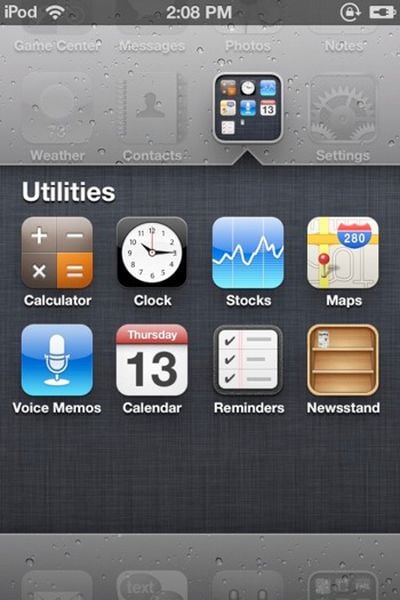
The Coding Massacre has discovered a trick to force the iOS 5 Newsstand into a folder. The only reason to do this is to tuck Newsstand away and hide it -- users who have performed this trick discovered that opening Newsstand when its in a folder crashes Springboard, the main home screen on the iPhone.

Simply follow these steps:

- Take two apps and go to create a folder
- The second the apps are in the folder and it’s doing the folder creation animation, drag Newsstand into the folder
- As long as you’re quick enough Newsstand will go into the folder!

If you wish to use Newsstand at some point, simply remove it from the folder and place it back on the main level.


Top Rated Comments

firestarter Avatar
191 months ago
Message to Apple: Please allow us to turn off features like this that we don't want/need!
Score: 42 Votes (Like | Disagree)
Icaras Avatar
191 months ago


A folder within a folder.

Inception? :D
Score: 19 Votes (Like | Disagree)
191 months ago
It's not just Newsstand, it's any folder.

MacRumors content image
Score: 19 Votes (Like | Disagree)
pellets007 Avatar
191 months ago


A folder within a folder.

MacRumors content image
Score: 17 Votes (Like | Disagree)
191 months ago
Message to Apple: Please allow us to turn off features like this that we don't want/need!
Agreed. Like contacts... it seems redundant to have a contacts app if I can access my contacts from the phone app.
Score: 12 Votes (Like | Disagree)
191 months ago
Wow, i cant believe my trick actually got posted on MacRumors. This is awesome :3 And yes, on the source link i did mention folder within a folder is possible using this method, but its not very practical, since it crashes everytime you try to open the folder. But if your trying to hide a folder from like your friends or something, its a perfect solution. Funny thing is, i tried this trick on an iOS4 device.. It worked. Its been an iOS glitch for over a year and i hadn't realized it till now xD
Score: 11 Votes (Like | Disagree)

Popular Stories

Apple Card iPhone 16 Pro Feature

Apple Card Promo to Offer Free AirPods Pro 3

Friday May 15, 2026 8:59 am PDT by
Starting as early as next week, customers who sign up for an Apple Card at Apple's retail stores in the U.S. will receive $249 cash back when they purchase AirPods Pro 3, according to Bloomberg's Mark Gurman. The promotion has yet to be officially announced by Apple, so exact terms and conditions are not available at this time. AirPods Pro 3 are priced at $249 in the U.S., so customers who...
airpods pro 3 pink

New Apple Card Holders Can Get Free AirPods Pro 3, But There's a Catch

Monday May 18, 2026 8:11 am PDT by
Apple today launched a new promotion offering new Apple Card holders the chance to earn back the cost of AirPods Pro 3 through monthly cash rebates, but there is a recurring spend requirement attached. Customers who open a new Apple Card account and purchase AirPods Pro 3 directly from Apple by June 15 will qualify. Starting July 1 and running through April 30, 2027, cardholders can earn $25 ...
Foldable iPhone 2023 Feature 1

Foldable iPhone Production Stalls Amid Hinge Issues

Monday May 18, 2026 7:29 am PDT by
Trial production of Apple's long-anticipated foldable iPhone, likely called the "iPhone Ultra," has run into a significant engineering hurdle centered on hinge reliability, according to a known leaker. The leaker known as "Instant Digital" posted on Weibo that the foldable device's hinge is consistently failing to meet Apple's quality control standards under conditions of prolonged,...














