

 When image editing and sharing app Skitch was acquired by Evernote earlier this year, we were told iPhone and iPad versions were on the way -- and now Skitch for iPad has arrived.
Skitch is the amazingly fun and surprisingly powerful way to move your ideas and projects forward using fewer words. With Skitch, annotate and draw on just about anything that you see, whether it’s a new or existing photo, a webpage, screenshot, map, or a blank canvas. Then, share your work with friends, colleagues or save it all to Evernote. It couldn’t be simpler.
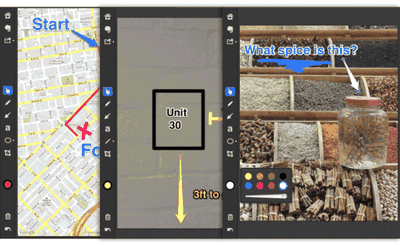
There are a number of ways to get content into Skitch including:
- Photos and Camera: Choose to work on an existing image from your camera roll or take a new photo with your iPad. Use the camera to take photos of things that inspire you or to draw a mustache on a friend. If you have an iPad 1 with no camera, then the camera option won’t appear.
- Screenshot: Skitch for iPad has built in smarts that help it identify recently-made screenshots. Taking a screenshot on your iPad is easy, simply press both the power and home buttons at the same time. The screen will flash and the screenshot will be saved to your camera roll. Open Skitch, tap the Screenshot button, annotate the image, then share it with your team. This is great for everything from mobile app design to showing off your latest Angry Birds score.
- Web: Skitch for iPad has its own web browser designed to help you mark up any webpages you encounter. After tapping the Web icon, you can either go directly to a URL or type in a search. When you find the page you want, tap on the Snap icon. Now you have an image of the webpage to annotate. Use this to provide feedback on a web project or to point out something you want to buy.
- Map: Have you ever struggled to explain exactly where to meet someone or which building on campus is yours or how to find the best hiking spot? Then the Skitch Map option is for you. Pinch and zoom into the map, then use the Skitch drawing tools to point out a landmark or draw a path. You would be surprised how often the exact place you need isn’t easy to locate without some additional help. With Skitch, you can put an end to driving in circles or walking for hours.
- Blank: Sometimes you just need to start fresh. Open the blank canvas and sketch to your heart’s content. Use the shapes, arrows, drawing tools, and colors to compose a work of art or to play a killer game of Pictionary.
Skitch for iPad is free on the App Store. [Direct Link]




















Top Rated Comments
It looks just like our very own Cassie's (https://forums.macrumors.com/member.php?u=82813)!
The app looks cool. Off to grab it...
Why is it that every video coming out seems to have the same inane music? Is it one guy with a ucalaly making all of this same melodic rubbish? Hold on let me ask Siri... Oh no he can't help as he is away at his ucalaly class. :eek: