

OnLive Launches Premium 'Desktop Plus' with Flash and PDF-Enabled Web Browser - MacRumorsOpen MenuShow RoundupsShow Forums menuVisit ForumsOpen Sidebar
Skip to Content

OnLive Launches Premium 'Desktop Plus' with Flash and PDF-Enabled Web Browser

Last month, OnLive introduced its free OnLive Desktop service that allows users to run virtual instances of Microsoft Office apps streamed from OnLive's remote PCs to the users' iPads. The company has now added Adobe Acrobat Reader support to the service and introduced a paid "Desktop Plus" subscription service to provide enhanced functionality including priority access and a Flash- and PDF-enabled browser experience. OnLive Desktop Plus is priced at $4.99 per month.

The free OnLive Desktop App, currently available on iPad—and coming soon to Android, PC, Mac, TVs and monitors—delivers no-compromise, media-rich, instant-response Windows applications including Microsoft Word, Excel and PowerPoint software, and as of today, Adobe Reader for PDFs, along with 2GB of cloud storage. OnLive Desktop Plus, available for $4.99/month at www.desktop.onlive.com, provides all OnLive Desktop Standard features plus OnLive’s gigabit-speed accelerated browsing experience with full Flash player capability. With OnLive Desktop Plus, the iPad not only becomes 100% Flash compatible, it becomes the world’s fastest mobile Flash player.

As with the original OnLive Desktop service, there is some lag in responding to touch input and visual artifacts when moving quickly through documents or web pages. The lag made it somewhat difficult to work with interactive Flash-based content such as games in our testing, but the service does allow for decent viewing of Flash video content on the web.
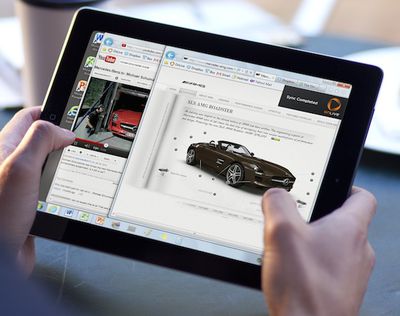
onlive desktop plus
While that slight lag is a function of the time needed for data to transfer between OnLive's servers and the user's iPad, OnLive's PCs themselves are connected to the Internet with gigabit connections, making for very fast loading of content and data transfers, which is then optimized for the iPad's display and passed along to the user.

OnLive is planning yet another tier of service, a $9.99/month "Pro" level that will offer additional PC applications for use from the iPad and an upgrade from to 50 GB of storage, up from 2 GB on the regular and Plus levels.


Related Roundup: iPad
Tag: OnLive
Buyer's Guide: iPad (Don't Buy)
Related Forum: iPad

Popular Stories

apple price hike

Apple Just Increased Prices on MacBooks, iPads, and More

Thursday June 25, 2026 5:44 am PDT by
Apple today dramatically increased device prices across multiple product lines. Subscribe to the MacRumors YouTube channel for more videos. After temporarily taking it down earlier today, Apple's online store is back up with a series of product price increases. The changes are as follows: HomePod mini: $129, up from $99 (+$30) HomePod: $349, up from $299 (+$50) Apple TV: $199, up from...
iCloud iPhone 17 Pro

iPhone Users Who Pay for iCloud Storage Get Two New Perks on iOS 27

Thursday July 2, 2026 6:10 am PDT by
If you pay for certain iCloud+ storage plans beyond the 5GB that Apple offers for free, you will receive two more perks on iOS 27 at no additional cost. A summary of the two new iCloud+ perks on iOS 27:Increased daily usage limits for some new Apple Intelligence features, including image generation in the revamped Image Playground app. HomeKit Secure Video cameras receive generated video...
Apple Event Logo

Apple Just Released a New Product

Thursday July 2, 2026 8:04 am PDT by
Apple's first product release of summer 2026 occurred this week, but do not get too excited, as it is merely the Beats Solo Buds in a new color. Beats Solo Buds are now offered in orange through Best Buy in the U.S., with availability set to expand to 7-Eleven stores in Japan on July 4. Apple already offered orange Solo Buds in India for free with the purchase of an iPhone 15 or iPhone 15 ...

Top Rated Comments

WiiDSmoker Avatar
187 months ago
"We tried to shoe-horn a desktop OS onto a tablet. It didn't work when we did it, so we're going to have someone else do it for us."
- Some guy at Microsoft, as he swims around in red tape.

All I can say is "LOL", and "Get the hell off my iPad."

You try way too hard.
Score: 17 Votes (Like | Disagree)
187 months ago
Awesome product, but should be catering to the HTML5 wave of the future.

The iPad does that natively with Safari. This fills a different need for those that have it. Our old timesheet software was only in flash.... the horror.
Score: 10 Votes (Like | Disagree)
187 months ago
How is this app different from SplashTop?

Instead of connecting to your computer at home, you connect to OnLive's computers. One of the benefits of this, as stated in the article, is that OnLive's computers are connected with ultrafast Internet connections..
Score: 9 Votes (Like | Disagree)
187 months ago
Cool, roll-over over that Flash menu with your curs... oh wait. :cool:
Score: 6 Votes (Like | Disagree)
SteveAbootman Avatar
187 months ago
Instead of connecting to your computer at home, you connect to OnLive's computers. One of the benefits of this, as stated in the article, is that OnLive's computers are connected with ultrafast Internet connections..

And one of the downsides of this is that you don't have full control over the VM. For 5 bucks you get the standard image and can't change it. Sounds like for 10 a month you can install additional programs, though I'd guess this is limited.

With Splashtop you connect to your local PC and can do whatever you want. I'd much rather pay the 3 bucks up front for that program than shell out 10 a month for OnLive.
Score: 6 Votes (Like | Disagree)
a.gomez Avatar
187 months ago
Awesome product, but should be catering to the HTML5 wave of the future.

some of us live (and work) in the present
Score: 4 Votes (Like | Disagree)















