


iPhoto for iOS, Updates for iMovie and Garageband Go Live on App Store - MacRumorsOpen MenuShow RoundupsShow Forums menuVisit ForumsOpen Sidebar
Skip to Content

iPhoto for iOS, Updates for iMovie and Garageband Go Live on App Store

iphotologoEarlier today, Apple announced iPhoto for the iPad and iPhone, saying it would launch today. Keeping to its word, iPhoto is now available for purchase. [Direct Link]

Additionally, updates to iMovie and GarageBand are now live as well.

With iPhoto for iOS, Apple brings Multi-Touch to photography in a breakthrough way. Browse, edit, and share your photos from your iPad or iPhone, like never before – all the powerful tools you need are at your fingertips. And with iCloud, you can share your experiences as stunning photo journals.

Use simple gestures to quickly sort through photos and find your best shots. A powerful set of Multi-Touch tools helps you perfect color and exposure, crop, straighten, and retouch images. Enhance pictures by adding beautiful, Apple-designed effects with just a tap. Or use fingertip brushes to apply adjustments exactly where you want them. In addition to posting photos to Facebook, Flickr, and Twitter, you can beam photos between your iPhone and iPad, stream photos and slideshows to your Apple TV with AirPlay, and use iCloud to publish photo journals to the web to share your stories with friends and family in a whole new way.
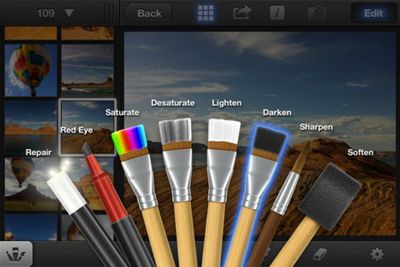
iphotoscreenshot
iPhoto is a universal app available for $4.99 on the App Store. [Direct Link]

iMovie is a universal app available for $4.99 on the App Store, and is a free upgrade for current owners. [Direct Link]


GarageBand is a universal app available for $4.99 on the App Store, and is a free upgrade for current owners. [Direct Link]

Popular Stories

macOS 27 on MacBook Pro

Apple Says macOS 27 Won't Be Compatible With These Macs

Wednesday June 3, 2026 8:29 am PDT by
During WWDC 2025, Apple revealed that macOS 26 Tahoe would be the final major macOS version for Intel-based Macs. macOS 27 will be compatible with Apple silicon Macs only, meaning that you will need a Mac with an M-series chip or a MacBook Neo with an A18 Pro chip in order to install the software update. Apple will unveil macOS 27 during its WWDC 2026 keynote this Monday, June 8, and the...
MacBook Neo on Yellow Feature

MacBook Neo is So Popular That Apple Reportedly Doubled Production

Wednesday June 3, 2026 9:24 am PDT by
On an earnings call in late April, Apple's CEO Tim Cook said that customer response to the MacBook Neo was "off the charts," and the popularity of the laptop has reportedly led the company to significantly boost production. Apple supply chain analyst Ming-Chi Kuo this week said he believes that MacBook Neo shipments to Apple were doubled from an initial target of 5 million units to 10...
iphone 18 pro blue%402x

iPhone 18 Pro: Dark Cherry, Light Blue, and Dark Gray Chassis Leaked [Update]

Thursday June 4, 2026 5:18 am PDT by
Update: Since publication, new information has come to light suggesting the images have been AI-manipulated and are not in fact iPhone 18 Pro chassis parts. The original article follows. The color options Apple is reportedly planning for the upcoming iPhone 18 Pro and ‌iPhone 18 Pro‌ Max have appeared online today in the form of images of chassis parts of unknown authenticity....

Top Rated Comments

GoGa Avatar
186 months ago
My question is...with the iPad 3....will you FINALLY be able to transfer HD 1080p video shot with a canon dslr like the T3i to the ipad via the Apple cam kit....and then BE ABLE TO EDIT THAT VIDEO IN IMOVIE?!!!! Lol

Thats all i wanna know. Love my ipad 1st gen....but skipped the ipad 2nd gen cause it couldnt do this. I am a photographer/videographer/blogger who travels alot, and I LOVE the form factor of the ipad and all it does.

But this is the one sticking point for me. I know there will always be things a laptop or desktop can do that an ipad isnt meant for....however...Tim Cook keeps stressing about a "Post PC world"....and this is a real world application. People shoot high quality video with dslrs and would like to edit that video while on the road. It seems like the umbilical cord has been cut btwn the ios devices and computers with the icloud and syncing....but not being able to load and edit video directly onto your ipad keeps the device stuck in the umbilical cord days. I find it very annoying.

The new retina display and faster speed make it the perfect device to edit videos while on the road.

You can do this, they updated iMovie a few months ago to support this.
Score: 12 Votes (Like | Disagree)
186 months ago
Just a heads up, apparently you can't run iPhoto on the iPad 1:

"Requirements: Compatible with iPhone 4, iPhone 4S, iPad 2 Wi-Fi, and iPad 2 Wi-Fi + 3G.Requires iOS 5.1 or later."

Didn't want someone to buy it over the desktop iTunes and then find out after the fact.
Thank you for mentioning it. You just saved me wasting some money.

----------

This is bloody annoying. If you try to install it on an iPad 1st Gen it produces a pop-up stating that you need a front facing camera - Why /

Are we expected to believe that all the photos used in the Apple demo were taken on an iPad ? No, of course not - they were up loaded onto the iPad the same as the 1000's on mine, - so why can't I have use of the app ?
I'd say the "front facing camera" requirement is Apple-speak for "the iPad 1 is far too crippled in the RAM department for you to even think about running this app. But lol, as if we're just going to come right out and say that".
Score: 10 Votes (Like | Disagree)
186 months ago
Dumb question:

Can this iPhoto somehow access iPhoto on your mac over WiFi or anything?
Score: 10 Votes (Like | Disagree)
186 months ago
wouoldve been nice if iphoto replaced the stock photos app
Score: 9 Votes (Like | Disagree)
186 months ago
Just a heads up, apparently you can't run iPhoto on the iPad 1:

"Requirements: Compatible with iPhone 4, iPhone 4S, iPad 2 Wi-Fi, and iPad 2 Wi-Fi + 3G.Requires iOS 5.1 or later."

Didn't want someone to buy it over the desktop iTunes and then find out after the fact.
Score: 9 Votes (Like | Disagree)
186 months ago
Just a heads up, apparently you can't run iPhoto on the iPad 1:

"Requirements: Compatible with iPhone 4, iPhone 4S, iPad 2 Wi-Fi, and iPad 2 Wi-Fi + 3G.Requires iOS 5.1 or later."

Didn't want someone to buy it over the desktop iTunes and then find out after the fact.

This is bloody annoying. If you try to install it on an iPad 1st Gen it produces a pop-up stating that you need a front facing camera - Why /

Are we expected to believe that all the photos used in the Apple demo were taken on an iPad ? No, of course not - they were up loaded onto the iPad the same as the 1000's on mine, - so why can't I have use of the app ?
Score: 8 Votes (Like | Disagree)












