

New iPad Notes: Battery Charging at 100%, Safari Scaling Images - MacRumorsOpen MenuShow RoundupsShow Forums menuVisit ForumsOpen Sidebar
Skip to Content

New iPad Notes: Battery Charging at 100%, Safari Scaling Images

A couple of new findings as people spend more time with their new iPads. First, iLounge reports on findings by DisplayMate on the new iPads charging behavior. It turns out the iPad continues to charge for as long as an hour after it says its at 100%, suggesting the on-screen indicator isn't quite accurate and may still need more charging.

In an email exchange with iLounge, DisplayMate President Ray Soneira indicated that the third-generation iPad—when connected to power via the included Apple 10W Power Adapter—actually continued to draw 10W of power for up to one hour after reaching what is reported by iOS as a full 100% charge

iLounge found in their battery testing of the new iPad that sometimes the charge would drop initially quickly when they thought the iPad was fully charged.

Earlier in the week, Tom's Hardware noticed that Safari on the new iPad was automatically scaling large images down significantly.
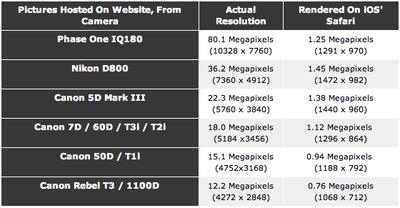
comparison
Large images were automatically scaled down to near 1 megapixel resolutions. This means that if you are viewing large images through Safari, you aren't getting the full Retina experience. A workaround mentioned is to save the image to Photos which seems to preserve the original resolution.

These findings were confirmed by web developer Duncan Davidson who ran into the limit when trying to enhance his websites with Retina-sized images.


Popular Stories

iOS 27 Next to iPhone

Here's When iOS 27 Rolls Out Today in Every Time Zone [Update: It's Out]

Sunday September 13, 2026 3:00 am PDT by
Update 10:04 a.m.: iOS 27 is rolling out now, though it may take a bit for all users to see it, so keep checking! Apple is about to release iOS 27, which will finally deliver more advanced Siri AI capabilities as well as a variety of other refinements, improvements, and new features to iPhones. It's Apple's biggest software update of the year, and Apple announced at Wednesday's iPhone event...
iOS 27 Icon iPhone

iOS 27 Available Now With These 8 New Features

Monday September 14, 2026 9:00 am PDT by
Update — 10 a.m. Pacific Time: Apple has released iOS 27. During its iPhone 18 Pro and iPhone Duo event last week, Apple announced that iOS 27 will be released widely on Monday, September 14. iOS 27 should be available around 10 a.m. Pacific Time / 1 p.m. Eastern Time today via the Settings app, under General → Software Update. Below, we have highlighted eight new features and...
Apple iCloud Plus expansion hero

iCloud+ Now Includes Apple TV, Apple Arcade, and Curated Apple Music Stations in Over 100 Countries

Tuesday September 15, 2026 1:43 am PDT by
Apple today announced a new subscription initiative that turns paid iCloud+ subscriptions into a broader services bundle in more than 100 countries. In select countries, Apple says every paid iCloud+ plan, including the cheapest 50GB tier, now includes Apple TV and Apple Arcade "at no additional cost," while family sharing extends the storage, TV and Arcade access to up to five people....

Top Rated Comments

Lordskelic Avatar
189 months ago
What's the point of the retina display if the images are just going to be scaled down? Didn't apple think about this before they released the iPad 3rd Generation?
Score: 14 Votes (Like | Disagree)
189 months ago
The Safari scaling issue is infuriating when looking for wallpapers. You simply can't look for them in your iPad because they're compressed to hell and scaled down to 1024x1024, you have to look for them on a computer, then transfer them to your iPad. I hope they fix this.
Score: 9 Votes (Like | Disagree)
189 months ago
What's the reason for the large images being scaled down? iOS bug?

EDIT: For those who say it is for memory, cellular reasons or speed of the web browser, the iPad 3 is meant for high resolution images. If there's one available, and you are on WiFi, then why restrain it. It does have 1GB of memory..

This makes sense on other iOS devices, but the iPad 3's selling point is the retina display. Seems daft to downscale images below the 3 megapixel screen the iPad 3 has when a WiFi connection is available along with enough memory.
Score: 8 Votes (Like | Disagree)
189 months ago
Probably Safari scales images on the server side (like an Apple proxy, as Opera does with its Opera Mini "turbo mode"). This may be one more agreement between Apple and carriers to keep low bandwidth usage.

No. Wifi content does not go through a proxy. This is built into the Safari app.
Score: 6 Votes (Like | Disagree)
189 months ago
Expecting a mobile device (even one with 1GB of RAM) to be able to render 10-80 MPixel images is a little nuts. Even if we ignore the download bandwidth, the GPU itself doesn't have the memory or the bus throughput needed to render such a large image to framebuffer.

As for the battery, I think the meter is wildly inaccurate for iOS 5.1 on the iPad 3. Apple will need to calibrate it better in the 5.1.1 update that is soon to follow.
Score: 5 Votes (Like | Disagree)
189 months ago
Images in Ios safari were already downgraded, is it the same issue Here

Hi all,

I remember having trouble reading an online comic because some strips were bigger than 2Mega Pixels, the image was unsharp, as if the number of pixels was reduced to 1/4th (was confirmed on the ios Safari specifications doc)

is'nt it the same kind of behaviour ?

update: https://developer.apple.com/library/safari/#documentation/appleapplications/reference/safariwebcontent/CreatingContentforSafarioniPhone/CreatingContentforSafarioniPhone.html (https://developer.apple.com/library/safari/#documentation/appleapplications/reference/safariwebcontent/CreatingContentforSafarioniPhone/CreatingContentforSafarioniPhone.html)

Know iOS Resource Limits

Your webpage performing well on the desktop is no guarantee that it will perform well on iOS. Keep in mind that iOS uses EDGE (lower bandwidth, higher latency), 3G (higher bandwidth, higher latency), and Wi-Fi (higher bandwidth, lower latency) to connect to the Internet. Therefore, you need to minimize the size of your webpage. Including unused or unnecessary images, CSS, and JavaScript in your webpages adversely affects your site’s performance on iOS.

Because of the memory available on iOS, there are limits on the number of resources it can process:

The maximum size for decoded GIF, PNG, and TIFF images is 3 megapixels for devices with less than 256 MB RAM and 5 megapixels for devices with greater or equal than 256 MB RAM.

That is, ensure that width * height ≤ 3 * 1024 * 1024 for devices with less than 256 MB RAM. Note that the decoded size is far larger than the encoded size of an image.

The maximum decoded image size for JPEG is 32 megapixels using subsampling.

JPEG images can be up to 32 megapixels due to subsampling, which allows JPEG images to decode to a size that has one sixteenth the number of pixels. JPEG images larger than 2 megapixels are subsampled—that is, decoded to a reduced size. JPEG subsampling allows the user to view images from the latest digital cameras.
Score: 5 Votes (Like | Disagree)















