'Air Display' Updated to Support HiDPI OS X Mode on New iPad - MacRumorsOpen MenuShow RoundupsShow Forums menuVisit ForumsOpen Sidebar
Skip to Content

'Air Display' Updated to Support HiDPI OS X Mode on New iPad

Last month, we noted that Avatron had announced forthcoming support for the new iPad in its Air Display software that allows users to add an iOS device as a wireless external monitor for their Mac.

With the new iPad's Retina display running at 2048x1536, Air Display would be able to display a relatively large OS X desktop, but at very small size. But Avatron has been working to make Air Display compatible with the high-resolution "HiDPI" mode that has been quietly built into OS X. Apple has kept the HiDPI feature hidden by default due to an absence of any Macs with ultra high-resolution "Retina" displays that could use it to significant effect.
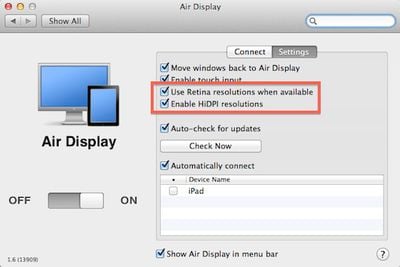
air display retina hidpi settings
Settings for Retina and HiDPI modes in Air Display Connect computer-side app for OS X (Source: MacStories)

The updated version of Air Display is now available [App Store, $9.99], allowing users to set the new iPad as a 1024x768 HiDPI display, taking advantage of the device's Retina display to display the high-resolution elements and text present in OS X Lion.

If you have Mac OS X Lion and a Retina iOS device, now you can turn on "HiDPI mode." HiDPI is a built-in Mac OS X feature that makes UI elements render at double resolution. It's absolutely stunning on a Retina display. By default, Mac OS X disables HiDPI because until now, there has been no Mac display with high enough resolution. Air Display on a new iPad, with its 2048x1536 264-dpi Retina display, finally brings HiDPI to life.

MacStories has some hands-on reports with the new version of Air Display, noting that the feature works very well without significant lag or compression visible when windows are still. When moving windows around the desktop, resolution is degraded as the app works to keep up with the on-screen movements, but for viewing relatively static content the app delivers "incredible image quality".

Air Display is compatible with most Macs running Mac OS X Snow Leopard or later. Notably, late 2008/mid-2009 15-inch MacBook Pro models and early 2009/mid-2009 17-inch MacBook Pro models are not compatible with the Air Display Connect computer-side application when running OS X Lion.

As we also noted last month, Apple's work on HiDPI mode is becoming more visible in OS X Mountain Lion, with the beta version of Messages available for OS X Lion showing some of the fruits of that labor to the public.
Related Roundup: iPad
Buyer's Guide: iPad (Don't Buy)
Related Forum: iPad

Popular Stories

iPad Pro 2024 vs Air 2024 Feature

Three New iPads Rumored to Launch in First Half of 2027

Sunday November 1, 2026 7:27 am PST by
After announcing a new iPad mini with an OLED display earlier this month, Apple plans to release new iPad Air, iPad Pro, and entry-level iPad models in the first half of 2027, according to the latest word from Bloomberg's Mark Gurman. In his Power On newsletter today, Gurman said the next iPad Air will also feature an OLED display, while he expects the next iPad Pro to be equipped with a...
iPad mini 7 Review Thumb 1 sans text

Apple Raises iPad and Mac Trade-In Values

Monday October 26, 2026 8:17 am PDT by
Apple today updated its U.S. trade-in estimates, raising maximum values across the iPad lineup and for most Macs following today's announcement of the new iPad mini. Every iPad category has gained value, although the increases are relatively modest. The iPad mini and standard iPad both rise by $20, while the iPad Air gains $15 and the iPad Pro increases by $10. The revised maximum estimates...
iOS 28 AI

Apple Taking New Approach to Developing iOS 28 and macOS 28

Sunday November 8, 2026 7:42 am PST by
Apple has made a change to its development process for iOS 28, macOS 28, and corresponding software updates, according to Bloomberg's Mark Gurman. In his Power On newsletter today, he said Apple separates development of each year's new operating systems into three major stages. Typically, he said each stage consists of four weeks of coding followed by a four-week "convergence" period where...

Top Rated Comments

191 months ago
It may make more sense to use an external Display ($100.00) than to waste your iPad's display acting as an external monitor.

Care to link me to a $100 monitor with 2048×1536 resolution...?
Score: 7 Votes (Like | Disagree)
191 months ago
Why use an $800 device to do the work of a $100 device??? That's just plain stupid, don't you think? It would be a waste of an iPad's processor to use it as a plain display. And on top of that, laggy.

----------


You could convert those diagrams to PDF, then view them on the iPad while programming, plus you could be making annotations of all kinds to it.

I would recommend the GoodReader App for this purpose. It's the most complete and stable of them all.

Combine it with Dropbox for synchronization, and you've got yourself a complete solution.


----------


Here's a better solution: http://www.startech.com/usb-video-adapters

For portability, I agree with you.

But as I said before I wouldn't be using an $800 device to do the job of a $100 device. It's like buying a monster truck to deliver pizza in Brooklyn.

I would rather use the iPad as a second computer in my configuration, and take advantage of it this way.
I currently do Email, Skype, and other tasks on the iPad while working on my main Mac in multi-monitor mode.

Wow, so ignorant when not considering other peoples uses.

$800 why, try $499 plus $10.

Why deal with annotating a PDF in iOS when you can do it on your Mac without moving your fingers off your keyboard.

Why you keep complaining about a $10 software that some people have uses for, but obviously not you. Considering the target market already purchased an iPad, $10 more for bringing more uses to an iPad is obvious, your complaints are really silly.

Sorry I can't fit a 20" external display and USB adaptor in my small bag that fits my 13" MBA and iPad..

I own the app and occasionally use it because of my current setup, but the times I do/did was well worth over $100 in every instance.
Score: 6 Votes (Like | Disagree)
jclardy Avatar
191 months ago
It may make more sense to use an external Display ($100.00) than to waste your iPad's display acting as an external monitor.

On the new Air's you can only have one external display, this makes an easy and cheap way to add a tertiary monitor if you already own an iPad.

Also with the Air you have an awesome portable dual screen setup.
Score: 5 Votes (Like | Disagree)
OneMike Avatar
191 months ago
It may make more sense to use an external Display ($100.00) than to waste your iPad's display acting as an external monitor.

If it worked well I could make use of it. Plenty of us already have an external display, this could be an additional.
Score: 4 Votes (Like | Disagree)
191 months ago
Have Mac peeps always been this pissy? Are they never happy? Do they still have their panties twisted from Steve's passing? Anyway...this program works just fine so long as you live within its confines (can't we say the same damn thing about a great many things in life?). If you expect to be playing first person shooters on a dang display hooked up over heavily trafficked wifi connections...well...let's just say there's more than just a screw loose going around. If you don't mind using it to improve your productivity with some slightly static information...well...it's not a bad little program for only $9.99.
Score: 3 Votes (Like | Disagree)
191 months ago


Why would you use an iPad for a second display? I'm guessing people on here have the ridiculous 27 incher and a cinema display. So what's the point. Enlighten me please... :)
I do a lot of programming at school and from various locations with my group on my Macbook Air. I would use this to have a Visio document with sequence diagrams, data models, etc. while I'm programming. It would come in handy for when I have work to do and I'm not at home on my desktop. It's definitely better than nothing in those situations.


Score: 3 Votes (Like | Disagree)
Latest Stories
Here's What Apple Fixed in iOS 27.2.1 and macOS 27.2.1
1 hour ago
Webex Gets iPhone Duo Support
2 hours ago
Meta's Muse AI Agent Comes to Apple Watch
2 hours ago
Anker Launches Eufy Security Cam With Auto-Tracking Light
3 hours ago
macOS 27.2.1 Fixes eMudhra Certificate Flaw in Command-Line Tools
4 hours ago
Anthropic Launches Claude Fable 5.2 and Mythos 5.2
5 hours ago
Apple Releases macOS Golden Gate 27.2.1
6 hours ago
Apple Releases iOS 27.2.1 With Bug Fixes
6 hours ago
Apple Releases watchOS 27.2.1 and visionOS 27.2.1 With Security Fixes
6 hours ago
Apple Watch Ultra 4 Gets $99 Amazon Discounts, Starting at $699.99
6 hours ago
Apple Pay Ad Features Martial Arts Convenience Store Food Fight
7 hours ago
Apple Continues to Say Some AI Features Will Have Fees for Extra Usage
7 hours ago
Apple Announces Türkiye Expansion Plans as Tim Cook Visits
8 hours ago
Singapore Saved Apple $2.7 Billion in Taxes This Year
8 hours ago
Apple Music's 2026 Artist of the Year is Olivia Dean
8 hours ago
This Could Be Your Last Chance to Pre-Order the HomeView at a Discount
9 hours ago
Some HomePod Mini 2 Buyers Returning Units Over Mac Speaker Issues
9 hours ago
MacBook Pro With PROLED XDR Display: Details You Might Have Missed
9 hours ago
Satechi Offers MacRumors Readers 30% Off Select Accessories in Early Black Friday Sale
9 hours ago
Leaker Envisions a Shorter iPhone With a New iOS Layout
10 hours ago
Apple to Give You More Control Over When Your Mac Passwords Lock
11 hours ago
Siri Is Getting a Better Memory
11 hours ago
iPhone 18e Could Feature Bigger Display and Battery
12 hours ago
Apple's Siri Boss May Leave - Here's Who Could Take Over
12 hours ago
Apple Launching Two More New Products This Friday
12 hours ago
Apple Store Subscription Sign-Up Controversy Exposed
21 hours ago
Siri AI Rumored to Become 'More Like an Agent' as Early as Next Year
1 day ago
Apple Taking New Approach to Developing iOS 28 and macOS 28
1 day ago
Early Apple Black Friday Deals on Apple Watch, MacBook Air, and More
2 days ago
'Backglow' Lets You Customize New MacBook Pro's Glowing Apple Logo
2 days ago