

Apple May Add Secure Password Suggestions to Safari with OS X Mountain Lion - MacRumorsOpen MenuShow RoundupsShow Forums menuVisit ForumsOpen Sidebar
Skip to Content

Apple May Add Secure Password Suggestions to Safari with OS X Mountain Lion

1Password is a popular password service which offers apps and browser plug-ins for a number of platforms, including Mac, Windows, iOS and Android. The service automatically generates strong, unique passwords whenever a login is needed, keeping them in a keychain under a master password. Once authorized, 1Password can then automatically fill in user names and passwords when needed without the user having to know the often complex passwords created for maximum security.

But with Apple continuing to push out developer betas of OS X Mountain Lion and Safari 5.2, it is now becoming apparent that the company is looking to bake similar functionality directly into Safari.
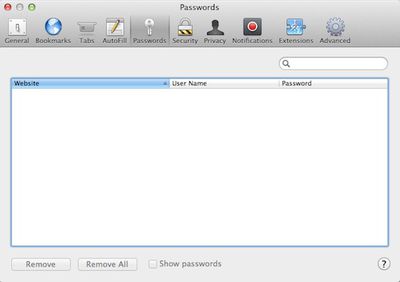
safari 5 2 password pane
"Passwords" preference pane in Safari 5.2

One of the more visible changes in the Safari 5.2 developer builds has been a new "Passwords" pane in the application's preferences, offering a way for users to access stored user names and passwords for various sites and services. As currently deployed, the pane is essentially a more convenient way to view passwords already stored and accessible through the dedicated Keychain Access application.
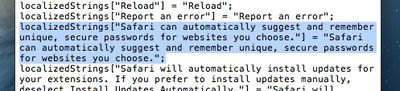
safari 5 2 password suggest string
Text string addressing unique password suggestions in Safari 5.2

But text strings associated with the last several builds of Safari 5.2 point to more extensive password functionality for Safari, including an ability to suggest unique passwords rather than simply storing user-created ones. Specifically, one of those strings which is present in Safari 5.2 but not currently used in a public-facing context reads:

Safari can automatically suggest and remember unique, secure passwords for websites you choose.

With Mountain Lion's focus on taking greater advantage of iCloud services to keep data synced across devices, it seems reasonable to speculate that Apple has plans to roll this password functionality out to iCloud and iOS as well. The move would allow "unique, secure passwords" created on one device to be automatically available for use on another device without having to manually record or insecurely copy and paste password information for transfer.

Apple has already revealed its plans to use iCloud to integrate browser activity across devices, as evidenced by Safari tab syncing making its way into test builds. And interestingly, Apple previously offered keychain syncing across devices with .Mac and MobileMe, but discontinued the feature with the transition to iCloud. It now appears that the functionality was removed while Apple worked to revamp and expand it to increase its functionality.

icloud safari syncing lion mountain lion
iCloud's Safari syncing entry in System Preferences in Lion (left) and Mountain Lion (right)

Apple has also signaled its intention to broaden the browser syncing features of Safari with the iCloud preference pane in System Preferences under Mountain Lion. While the Safari section has been titled "Bookmarks" under Lion, with the addition of browser tab syncing and perhaps new user name and password syncing the section has now simply been retitled "Safari".

But while Apple certainly seems to have all of the pieces in place for higher security unique password generation and syncing across platforms via iCloud, the feature has not yet been introduced for testing in developer builds of OS X Mountain Lion. The feature has also not been seen in iOS builds, although the company has yet to begin developer testing on either iOS 6 or an interim iOS 5.2 update.


Popular Stories

iCloud iPhone 17 Pro

iPhone Users Who Pay for iCloud Storage Get Two New Perks on iOS 27

Thursday July 2, 2026 6:10 am PDT by
If you pay for certain iCloud+ storage plans beyond the 5GB that Apple offers for free, you will receive two more perks on iOS 27 at no additional cost. A summary of the two new iCloud+ perks on iOS 27:Increased daily usage limits for some new Apple Intelligence features, including image generation in the revamped Image Playground app. HomeKit Secure Video cameras receive generated video...
American Express Gold Apple Pay Feature

American Express Announces New Apple Pay Feature

Tuesday June 30, 2026 10:27 am PDT by
American Express today announced that you can now redeem Membership Rewards points when checking out with Apple Pay on the web and in apps on the iPhone and iPad. When checking out with Apple Pay on iOS 18 or iPadOS 18 or later, tap on your eligible American Express card (Platinum, Gold, Green, and others) and select the Membership Rewards points option. You can use points to cover all or...
series 10 apple watch titanium digital crown

Report: Apple Watch Redesign Coming Next Year With New Band System

Tuesday June 30, 2026 8:45 am PDT by
A "major overhaul" of the Apple Watch's design is due to arrive next year with a new system for connecting bands, according to a known Weibo leaker. In a set of recent posts, the leaker known as "Instant Digital" linked the new claim to older rumors about an "Apple Watch X" model, which was said to introduce a fresh design and break compatibility with the existing watch band system. Citing...

Top Rated Comments

Small White Car Avatar
185 months ago
I think I'm the only person in the world who tried and didn't like 1Password, so I'll be interested to see if Apple somehow does it differently.
Score: 9 Votes (Like | Disagree)
185 months ago
I really am not liking the way Apple has "upgraded" the password thing for my apple account. It used to be just a password. Now if someone answers five questions about me that can probably easily be phished through casual conversation (what school did you go to?) they defeat my password.

My only alternative is to use false answers for those questions. Which means I need to keep track of my answers, which means I need something like 1password and if the password for that gets cracked, the keys to the kingdom are truly compromised.
.
You could use your existing password as answer to all questions. That way you are back to one password only.
Score: 5 Votes (Like | Disagree)
AdeFowler Avatar
185 months ago
As the Keychain App already has the ability to suggest and create secure passwords I guess this is a logical move. However, until they can be synced between devices, 1Password have nothing to fear.
Score: 4 Votes (Like | Disagree)
185 months ago
And interestingly, Apple previously offered keychain syncing across devices with .Mac and MobileMe, but discontinued the feature with the transition to iCloud. It now appears that the functionality was removed while Apple worked to revamp and expand it to increase its functionality.
If this is true, I'd be ecstatic. I was disappointed when keychain syncing was removed, but if this was done to improve it, I'm game. Now if Apple works on Documents as a possible replacement for iDisk (using Dropbox now which is great), I'd be a happy camper with iCloud.
Score: 3 Votes (Like | Disagree)
DavidLeblond Avatar
185 months ago
I love 1password. I'll probably stick with them since they sync to my work Windows machine as well.
Score: 3 Votes (Like | Disagree)
185 months ago
That’s where they are now if you’re using DropBox. The encryption is good though.

I'm a 1password user and I use Dropbox for syncing, but here's a serious security risk:

Any app that you grant Dropbox permission to has access to your 1password database. A malicious app developer could, for example, put an app on the App Store that masquerades as a text editor that syncs with Dropbox. At a given time interval months from now (so as to evade App Store rejection), it uploads your 1password database to their server. At that point the developer can brute force the 1password database (could take days to years depending on your password strength) and have access I all your passwords. Even if 80% of 1password users use a strong enough password to make brute forcing a non-worthwhile endeavor, it's the unfortunate 20% who would get their password exposed by this sort of attack, and thus make this attack a profitable venture for a black hat. It's a very feasible scenario.

On the other hand, with Apple's hypothetical solution, it sounds like your master password would be sandboxed away from app developers whose apps access iCloud. My understanding of the iCloud APIs is that an app can only access data inside its own sandbox. Personally, if Apple comes up with a password syncing solution, I'll certainly switch.
Score: 2 Votes (Like | Disagree)













