

Concept Video Suggests Means to Vastly Improve Text Editing in iOS - MacRumorsOpen MenuShow RoundupsShow Forums menuVisit ForumsOpen Sidebar
Skip to Content

Concept Video Suggests Means to Vastly Improve Text Editing in iOS

by

iDownloadBlog points to a new YouTube concept video showing one user's idea of how Apple could vastly improve the text editing functionality on the iPad and other iOS devices.
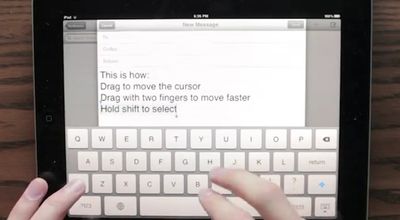
ipad text edit concept
While the current method of text selection involves tapping and dragging around the screen to select cursor position and highlight text, Daniel Hooper suggests that Apple could make use of gestures in the keyboard area of the screen to easily move the cursor in text fields. Simply holding down the keyboard's shift key while gesturing would easily select sections of text for editing.


The suggestion is of course not an official product of Apple's software designers, and so Hooper has also provided instructions on how to use Apple's bug reporting system to suggest the feature to the company's engineers. Apple maintains a policy discouraging users from submitting unsolicited ideas, but notes that it retains the full rights associated with ideas that are submitted to the company.


Top Rated Comments

188 months ago
Easy Solution

As usual, some people seem to really want this feature, and some people really don't.

There's a nice compromise: be able to turn the feature on or off in the Keyboard settings.


Boom. Everyone wins.
Score: 11 Votes (Like | Disagree)
188 months ago
Apple absolutely HAVE to integrate this into iOS. Editing text in messages/emails is painfully slow, awkward and cumbersome at present.
Score: 6 Votes (Like | Disagree)
188 months ago
This would break the keyboard for many non-English languages.

Really hoping Apple won't implement this. Sorry.

I don’t know why you’re being voted down for this. You’re absolutely right. As a German, I make use of the swiping up gesture on certain lettres to get a special character. This would likely sometimes interfere with the idea to swipe up if you want to go up with the curser.
Score: 4 Votes (Like | Disagree)
fabian9 Avatar
188 months ago
The problem that many of you are describing is easily solved. In fact, the solution is already shown in the video.

As far as I'm aware, no international keyboard at the moment uses a two finger swipe to select any special characters (correct me if I'm wrong). In the video, one finger swipe moves the cursor slowly, two finger swipe moves the cursor quickly.

The solution is simple: only implement the two finger swipe to move the cursor!

It's not intuitive that two fingers should swipe quicker than one finger… the speed of cursor movement should be dependent on the speed of the swipe only, not on the number of fingers being used.

(Queue the "that's what she said" jokes…)

----------

It may be faster to move the cursor by swiping, but what I want is more precision with cursor positioning. It's not clear to me from the video exactly how I would stop the cursor at the exact position I want it.

The cursor moves as you swipe. When you stop swiping, the cursor stops moving… how is that not letting you control the exact position you want?
Score: 3 Votes (Like | Disagree)
188 months ago
But it isn't a swiping up gesture, is it? It's a hold-for-one-second-then-swipe-up-and-slightly-to-the-right gesture (which btw was way better before iOS4 when it automatically preselected the most likely character (e.g. in German äöüß) from the list).

You don't swipe up, you hold the key for a fraction longer and than the special characters appear. I don't think this system would interfere with it.

Yes, you can hold keys, but on the iPad you can also swipe up. Just try it on the question mark or the comma key.

Keyboards in non-english languages let you do this with letters that have diacritics on top of them. (Umlauts etc...)
Score: 3 Votes (Like | Disagree)
188 months ago
That is seriously awesome, kudos to the people that developed that. I hope Apple take a look at the video, I'd love to see that in iOS 6 ;)
Score: 3 Votes (Like | Disagree)

Popular Stories

iOS 27 Next to iPhone

Here's When iOS 27 Rolls Out Today in Every Time Zone [Update: It's Out]

Sunday September 13, 2026 3:00 am PDT by
Update 10:04 a.m.: iOS 27 is rolling out now, though it may take a bit for all users to see it, so keep checking! Apple is about to release iOS 27, which will finally deliver more advanced Siri AI capabilities as well as a variety of other refinements, improvements, and new features to iPhones. It's Apple's biggest software update of the year, and Apple announced at Wednesday's iPhone event...
iOS 27 Icon iPhone

iOS 27 Available Now With These 8 New Features

Monday September 14, 2026 9:00 am PDT by
Update — 10 a.m. Pacific Time: Apple has released iOS 27. During its iPhone 18 Pro and iPhone Duo event last week, Apple announced that iOS 27 will be released widely on Monday, September 14. iOS 27 should be available around 10 a.m. Pacific Time / 1 p.m. Eastern Time today via the Settings app, under General → Software Update. Below, we have highlighted eight new features and...
Apple iCloud Plus expansion hero

iCloud+ Now Includes Apple TV, Apple Arcade, and Curated Apple Music Stations in Over 100 Countries

Tuesday September 15, 2026 1:43 am PDT by
Apple today announced a new subscription initiative that turns paid iCloud+ subscriptions into a broader services bundle in more than 100 countries. In select countries, Apple says every paid iCloud+ plan, including the cheapest 50GB tier, now includes Apple TV and Apple Arcade "at no additional cost," while family sharing extends the storage, TV and Arcade access to up to five people....















