

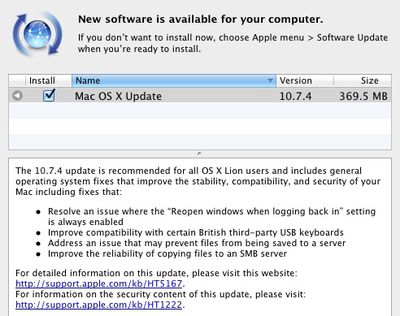
Apple today released OS X 10.7.4, the fourth maintenance update to OS X Lion. The update is currently available via Software Update and should appear on Apple's download pages soon.
The 10.7.4 update is recommended for all OS X Lion users and includes general operating system fixes that improve the stability, compatibility, and security of your Mac including fixes that:
- Resolve an issue where the “Reopen windows when logging back in” setting is always enabled
- Improve compatibility with certain British third-party USB keyboards
- Address an issue that may prevent files from being saved to a server
- Improve the reliability of copying files to an SMB server
Detailed information is available in the full release notes. Notably, the update also includes a fix for the password security hole detailed earlier this week.
An issue existed in the handling of network account logins. The login process recorded sensitive information in the system log, where other users of the system could read it. The sensitive information may persist in saved logs after installation of this update. See http://support.apple.com/kb/TS4272 for more information about how to securely remove any remaining records. This issue only affects systems running OS X Lion v10.7.3 with users of Legacy File Vault and/or networked home directories.
Available versions include:
- OS X Lion Update 10.7.4 (Client) (692.68 MB)
- OS X Lion Update 10.7.4 (Client Combo) (1.4 GB)
- OS X Lion Update 10.7.4 (Server) Client (738.71 MB)
- OS X Lion Update 10.7.4 (Server) Combo (1.49 GB)
- Server Admin Tools 10.7.4 (212.4 MB)
Apple has also released Security Update 2012-002 to bring security fixes to users running systems with Mac OS X Snow Leopard:
- Security Update 2012-002 (Snow Leopard) (238.73 MB)
- Security Update 2012-001 Server (Snow Leopard) (258.11 MB)
Apple has separately pushed out a Safari 5.1.7 update containing several improvements including disabling out-of-date versions of Adobe Flash Player for security reasons.
Out-of-date versions of Adobe Flash Player do not include the latest security updates and will be disabled to help keep your Mac secure. If Safari 5.1.7 detects an out-of-date version of Flash Player on your system, you will see a dialog informing you that Flash Player has been disabled. The dialog provides the option to go directly to Adobe's website, where you can download and install an updated version of Flash Player.
Finally, Apple has also released Apple Remote Desktop 3.5.3 Client (3.80 MB) to address general compatibility issues.



/https://forums.macrumors.com/proxy.php%3Fimage=http://3.bp.blogspot.com/-8WpKdj9awek/TeXTXwYsuEI/AAAAAAAAAcI/XpOqGt85hJg/s1600/johnny_drama_victory.jpg&hash=f3b0f38169d539b0b3e91d14aaec9fe1)


















