

As highlighted by TidBITS (via Macworld), Apple has informed the last holdout users still on the company's MobileMe service that they will be able to continue using their Me.com even after MobileMe's June 30 discontinuation, even if they do not fully convert to iCloud. The option, which is detailed on Apple's MobileMe transition guide, will be of particular benefit to those users whose devices aren't compatible with iCloud.
What if I just want to keep using my email on all my devices?
As of May 1, you can choose to keep using your mail after MobileMe ends, even on devices that don’t meet the iCloud system requirements. Just go to me.com/move and select the option to keep using your email after MobileMe ends. Once you have completed this short process, your mail will continue to work on devices that don’t meet the iCloud requirements after MobileMe ends on June 30th, 2012.
Apple's notice to current MobileMe members was actually detailed by The Mac Observer back on May 1, including screenshots showing the option at me.com/move for users to opt out of moving to the full iCloud service and simply retain access to email and calendars.
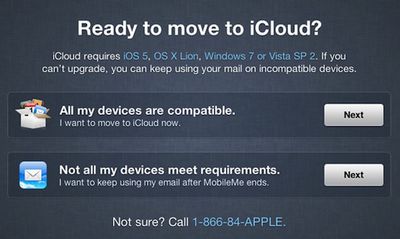
Apple's process suggests that only web-based access to Me.com/Mac.com email will be available following the migration, but TidBITS notes that users can bypass Apple's automated iCloud email setup to manually access MobileMe accounts.
In Mail, after moving your address to iCloud, delete your existing MobileMe account: Choose Mail > Preferences, click Accounts, select your MobileMe account in the list on the left, and click the – (minus) button. Then click the + (plus) button to add a new account and fill in your mac.com or me.com address and password. But now hold down Option while clicking Continue. This bypasses Mail’s automated setup process (which would configure the account for the MobileMe servers — not what you want). On the next screen, choose IMAP from the Account Type pop-up menu. Enter imap.mail.me.com for the incoming mail server address, click Continue, and enter smtp.mail.me.com for the outgoing mail server address. Once you’ve completed the process, Mail in Snow Leopard should be able to check your iCloud mail both now and after MobileMe is turned off.
Most notably, iCloud is not officially compatible with OS X Snow Leopard, leaving some users who systems are not compatible with OS X Lion without access to iCloud. Apple has been trying to push all potential MobileMe users toward iCloud as the MobileMe service heads for discontinuation next month, even offering free copies of Snow Leopard to help users of even older operating systems to move to iCloud-compatible Lion.




















Top Rated Comments
MobileMe came out in 2008 thus giving subscribers with .Mac accounts a @Me address.
This.
Got my Apple ID that's got iTunes, App Store, Apple Online Store etc on it, and my
MobileMeiCloud ID. Would love to merge them.This information doesn't apply to you. This is for MobileMe customers who have not transitioned to iCloud, or may never transition.
You can tell he's been in IT for 15 years with how he gets the company (Apple) and the trademark (Mac) mixed up, and spells it in all capital letters like it's a Media Access Control address.
Yet if I was running Windows Vista or Windows 7 I would be. Totally UNSAT, Apple.
Windows' previous OS is compatible, but Apple's isn't?
Hey, guess what, Apple? I HATE Lion (I suspect I'm not alone here) and it will never, EVER see the light of day on my Mac Pro.
It's a sad day when Apple supports VISTA over one of its own operating systems.