

OS X Mountain Lion Adding Offline Safari Reading List Mode and Dictation to Mac - MacRumorsOpen MenuShow RoundupsShow Forums menuVisit ForumsOpen Sidebar
Skip to Content

OS X Mountain Lion Adding Offline Safari Reading List Mode and Dictation to Mac

In the week since Apple's last developer update of OS X Mountain Lion, several new features including hints of automatic app downloads have been discovered in the next-generation operating system. The discoveries are still continuing, with signs of two new features: offline Reading List mode and iOS-like dictation.

Gear Live highlights the offline reading list option, which is an augmentation of the Safari bookmarking feature that debuted in OS X Lion and syncs saved articles across devices. As noticed by Gear Live, a warning screen in Safari on OS X Mountain Lion indicates that articles saved to Reading List are available for viewing even when the user's Mac is not connected to the Internet.

While troubleshooting a home network issue today, I stumbled upon a new feature that Apple is introducing in OS X Mountain Lion. [...]

When you aren't connected to a network and pull up Safari, you get a message that tells you that you aren't connected to the Internet, but that your "Reading List articles are available for viewing while you are offline."

safari reading list offline
Meanwhile, 9to5Mac reports that a keyboard shortcut listing in the latest build of OS X Mountain Lion suggests that built-in dictation capabilities will be coming to the Mac. Such capabilities debuted as part of Siri on the iPhone 4S, with only the dictation portion making its way into the third-generation iPad released earlier this year.

According to a resources file inside of the latest build of Safari in the newest seed of the upcoming OS X Mountain Lion, Dictation might be making its way to Macs next. Since Macs do not sport virtual keyboards or physical keyboards with a microphone-labled key, users (by default) will apparently need to simultaneously click both command keys to start voice input.
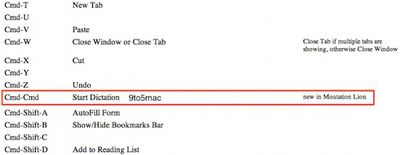
mountain lion dictation
No other evidence of dictation or other Siri-like features has yet been discovered in OS X Mountain Lion, but Apple continues to work on the next-generation operating system and will undoubtedly issue an extensive preview of it at next month's Worldwide Developers Conference in San Francisco.


Popular Stories

iOS 27 Next to iPhone

Here's When iOS 27 Rolls Out Today in Every Time Zone [Update: It's Out]

Sunday September 13, 2026 3:00 am PDT by
Update 10:04 a.m.: iOS 27 is rolling out now, though it may take a bit for all users to see it, so keep checking! Apple is about to release iOS 27, which will finally deliver more advanced Siri AI capabilities as well as a variety of other refinements, improvements, and new features to iPhones. It's Apple's biggest software update of the year, and Apple announced at Wednesday's iPhone event...
iOS 27 Icon iPhone

iOS 27 Available Now With These 8 New Features

Monday September 14, 2026 9:00 am PDT by
Update — 10 a.m. Pacific Time: Apple has released iOS 27. During its iPhone 18 Pro and iPhone Duo event last week, Apple announced that iOS 27 will be released widely on Monday, September 14. iOS 27 should be available around 10 a.m. Pacific Time / 1 p.m. Eastern Time today via the Settings app, under General → Software Update. Below, we have highlighted eight new features and...
Apple iCloud Plus expansion hero

iCloud+ Now Includes Apple TV, Apple Arcade, and Curated Apple Music Stations in Over 100 Countries

Tuesday September 15, 2026 1:43 am PDT by
Apple today announced a new subscription initiative that turns paid iCloud+ subscriptions into a broader services bundle in more than 100 countries. In select countries, Apple says every paid iCloud+ plan, including the cheapest 50GB tier, now includes Apple TV and Apple Arcade "at no additional cost," while family sharing extends the storage, TV and Arcade access to up to five people....

Top Rated Comments

Ciclismo Avatar
187 months ago
Keyboard shortcut? Can't I just say "Computer"?

MacRumors content image
Score: 17 Votes (Like | Disagree)
187 months ago
Mountain Lion seems to have some nifty features, but I have to admit: I miss that excited feeling I used to get when new OS X versions came out (e.g. Tiger, Leopard). Although more expensive, they were stuffed with new user-facing features. The past few years of OS X have not been quite as exciting as iOS...

I'll hold out til WWDC to see if there's something cool and unexpected!

I am gonna repeat the post I wrote in another thread in order to express, once more, a feeling similar to that above.

I want to make it clear that I am probably one of the most vocals "fanboys" out there, having converted at least 15 people to Mac over the last 5 years.

Moreover, I absolutely hate Windows in all its forms. However, the point I am trying to make is that Apple NEEDS to devote further resources to the OS X team in order to: (i) fix outstanding issues; (ii) come up with new features on the basis of experienced users' feedback, and NOT on automatic presumptions that whatever appears on iOS must be replicated on OS X.

I also noted above a number of other problems which are being either deliberately ignored by Apple, or for which there are no specific resources available, such as:

- the pathetic Airport Utility (the availability of version 5.6 notwithstanding);
- the even more pathetic OS X Server (or what remains of it);
- the less-than-ideal implementation and performance of OpenGL/GPU drivers;
- lack of built-in video codecs for Safari and QuickTime (why do I have to install the now-dead Perian for that?);
- lack of possibilities to tweak settings such as mouse polling rates (so as to avoid jumpy cursors in third-party mouses);
- resolution-independence options as referred to above - I mean, Apple has ALWAYS been at the forefront of handicapped people's needs;
- 64-bit awareness and multithreading across the board (I have EIGHT cores waiting to be used and only HandBrake or a handful of pro apps employ them!);
- basic Blu-Ray support (not that I care either, but why not?);
- dual/triple monitor unified desktop support;
- Safari memory leaks (not that I personally care with 16GB of RAM);
- iMessages' disk space bug (which ends up consuming all RAM plus all available space in the startup disk);
- better WebDAV and so on;
- a growing disregard for Apple UI standards across the board.

So there you go; or do you really want me to care about on-screen reminders? For this we already have Growl. And you must agree with me: Launchpad was definitely not Apple's finest hour.
Score: 11 Votes (Like | Disagree)
187 months ago
The screenshot says Moutation Lion?
Score: 8 Votes (Like | Disagree)
inkswamp Avatar
187 months ago
Only in an apple forum can a tech company be comsidered to eschew criticism for the (admitted) poor performance of one of their flagship products (safari) via a suggestion to use an arch and much maligned competitors product (googles chrome) and the belittling of a free similar product offered by a another company with infinitesimally less resources.

Only in an apple forum...:rolleyes:

I'm a native speaker of English but haven't the slightest clue what you're trying to say in that convoluted tangle of words. :confused:
Score: 7 Votes (Like | Disagree)
AppleGuesser Avatar
187 months ago
Mountain Lion seems to have some nifty features, but I have to admit: I miss that excited feeling I used to get when new OS X versions came out (e.g. Tiger, Leopard). Although more expensive, they were stuffed with new user-facing features. The past few years of OS X have not been quite as exciting as iOS...

I'll hold out til WWDC to see if there's something cool and unexpected!

I feel the total opposite, I feel like every version of OS X that is released is more feature packed than the version before it. Granted, a lot more less visible but very important features were baked into Tiger and Leopard compared to say Lion. Every OS X release is slam packed to the max with new features that get me way more excited than iOS, even though i get excited for both :D
Score: 7 Votes (Like | Disagree)
187 months ago
Cmd-Cmd doesn't seem like the best shortcut to use..
Score: 7 Votes (Like | Disagree)













