

Alfred 2.0 to Add More Complex Functions Via 'Workflows' - MacRumorsOpen MenuShow RoundupsShow Forums menuVisit ForumsOpen Sidebar
Skip to Content

Alfred 2.0 to Add More Complex Functions Via 'Workflows'

by

Alfred is a beloved launcher program for Mac OS X that allows users to quickly launch Google searches, launch applications, make quick calculations and more. Now, the developers behind Alfred have revealed in a blog post one of the new features for version 2.0.
alfred workflow movies
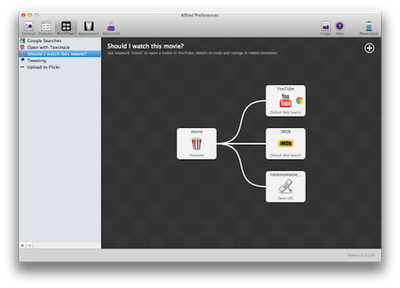
The feature is called Workflows and allows users to create advanced functions to make Alfred even more useful. Some examples are the ability to research a film before watching or uploading photos to Flickr.

Movies weren’t created equal, so before I start watching a movie, I can search for “movie dark knight rises” to decide whether or not I should watch it. This will launch a YouTube search for the trailer in Chrome (because I don’t have Flash installed in Safari), an IMDB search using a default web search, and a Rotten Tomatoes custom search I’ve created.

Alfred 2.0 goes into beta in January and prospective beta testers can take part by upgrading to a "Mega Supporter" account.


Top Rated Comments

achtung! Avatar
176 months ago
Why run extra software when Spotlight's super snappy and OS-integrated already?

Also, is it really that much of an issue to type the movies name in Google and find the trailer on the first page?

Glassed Silver:mac

you clearly never used alfred. is WAY faster and more powerful than spotlight. after using it a couple times you'll never get back to spotlight! ;)
Score: 6 Votes (Like | Disagree)
176 months ago
One of the best Spotlight replacement apps!
Can't wait to get it in January.
Score: 2 Votes (Like | Disagree)
ksgant Avatar
176 months ago
I have Alfred and only used it for a few days. No different than Spotlight. I no longer use it as Spotlight does everything I need without eating up the extra resources. Alfred is more a solution looking for a problem.

If you're using it just as an app launcher, then yeah, Spotlight may be better. But this does MUCH more than Spotlight. You need to look at the actual app that you have to pay for the powerpack, not the very limited version that's on the Apple App Store.

This isn't a replacement for Spotlight. This isn't Spotlight. Look further into the program and what it can do. It solve many many problems for some people. But obviously not for everyone, such as yourself.
Score: 1 Votes (Like | Disagree)
176 months ago
This update looks simply phenomenal. I'm hoping Alfred will end up being the Automator that Apple never made... :D

I just wish they'd offer the paid version in USD as well as in EURO. Maybe with this update?
Score: 1 Votes (Like | Disagree)
176 months ago
I just don't need more than file and application search and Spotlight surely is fast enough...
I type 3 letters and the app is right there... You can immediately press Enter and it starts.
No need to waste extra resources for features I won't use.
I used to have the same point of view, but after my first few days using Alfred I was hooked on not using my mouse:

I can quickly type "Netflix Seinfeld" to find it on Netflix. Or "IMDB Seinfeld" or maybe "Amazon Seinfeld" if I want to see how much the box set costs. Type any of those phrases and your default browser opens, already searching the site you wanted to search.

Or maybe I want to eject my flash drive "Flashy". I type "eject Flashy" and I'm done. Versus going to the Finder, opening a window or showing the desktop, and then either right-clicking to eject, dragging to the trash, etc... All those motions take WAY more time than typing.

Let's say I want to call up the phone number of my friend Bob Sacamano. I start typing "Bob S..." and his contact card is right there.
Score: 1 Votes (Like | Disagree)
coder12 Avatar
176 months ago
Alfred is one of the best purchases I have ever made. I can't wait for this!
Score: 1 Votes (Like | Disagree)

Popular Stories

macOS 27 on MacBook Pro

Apple Says macOS 27 Won't Be Compatible With These Macs

Wednesday June 3, 2026 8:29 am PDT by
During WWDC 2025, Apple revealed that macOS 26 Tahoe would be the final major macOS version for Intel-based Macs. macOS 27 will be compatible with Apple silicon Macs only, meaning that you will need a Mac with an M-series chip or a MacBook Neo with an A18 Pro chip in order to install the software update. Apple will unveil macOS 27 during its WWDC 2026 keynote this Monday, June 8, and the...
MacBook Neo on Yellow Feature

MacBook Neo is So Popular That Apple Reportedly Doubled Production

Wednesday June 3, 2026 9:24 am PDT by
On an earnings call in late April, Apple's CEO Tim Cook said that customer response to the MacBook Neo was "off the charts," and the popularity of the laptop has reportedly led the company to significantly boost production. Apple supply chain analyst Ming-Chi Kuo this week said he believes that MacBook Neo shipments to Apple were doubled from an initial target of 5 million units to 10...
iphone 18 pro blue%402x

iPhone 18 Pro: Dark Cherry, Light Blue, and Dark Gray Chassis Leaked [Update]

Thursday June 4, 2026 5:18 am PDT by
Update: Since publication, new information has come to light suggesting the images have been AI-manipulated and are not in fact iPhone 18 Pro chassis parts. The original article follows. The color options Apple is reportedly planning for the upcoming iPhone 18 Pro and ‌iPhone 18 Pro‌ Max have appeared online today in the form of images of chassis parts of unknown authenticity....













