

A new combination of iPhone app and plug-in adapter from Automatic to read data from your car's onboard diagnostics (OBD) port turns virtually any car manufactured after 1996 into a connected car, providing detailed data on your driving habits and cost of driving (via The Verge).
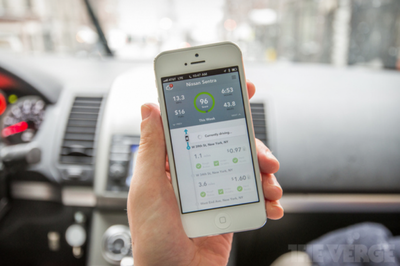
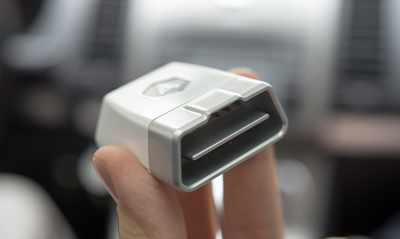
The OBD-II data port is a standard feature on all modern cars, providing access to fuel, mileage and engine data. Plugging in a small $69.95 reader allows this data to be transmitted via Bluetooth to your iPhone as you drive. The app then analyzes this to log a range of data, including fuel efficiency, driving style and engine performance. The app then combines this data with GPS info and an online database to tell you the cost of every journey you make.
The hardware unit connects to a car's OBD-II Data Link Connector — an often-overlooked data port that's been standard on every car since 1996. Through the data link, Automatic has access to fuel, mileage, and engine information, which it sends to your phone through its Bluetooth antenna. From there, the app pulls in GPS, fuel pricing, and map data to build a comprehensive picture of every drive you take. When you stop to fill up, Automatic uses geolocation data to determine which gas station you're at, then uses its own database of stations and daily prices to calculate how much you paid.
Audio pings tell you when you are braking sharply or accelerating hard, driving behaviors that can increase gas mileage by a third. The app can also read and reset "engine check" codes, allowing you to determine whether that annoying light on your dash is something serious or trivial, and allow you to switch it off again without the need to visit a mechanic.
Automatic also includes a "crash alert" system, using the iPhone's accelerometer to detect certain types of crashes and automatically call 911 to report name, location, and vehicle description.
Automatic Link is not the first product to offer access to ODB data on iOS devices, but it does appear to offer a more complete feature set and polished user interface than has been seen on products released to date. Automatic Link launches in May, with pre-orders available now.




















Top Rated Comments
Yes, the OBD2 port provides power when the car is running.
It would cost about the same to simply buy an OBD2 reader from an automotive tool shop. It wouldn't be as fully featured, but if all you want to know is why your check engine light is on, it's a good tool to have. Some shops will charge $25-50 just to do the diagnostic, and it could be for a reason as simple as you forgot to screw in the gas cap all the way tight.
Edit: After looking at their website description: "Using Bluetooth 4.0 technology and sophisticated energy-saving algorithms, the Automatic Link minimizes your phone's battery consumption."
Somewhere in the driver side footwell. Sometimes it's pretty visible if you put your head at the seat level and look around, other times it's partially hidden. But if your car is newer than 1996, it definitely has one. It took us a while to find it on my brother's Honda Civic, but there it was to the right of the gas pedal.
The true value of this package is in the software and the features they added to the app that make use of the geolocation, getting automatically the price you payed for the gas, the accident detection/emergency calls, .... etc.
It is probably not 100% innovative, nothing groundbreaking new, but it is combining many existing technologies into an easy to use package that runs in the background without you noticing it and lots of software features. (Just works, no interaction involved).
I pre-ordered one since I don't think any other competing offer has the same easy use and full feature list wrapped in a beautiful app.
This is what sets this package apart from the others.