Apple Releases MacBook Air Flash Storage Firmware Update 1.0 - MacRumorsOpen MenuShow RoundupsShow Forums menuVisit ForumsOpen Sidebar
Skip to Content

Apple Releases MacBook Air Flash Storage Firmware Update 1.0

by

Apple today released MacBook Air Flash Storage Firmware Update 1.0, an update for Mid-2012 MacBook Air models to address an issue with recovering from crashes.

This update is recommended for MacBook Air (mid 2012) models. This update addresses a storage firmware issue that, in rare cases, may cause a system to fail to recover from a crash.
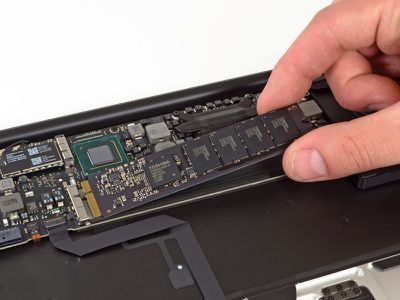
macbook_air_2012_flash

Flash storage module from mid-2012 MacBook Air (Source: iFixit)

The update is 1.69 MB and requires OS X 10.7.5 or OS X 10.8.3.

Related Roundup: MacBook Air
Buyer's Guide: MacBook Air (Neutral)
Related Forum: MacBook Air

Top Rated Comments

Weaselboy Avatar
172 months ago
The MAS showed the update was available. I installed it, it rebooted, did it's thing, but it keeps showing up in MAS as an available update. Downloading the manual update now to see if that one will stick.
Manual update said it requires 10.7 (I'm on 10.8.3) and wouldn't install. So there's obviously something wrong with this update. I tried installing the update from the MAS again, but this time I manually shut down and let it install. Still showing up in the MAS. Oh well.
Same here on 2012 13" MBA with 10.8.3. It goes through the update and reboots instead of shutting down like the instructions explain. Tried both manually and through the app store.

I wonder if having Filevault on is causing a problem. I'm decrypting FV2 now to test this theory. Do you have FV2 on by any chance.

Edit: Yep, that was it. I turned off FV2 and waited for it to unencrypt, then applied the update and it worked just fine. You can see the new SSD firmware version TPVABBF0 in sys info.
Score: 3 Votes (Like | Disagree)
Simplicated Avatar
172 months ago
Mine is Samsung and I didn't get the update (yet?).

Because this is for Apple notebooks. :D:D
Score: 2 Votes (Like | Disagree)
chrfr Avatar
172 months ago
After the firwmare updated the computer completely shut off and didnt turn back on.

The installer states that this will happen in the dialog window that opens to confirm you want to install.
Score: 1 Votes (Like | Disagree)
Acorn Avatar
172 months ago
Thanks for posting about the encryption. At first I tried to install the update with the encryption on and it didnt work. So I did what others have suggested and turned off encryption (fully wait for it to finish) then reboot then re-run the update and it worked perfectly.

If i wasnt apple enthusiast and visited the forums there would have been no way to know that the drive needed to be decrypted first.

Edit* it also gave me a scare. After the firwmare updated the computer completely shut off and didnt turn back on. It was like 5 minutes before I tried to turn it back on because i was to scared to touch anything.
Score: 1 Votes (Like | Disagree)
ConCat Avatar
172 months ago
I have not seen any reports of a user able to apply this update with FV2 on, so I think it is necessary to turn it off.

I believe what is happening is the updater writes itself to Macintosh HD for install upon reboot, but with FV2 on Macintosh HD is a virtual core storage (encrypted) volume that cannot be accessed at boot time, so the update fails.

I was on AC adaptor during my earlier failed attempts to install.
Apple needs to get Core Storage implemented in the firmware. It'll solve so many problems... By that I mean removing the need to have PVs backed by GPT, and to allow decryption without needing a boot partition. They could even implement a GPT emulation layer, complete with a protective MBR for booting Windows.
Score: 1 Votes (Like | Disagree)
172 months ago
I am always surprised how many people seem to manually download Apple firmware and software updates which don't show up on their machines and try everything to get them installed. We can probably assume to 99% that if they don't show up even after waiting, they aren't required for your components... Seems a play with fire to me to try everything to force these updates nevertheless. (no connection to the post above me, that is a different case.)

EDIT: Okay, now that I read this thread again it only seems to be one single guy here doing this, LOL - the others have the MAS notification of the update... Anyway, in other threads with firmware updates I stumbled upon people like described above.
Score: 1 Votes (Like | Disagree)

Popular Stories

apple price hike

Apple Just Increased Prices on MacBooks, iPads, and More

Thursday June 25, 2026 5:44 am PDT by
Apple today dramatically increased device prices across multiple product lines. Subscribe to the MacRumors YouTube channel for more videos. After temporarily taking it down earlier today, Apple's online store is back up with a series of product price increases. The changes are as follows: HomePod mini: $129, up from $99 (+$30) HomePod: $349, up from $299 (+$50) Apple TV: $199, up from...
2026 Macs and Studio Display 2 Feature

Apple Adds More 2026 Macs and Studio Display 2 to Refurbished Store

Friday June 26, 2026 7:12 am PDT by
Earlier today, we reported that Apple added the MacBook Neo to the refurbished store on its website, and it turns out the new additions go beyond that. The other products added to Apple's refurbished store in the U.S. and Canada for the first time today include the MacBook Air with the M5 chip, MacBook Pro models with M5 Pro and M5 Max chips, and the second-generation Studio Display (2026)....
iPhone 18 Pro Deep Red Feature

iPhone 18 Pro Launching in Two Months With These 12 New Features

Friday July 17, 2026 10:39 am PDT by
It is now mid-July, and that means the iPhone 18 Pro and iPhone 18 Pro Max are now just two months away. The devices are expected to look similar to the iPhone 17 Pro and iPhone 17 Pro Max, but there will still be many year-over-year changes, with rumored features including a smaller Dynamic Island, 5G via satellite, and more. Apple is expected to unveil the iPhone 18 Pro, iPhone 18 Pro Max, ...