

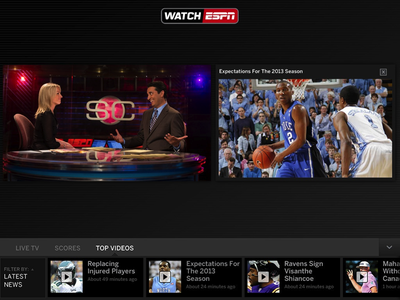
ESPN has updated its WatchESPN app with new support for split-screen viewing of content. For example, users could watch a live stream of one of ESPN's many channels while simultaneously pulling up some on-demand video content or live sports scores.
The feature is exclusive to newer iPads and the iPad mini currently, but will be coming to other devices like the Apple TV and Xbox in the future.
AllThingsD has more on how the feature works:
The key here is something ESPN is calling a “live toolbar.” It’s a widget that runs across the bottom of the video screen and lets you pull up data like scores and stats for other games you’re not watching. And, if your attention span can handle it, you can also use it to pull up on-demand video clips, like highlight reels, that you can watch side-by-side with a live feed.
What's new
Introducing the WatchESPN Live Toolbar on iPad! Now you can keep up with news, scores and on-demand video from your favorite sporting events while watching live programming on ESPN.
The live toolbar includes:
- Live TV Lineup: See what's on ESPN's networks and switch to additional ESPN programming without exiting the video.
- Scores: Follow additional games while watching your game on ESPN. Launch video highlights at the conclusion of an event (where available).
- Top Videos: Watch multiple things at once! Keep up with the latest news and highlights right alongside the live ESPN programming you're watching. Rotate your device while watching two videos.*The Live Toolbar is available on iPad and iPad Mini only.
Also new in 1.7:
- Users connecting from a college or military network now get access to ESPN3 events automatically!
- WatchESPN is now compatible with iOS7.
- "ESPN on ABC" events will now appear in the WatchESPN app. Selecting these events will bring you into the WatchABC app.
As with many of these apps, live streaming is U.S. only and requires authentication through one of these paid television providers: AT&T U-verse, Bright House Networks, Charter, Comcast XFINITY, Cox, Midcontinent Communications, Optimum, Time Warner Cable, or Verizon FiOS TV.
WatchESPN is a free download from the App Store. [Direct Link]



















Top Rated Comments
When march madness rolls around, we'll be wishing this go quad-screen.
Looks like your ads are no longer relevant.
:p