

VMware Fusion 6 Brings Updated Virtualization Support for OS X Mavericks and Windows 8.1 - MacRumorsOpen MenuShow RoundupsShow Forums menuVisit ForumsOpen Sidebar
Skip to Content

VMware Fusion 6 Brings Updated Virtualization Support for OS X Mavericks and Windows 8.1

Following last week's introduction of Parallels Desktop 9, VMware has announced the launch its new VMware Fusion 6 virtualization software, adding support for OS X Mavericks and Windows 8.1, as well as a number of other new features.

- Designed for Mac OS X Mavericks - Extend the unique features of Mavericks to a Windows environment, such as taking full advantage of every display connected to a Mac with multiple display support and enhanced dictation support in Windows applications.

- Ready for Windows 8.1 - Get the most out of Windows 8.1 by running Windows Store applications side-by-side with Mac applications. With VMware Fusion 6, users can access Windows Store applications in Launchpad or the Applications folder and put them in the Dock in Unity mode.

- Optimized for the Latest Macs - VMware Fusion 6 is optimized for the latest Macs taking advantage of Intel's latest Haswell processors for even better battery life and even faster performance when running Windows applications.

- Create the Most Powerful Virtual Machines - Create virtual machines with support for up to 16 vCPUs, 8 TB virtual disks, and up to 64 GB of memory to run the most demanding Windows applications on a Mac.

- Enhanced User Interface - From its streamlined user experience and improved PC migration assistant, to easier installation of Windows and more granular selection of computer resources, everything has been enhanced to give users an even better way to run Windows on a Mac.
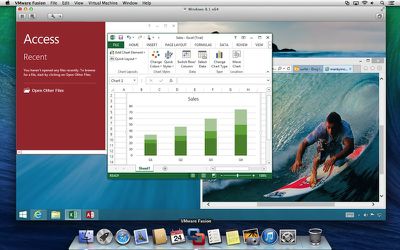
vmware_fusion_6_windows_8_1
A more advanced VMware Fusion 6 Professional version is also available, adding greater flexibility for restricting and expiring virtual machines, linked clones for easily creating multiple copies of virtual machines, and more.

Available through the VMware Store, VMware Fusion 6 is priced at $59.99 while VMware Fusion 6 Professional is priced at $129.99. Users upgrading from version 4 or 5 can receive discounted pricing of $49.99/$69.99, while any customers who purchased VMware Fusion 5 on or after August 1 can receive a free upgrade to version 6.


Popular Stories

iOS 27 Next to iPhone

Here's When iOS 27 Rolls Out Today in Every Time Zone [Update: It's Out]

Sunday September 13, 2026 3:00 am PDT by
Update 10:04 a.m.: iOS 27 is rolling out now, though it may take a bit for all users to see it, so keep checking! Apple is about to release iOS 27, which will finally deliver more advanced Siri AI capabilities as well as a variety of other refinements, improvements, and new features to iPhones. It's Apple's biggest software update of the year, and Apple announced at Wednesday's iPhone event...
iOS 27 Icon iPhone

iOS 27 Available Now With These 8 New Features

Monday September 14, 2026 9:00 am PDT by
Update — 10 a.m. Pacific Time: Apple has released iOS 27. During its iPhone 18 Pro and iPhone Duo event last week, Apple announced that iOS 27 will be released widely on Monday, September 14. iOS 27 should be available around 10 a.m. Pacific Time / 1 p.m. Eastern Time today via the Settings app, under General → Software Update. Below, we have highlighted eight new features and...
Apple iCloud Plus expansion hero

iCloud+ Now Includes Apple TV, Apple Arcade, and Curated Apple Music Stations in Over 100 Countries

Tuesday September 15, 2026 1:43 am PDT by
Apple today announced a new subscription initiative that turns paid iCloud+ subscriptions into a broader services bundle in more than 100 countries. In select countries, Apple says every paid iCloud+ plan, including the cheapest 50GB tier, now includes Apple TV and Apple Arcade "at no additional cost," while family sharing extends the storage, TV and Arcade access to up to five people....

Top Rated Comments

170 months ago
and let the parallels vs fusion arguments begin!!

VirtualBox!!
Because I'm cheap!
Score: 10 Votes (Like | Disagree)
tigres Avatar
170 months ago
damn, these yearly required upgrades are so tiresome. I think I have paid them nearly a grand over the years.

:(
Score: 7 Votes (Like | Disagree)
sjinsjca Avatar
170 months ago
Any reason why people just aren't using bootcamp??
Bootcamp is great if your Windows instance absolutely needs all the resources of your machine, as in gaming.

However, today's personal computers are so powerful that you can get amazing performance running Windows (or Linux, or what-have-you) at the same time as OS X. There are many advantages to doing so, not least being that you can hot-key between OS X and Windows (or Linux or...). It's like having a desk with two computers on it.

Or more: my rMBP is powerful enough to run several virtual machines at the same time. So I can have Windows XP, Windows 7, any of several flavors of Linux, all accessible simultaneously.

In my work it's necessary that I have reasonably quick and portable access to different versions of various OSes with different versions of various software. Virtual machines make that possible. I have a nice USB 3 external drive with my less-used VMs on it; I just velcro it to the back of my rMBP's display when I need it. Connected via USB 3 or Thunderbolt, the VMs run at native speed. (For external storage, USB 3 and Thunderbolt are pretty evenly matched, as the drive is the bottleneck in that case.) If I'm using a particular VM frequently for a project or something, I'll copy it to my rMBP's SSD. Currently I have four VMs resident on the SSD.

Within the last hour I've had Win7, WinXP and Linux Mint all running at the same time as OS X. Can't do that with Boot Camp.

If I don't need a VM that's currently on my SSD, I can just copy it to my external drive and reclaim the disk space in my laptop. Can't do that with Boot Camp either.

If I screw up a VM, I can just pull an earlier version from my Time Machine backups. Can't do that with Boot Camp-- lots of folks don't realize it until it's too late, but Time Machine doesn't touch the Boot Camp partition. Or, I can make snapshots of my VMs and revert to them if desired. (They take up beaucoup disk space, though.)

I have VirtualBox too. It has improved greatly in recent years. Its USB handling still lags behind Fusion's, but it may be fine for your purposes and is free. If you're not a gamer, I'd recommend it over Boot Camp for running Windows or Linux.
Score: 5 Votes (Like | Disagree)
Plutonius Avatar
170 months ago
I prefer bootcamp :)

I prefer OS X :).
Score: 3 Votes (Like | Disagree)
170 months ago
I installed it, it replaced VMWare Fusion 5. It crashes each time it attempts to launch. I restarted. will reinstall now. I don't have a list of things to try, to fix it.

Here's how I fixed it:
1. Uninstalled it by dragging "VMWare Fusion" folder to the trash.
2. Restart machine
3. Delete preferences folder "/Library/Preferences/VMware Fusion"
4. Empty trash
5. Re-installed Fusion 6
Score: 2 Votes (Like | Disagree)
lincolntran Avatar
170 months ago
Are you also tired of the annual payment hike for OS X or are you only tired of the annual payment hike for third party software like VMWare Fusion...?

It's expensive to live in Apple land. I think everybody knows that by now.

What are you talking about? Unlike windows, OS X gets cheaper to upgrade every release.
Score: 2 Votes (Like | Disagree)













