

Apple Highlights New Apple TV 6.0 'Touch Setup' Feature in Support Document - MacRumorsOpen MenuShow RoundupsShow Forums menuVisit ForumsOpen Sidebar
Skip to Content

Apple Highlights New Apple TV 6.0 'Touch Setup' Feature in Support Document

Apple today released a support document detailing a newly implemented Apple TV setup feature that was introduced last week with its Apple TV 6.0 software update.

Users that have a third-generation Apple TV running the 6.0 software can use an iPhone, iPad, or iPod touch running iOS 7 to automatically transfer network settings, Apple ID information, and language preferences to the Apple TV, allowing for faster setup. The information exchange is done via Bluetooth by touching the iOS device to the Apple TV, taking advantage of the Bluetooth LE built into all Apple devices after the iPhone 4.
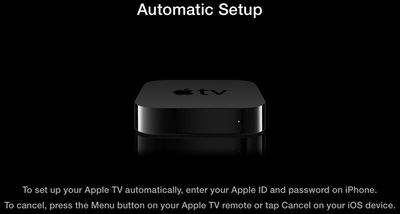
autosetup
Apple's support article includes a detailed list of instructions on the process:

1. Connect your Apple TV to your television and power and wait until your Apple TV displays the setup screen.

2. Unlock your iOS 7 device and ensure that Bluetooth is enabled. Also ensure that you are connected to the Wi-Fi network you want to use with Apple TV.

3. Touch your iOS device to your Apple TV and wait for the prompts to appear on your iOS device and Apple TV.

4. Enter your Apple ID and password on your iOS device.

5. Choose if you want Apple TV to remember your Apple ID password, and if you want Apple TV to send data to Apple.

6. Your Apple TV will start the configuration process, including connecting to your Wi-Fi network, activating Apple TV, and setting up your iTunes Store account.

Prior to the implementation of the tap setup feature, entering Apple TV information was a tedious process that required connecting a Bluetooth keyboard or using the Apple TV remote to pick and choose letters.

As noted by Apple, the transfer requires an iPhone 4s or later, a third-generation iPad or later, an iPad mini, or a fifth-generation iPod touch. The feature does not work with the iPhone 4 or the iPad 2.


Related Roundup: Apple TV
Buyer's Guide: Apple TV (Don't Buy)

Popular Stories

tvOS 26 Feature

Apple Releases tvOS 26.5

Monday May 11, 2026 10:02 am PDT by
Apple today released tvOS 26.5, the fifth update to the tvOS operating system that came out last fall. tvOS 26.5 is available for the Apple TV 4K, and it comes over a month after Apple released tvOS 26.4. tvOS 26.5 can be downloaded using the Settings app on the ‌‌Apple TV‌‌. Open up Settings and go to System > Software Update to get the new software. ‌‌Apple TV‌‌ owners who...
General visionOS watchOS and tvOS Betas Feature Redux

Apple Releases First watchOS 26.6, tvOS 26.6 and visionOS 26.6 Betas

Tuesday May 26, 2026 10:03 am PDT by
Apple today provided developers with the first betas of upcoming watchOS 26.6, tvOS 26.6, and visionOS 26.6 betas for testing purposes. The software two weeks after Apple launched the 26.5 versions of each platform. The software updates are available through the Settings app on each device, and because these are developer betas, a free developer account is required. There's no word on...
Where is the New Apple TV Feature

Apple Previews New tvOS 27 Feature

Wednesday May 20, 2026 1:02 pm PDT by
Apple has announced that "Larger Text" support is coming to tvOS, allowing users to increase the on-screen text size to make it easier to read. "Larger Text" lets you adjust the size of text in supported apps, with the option already available on other devices like the iPhone, iPad, and Vision Pro. This was one of the new accessibility features that Apple previewed earlier this week, with ...

Top Rated Comments

DaGreat01 Avatar
166 months ago
Such a good feature. Typing in information with direction arrows and a select button sucks.
Score: 17 Votes (Like | Disagree)
MacGeek1987 Avatar
166 months ago
Not sure why tapping the devices is necessary, but I'd gladly do so instead of using that ridiculous "remote" to select one character at a time.
Score: 10 Votes (Like | Disagree)
jclo Avatar
166 months ago
Given that it's Bluetooth, why do the devices need to touch at all?

This isn't far off from the 'bumping' they mocked (though I realise there's a huge difference between this and AirDrop).

They don't need to touch. But touching ensures that the iOS device is close enough to the Apple TV, which is why I assume Apple specifies a touch in the documentation.
Score: 10 Votes (Like | Disagree)
Carlanga Avatar
166 months ago
lol, tedious...
takes about 4 minutes w the remote.
Either way is a welcome addition'
Score: 5 Votes (Like | Disagree)
Anonymous Freak Avatar
166 months ago
Now I want to wipe my :apple:TV 3 just to see this in action!

Edit: Okay, that was pretty slick.

Reset my :apple:TV, and it gave this prompt. Got my iPhone 4S about an inch from the :apple:TV, and a dialog appeared on the iPhone asking for my iTunes password. A couple "yes or no" type questions on the iPhone, and the :apple:TV was ready to go.
Score: 4 Votes (Like | Disagree)
166 months ago
Given that it's Bluetooth, why do the devices need to touch at all?

This isn't far off from the 'bumping' they mocked (though I realise there's a huge difference between this and AirDrop).

Edit: It may be that they're doing something clever with the iOS device's accelerometer readings to initiate the process whilst ensuring that they're within Bluetooth range...?
Score: 4 Votes (Like | Disagree)













