

Apple Releases OS X 10.8.5 Supplemental Update With Several Bug Fixes - MacRumorsOpen MenuShow RoundupsShow Forums menuVisit ForumsOpen Sidebar
Skip to Content

Apple Releases OS X 10.8.5 Supplemental Update With Several Bug Fixes

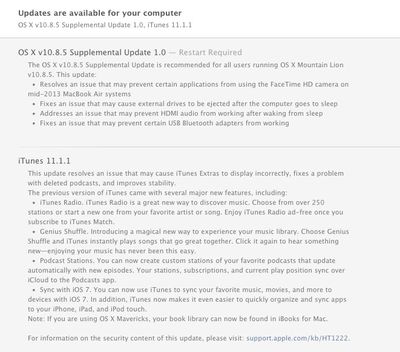
Following an employee test period earlier this week, Apple today released a Supplemental Update to OS X 10.8.5, fixing an issue with the FaceTime HD camera on 2013 MacBook Airs, a bug that caused external drives to be ejected after a computer goes to sleep, an HDMI audio issue, and a problem that prevented certain USB Bluetooth adapters from working.

The OS X v10.8.5 Supplemental Update is recommended for all users running OS X Mountain Lion v10.8.5. This update:

- Resolves an issue that may prevent certain applications from using the FaceTime HD camera on mid-2013 MacBook Air systems
- Fixes an issue that may cause external drives to be ejected after the computer goes to sleep
- Addresses an issue that may prevent HDMI audio from working after waking from sleep
- Fixes an issue that may prevent certain USB Bluetooth adapters from working

The update also includes iTunes 11.1.1, fixing a bug that caused iTunes Extras to display incorrectly and an issue that resulted in deleted podcasts.
1085supplemental
The update can be accessed from the software update tool in the Mac App Store or via Apple's support page.

- OS X Mountain Lion v10.8.5 Supplemental Update

Revised Versions of 10.8.5:

- OS X Mountain Lion Update v10.8.5
- OS X Mountain Lion Update v10.8.5 (Combo)

Popular Stories

macOS 27 on MacBook Pro

Apple Says macOS 27 Won't Be Compatible With These Macs

Wednesday June 3, 2026 8:29 am PDT by
During WWDC 2025, Apple revealed that macOS 26 Tahoe would be the final major macOS version for Intel-based Macs. macOS 27 will be compatible with Apple silicon Macs only, meaning that you will need a Mac with an M-series chip or a MacBook Neo with an A18 Pro chip in order to install the software update. Apple will unveil macOS 27 during its WWDC 2026 keynote this Monday, June 8, and the...
MacBook Neo on Yellow Feature

MacBook Neo is So Popular That Apple Reportedly Doubled Production

Wednesday June 3, 2026 9:24 am PDT by
On an earnings call in late April, Apple's CEO Tim Cook said that customer response to the MacBook Neo was "off the charts," and the popularity of the laptop has reportedly led the company to significantly boost production. Apple supply chain analyst Ming-Chi Kuo this week said he believes that MacBook Neo shipments to Apple were doubled from an initial target of 5 million units to 10...
iphone 18 pro blue%402x

iPhone 18 Pro: Dark Cherry, Light Blue, and Dark Gray Chassis Leaked [Update]

Thursday June 4, 2026 5:18 am PDT by
Update: Since publication, new information has come to light suggesting the images have been AI-manipulated and are not in fact iPhone 18 Pro chassis parts. The original article follows. The color options Apple is reportedly planning for the upcoming iPhone 18 Pro and ‌iPhone 18 Pro‌ Max have appeared online today in the form of images of chassis parts of unknown authenticity....

Top Rated Comments

165 months ago
And... Permissions from iTunes 11.1.1 are still NOT REPAIRABLE.

:mad:

Apple should ditch permission repair if it's not important at all.
Score: 8 Votes (Like | Disagree)
165 months ago
Yup broken here too! WTF is up with Apple!

Why does this bother you? Is it causing something to behave incorrectly?
Score: 5 Votes (Like | Disagree)
blackburn Avatar
165 months ago
You can fix it with
sudo chflags hidden /mach_kernel
on the terminal
Score: 5 Votes (Like | Disagree)
165 months ago
Great, they forgot to make mach_kernel invisible again.
Score: 5 Votes (Like | Disagree)
BillyBobBongo Avatar
165 months ago
Additionally, why is the Mach_Kernel now visible in the root directory?

Because Apple doesn't do Quality Control anymore! ;)

Put this in Terminal and it will become invisible again.

sudo chflags hidden /mach_kernel
Score: 4 Votes (Like | Disagree)
165 months ago
What exactly are the real consequences to these permissions issues? I ran Disk Utility and saw the errors when executed "Verify Disk Permissions," but iTunes seems to be working just fine for me.

Edit: A quick search of the Apple Support forums revealed this helpful post:


So I think the people blasting Apple over these "errors" need to take it down a notch.

I do not agree. Over the past year, Apple has had terrible quality control. This most recent issue with iTunes - while it doesn't personally affect me - is absolutely blatant disregard for quality, as it happens on every single computer with iTunes 11.1 and is reported by disk utility. It's damn silly that they allowed it to occur in the first place but it's even worse that they didn't correct it on the update. That said, if you do a little more research you will find that some users report crackling audio in iTunes since 11.1. Is this related? Who knows.

Anyways, this combined with other issues throughout the past year (ghosting on screens, the battery issues that plagued mountain lions initial iterations, laggy rmbp ui, iMessages not sending properly in ios7, etc. etc.) all underscore how crummy Apple has been at providing quality. It's literally as if they don't even test or use their own products. I hope I'm wrong, but the direction of the company is currently garbage.
Score: 3 Votes (Like | Disagree)
















