

Netflix Updates iOS App with HD Video and AirPlay Support - MacRumorsOpen MenuShow RoundupsShow Forums menuVisit ForumsOpen Sidebar
Skip to Content

Netflix Updates iOS App with HD Video and AirPlay Support

by

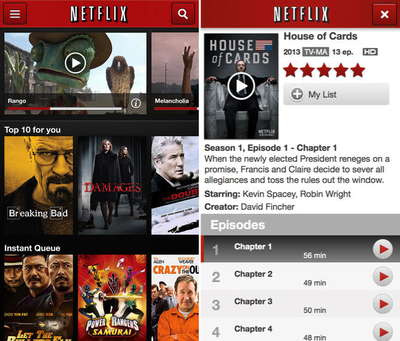
Netflix has updated its iOS app to version 5.0, bringing various new features including HD video quality and support for AirPlay streaming for devices on iOS 7, with the latter requiring the user to disable the AirPlay mirroring feature. The update also contains playback optimizations and general stability improvements.
netflix_hd_2
Netflix released the last major update for its iOS app in April, which brought a minor design and the addition of an episode selector on the iPad. The company also added a multiple profile option for its app on Apple TV in August, and added a “Super HD” option for all users and additional devices last week, including support for the feature on the 3rd generation Apple TV.

Netflix is a free app for the iPhone and iPad and can be downloaded through the App Store. [Direct Link]


Top Rated Comments

165 months ago
School me on the need for the AirPlay feature - if I have an AppleTV to AirPlay to, then I have a Netflix app on my TV...

It might come in handy at friend's house who doesn't have a Netflix account, yet has an Apple TV?
Score: 5 Votes (Like | Disagree)
alex.sebenski Avatar
165 months ago
Schooled

School me on the need for the AirPlay feature - if I have an AppleTV to AirPlay to, then I have a Netflix app on my TV...
Example: You're on your way home from work on the bus watching Orange is the New Black and halfway through the episode you get home and want to finish watching on your couch. You turn on the TV, hit the AirPlay button and sit down.

VS.

You get home, stop the app, turn on your TV, grab the Apple TV remote, start up the Apple TV Netflix app, browse to Recently Watched, hit Orange is the New Black, hit the episode you were watching, hit resume playback.

You skip approx. 4-5 steps in this use-case which makes it a lot faster and easier to use.

----

For those of your who are going to say "who uses cellular date to watch Netflix", replace bus/work with toilet/other room on Wifi. Still works.
Score: 2 Votes (Like | Disagree)
RedBear Avatar
165 months ago
Well, yes and no

Reviews on the app store are claiming that airplay is sending audio only. Can anyone confirm?

It's only AirPlaying the audio for me.

Wait, no. In the middle of writing this post it started playing the video on the Apple TV as well. WTF? I almost didn't even notice when it changed.

So, yeah. I can both confirm and deny. LOL.
Score: 1 Votes (Like | Disagree)
165 months ago
Example: You're on your way home from work on the bus watching Orange is the New Black and halfway through the episode you get home and want to finish watching on your couch. You turn on the TV, hit the AirPlay button and sit down.

VS.

You get home, stop the app, turn on your TV, grab the Apple TV remote, start up the Apple TV Netflix app, browse to Recently Watched, hit Orange is the New Black, hit the episode you were watching, hit resume playback.

You skip approx. 4-5 steps in this use-case which makes it a lot faster and easier to use.

----

For those of your who are going to say "who uses cellular date to watch Netflix", replace bus/work with toilet/other room on Wifi. Still works.

Then you have to leave the Netflix app open on your iPad or iPhone. I like to be able to use my device while watching netflix on my AppleTV
Score: 1 Votes (Like | Disagree)
165 months ago
School me on the need for the AirPlay feature - if I have an AppleTV to AirPlay to, then I have a Netflix app on my TV...

You could browse and control Netflix using your iPad instead of the terrible infrared remote that the Apple TV comes with.
Score: 1 Votes (Like | Disagree)
165 months ago
School me on the need for the AirPlay feature - if I have an AppleTV to AirPlay to, then I have a Netflix app on my TV...
Score: 1 Votes (Like | Disagree)

Popular Stories

macOS 27 on MacBook Pro

Apple Says macOS 27 Won't Be Compatible With These Macs

Wednesday June 3, 2026 8:29 am PDT by
During WWDC 2025, Apple revealed that macOS 26 Tahoe would be the final major macOS version for Intel-based Macs. macOS 27 will be compatible with Apple silicon Macs only, meaning that you will need a Mac with an M-series chip or a MacBook Neo with an A18 Pro chip in order to install the software update. Apple will unveil macOS 27 during its WWDC 2026 keynote this Monday, June 8, and the...
MacBook Neo on Yellow Feature

MacBook Neo is So Popular That Apple Reportedly Doubled Production

Wednesday June 3, 2026 9:24 am PDT by
On an earnings call in late April, Apple's CEO Tim Cook said that customer response to the MacBook Neo was "off the charts," and the popularity of the laptop has reportedly led the company to significantly boost production. Apple supply chain analyst Ming-Chi Kuo this week said he believes that MacBook Neo shipments to Apple were doubled from an initial target of 5 million units to 10...
iphone 18 pro blue%402x

iPhone 18 Pro: Dark Cherry, Light Blue, and Dark Gray Chassis Leaked [Update]

Thursday June 4, 2026 5:18 am PDT by
Update: Since publication, new information has come to light suggesting the images have been AI-manipulated and are not in fact iPhone 18 Pro chassis parts. The original article follows. The color options Apple is reportedly planning for the upcoming iPhone 18 Pro and ‌iPhone 18 Pro‌ Max have appeared online today in the form of images of chassis parts of unknown authenticity....














