

Flickr for iOS Updated with Auto Upload Capability and Straightening Tool - MacRumorsOpen MenuShow RoundupsShow Forums menuVisit ForumsOpen Sidebar
Skip to Content

Flickr for iOS Updated with Auto Upload Capability and Straightening Tool

by

Yahoo's image and video hosting website Flickr has released an update to its iOS app, which contains a new "Auto Upload" feature that saves images in their original resolution and uploads them directly to the service. Auto Upload can also be toggled to save images only when connected to a Wi-Fi network or enabled on both Wi-Fi and cellular connections, and all saved images are marked as private by default. The update also contains a new auto-straighten tool and fixes for users signing in with Google.
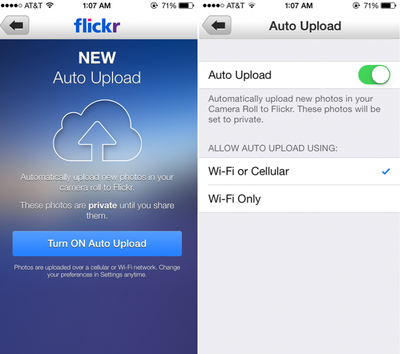
flickr_autoupload
Flickr received attention earlier this year when it began offering 1 TB of free photo storage space and underwent a major design overhaul. As previously speculated, Flickr is also now integrated within iOS 7, as users can choose to share photos directly to Flickr from the Photos app or various third-party apps with the functionality.

The last major update to Flickr for iOS came in August, when live filters and professional editing capabilities were added to the app. Flickr is a free download on the App Store. [Direct Link]


Top Rated Comments

ArtOfWarfare Avatar
169 months ago
Still looks like iOS 6. Not going on my phone.

Ew, iOS 6; that's so 5 weeks ago.
Score: 2 Votes (Like | Disagree)
169 months ago
So if I do burst mode, does it upload the full burst or just the "best of the bunch"?
Score: 1 Votes (Like | Disagree)
169 months ago
Why is there no iPad app? I'd love to just grab my iPad, open flickr and show people my photos. Is that really too much to ask?

Best I can do is load up flickr in the iOS version of Chrome, which fails to load properly.
Score: 1 Votes (Like | Disagree)
169 months ago
Can't see a way to upload existing stuff on Camera Roll.
Doesn't seem there's such an option at the moment, would be handy though.

Other than that it's a nice way to back everything up, especially if you take lots of pics and in a possession with a 16GB device only.
If you click on the camera icon in the middle of the bottom toolbar you should be able to go to your existing photos (and Camera Roll) by selecting the photo thumbnail on the bottom left of the camera screen, and from there you should be able to select photos to upload.

Or, as one of the in-app tips mentions, simply double tap the camera icon in the middle of the bottom toolbar and that should take you directly to Camera Roll to select photos to upload.
Score: 1 Votes (Like | Disagree)
169 months ago
Still no universal app? :-(
Score: 1 Votes (Like | Disagree)

Popular Stories

iOS 27 Next to iPhone

Here's When iOS 27 Rolls Out Today in Every Time Zone [Update: It's Out]

Sunday September 13, 2026 3:00 am PDT by
Update 10:04 a.m.: iOS 27 is rolling out now, though it may take a bit for all users to see it, so keep checking! Apple is about to release iOS 27, which will finally deliver more advanced Siri AI capabilities as well as a variety of other refinements, improvements, and new features to iPhones. It's Apple's biggest software update of the year, and Apple announced at Wednesday's iPhone event...
iOS 27 Icon iPhone

iOS 27 Available Now With These 8 New Features

Monday September 14, 2026 9:00 am PDT by
Update — 10 a.m. Pacific Time: Apple has released iOS 27. During its iPhone 18 Pro and iPhone Duo event last week, Apple announced that iOS 27 will be released widely on Monday, September 14. iOS 27 should be available around 10 a.m. Pacific Time / 1 p.m. Eastern Time today via the Settings app, under General → Software Update. Below, we have highlighted eight new features and...
Apple iCloud Plus expansion hero

iCloud+ Now Includes Apple TV, Apple Arcade, and Curated Apple Music Stations in Over 100 Countries

Tuesday September 15, 2026 1:43 am PDT by
Apple today announced a new subscription initiative that turns paid iCloud+ subscriptions into a broader services bundle in more than 100 countries. In select countries, Apple says every paid iCloud+ plan, including the cheapest 50GB tier, now includes Apple TV and Apple Arcade "at no additional cost," while family sharing extends the storage, TV and Arcade access to up to five people....














