

Oyster, an e-book subscription service that originally launched on a limited basis for the iPhone last month, has been expanded to the iPad and is now available for all users.
Described as Netflix for e-books, Oyster offers access to more than 100,000 e-books for a $9.95 monthly fee. The service is currently limited to iOS and is growing rapidly, with additional titles being added on a regular basis.
Oyster for iPad functions similarly to other e-book reading apps like iBooks, allowing users to select content from a dedicated library that can be read within the app. Pages are turned via scrolling, and it incorporates a darker night time reading mode. The app functions in both landscape and portrait mode, and books that are downloaded can be synced between devices.
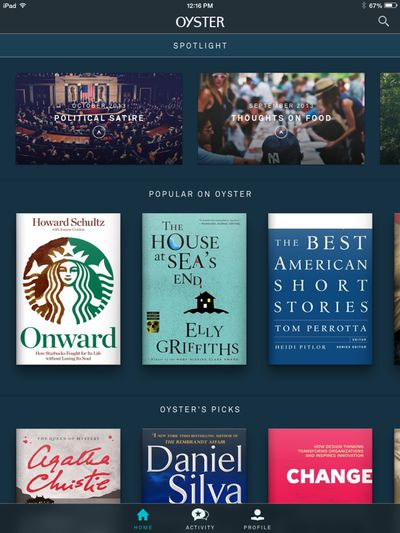
Download the app to get unlimited access to thousands of books, available anytime, anywhere. Requires an Oyster paid subscription.
With Oyster, members enjoy instant access to more than 100,000 titles including everything from international bestsellers and celebrated classics, to cult sci-fi and seminal biographies. Designed and developed for mobile reading, our editorial sets, related titles, and personalized recommendations get you into a book you’ll love in as few taps as possible.
In addition to iPad support, the new update also brings an iOS 7-style redesign and better content discovery in the form of additional recommendations and genre-based recommendations. Newly added books are also readily available, featured directly on the home screen. Book opening animations have been improved, and a number of bug fixes have also been included.
Oyster is a universal app that can be downloaded from the App Store for free. [Direct Link] The service costs $9.95 per month, but the company is currently offering all new users 30 days of free access.




















Top Rated Comments
First off, it's only available in the. U.S. - though they have plans to expand.
Secondly, you can have up to 10 books in your collection at at any one time (you download what you want and read at your leisure - no need for constant connectivity).
Third - and this one's a deal breaker for me, even if it were offered in my country - they seek out the rights to distribute a few months after the book is released. So if you're excited about a Barry Eisler book that was just released (for example) - you have to wait around for a while before you can access it.
The full set of FAQs can be found here: Oyster for iPad FAQs (https://www.oysterbooks.com/help/customer-faq#q5)
I've used the iPad for reading PDFs as it does that much better (they never convert well for the Kindle). Anything color is obviously better on the iPad. Carrying both with isn't bad at all. The Kindle takes up very little extra room and can almost be stuffed in the same sleeve with the iPad really. The weight difference when holding it while laying down is huge. It's also much easier when reading in low light or even out in bright light. iPad is great for most everything but for reading I really do prefer my Kindle.
I can say that it's nice to read in an iPad, but the Kindle Paperwhite is more "real" and it's nice to be able to read in sunlight, not to mention I only charge it once a month. It's also nice that it's purely for books, so no disturbances leak in or entice me to jump into Safari---questions I might have are readily available tapping X-Ray.
I just signed up for Oyster on my iPad---it's pretty good
Why subtly / sneaky? well, most apps that can consume content that is purchased outside of the app - think any ebook app - , and do not use IAP (In App Purchase) cannot have any kind of account creation / sign up functionality within them, lest they be rejected by Apple.
Of course I'm assuming they aren't using IAP, anyone from the US care to have a look and see if there is an IAP system in the app?
This would be perfect for so many people in my family. Does anyone know if the Game of Thrones series is available here? I can't seem to search through their library unless I use the app.