

Screen Sharing Now Available on Apple Support Site - MacRumorsOpen MenuShow RoundupsShow Forums menuVisit ForumsOpen Sidebar
Skip to Content

Screen Sharing Now Available on Apple Support Site

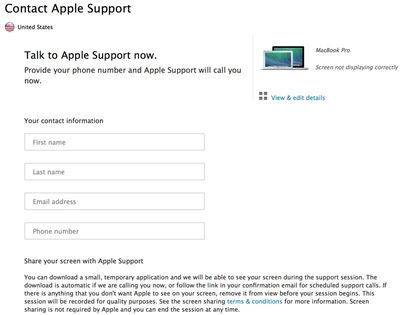
Apple today enhanced its Apple Support site with a new option allowing customers to initiate automatic screen sharing when receiving help on a Mac via phone call, giving customers more control over their Apple support experience and facilitating quicker, more accurate responses from support staff.

Selecting the screen sharing box prompts a temporary download that will allow screen sharing to begin when a support call is initiated by Apple, though customers can choose to disallow screen sharing with an Apple representative by not checking the box. Screen sharing can only be used on voice calls and is not an available option for chat sessions.
screensharingapplecare
As noted by 9to5Mac, the new automated website selection replaces previous screen sharing protocols, which involved AppleCare representatives asking customers to opt into screen sharing only when necessary. Choosing to use screen sharing is now a customer decision, and while customers were previously able to request screen sharing options, the new checkbox makes the process simpler.

Customers have always been able to request screensharing, at which point the AppleCare representative would instruct them to download an application from Apple's site that facilitates the connection. Now the download is listed directly on the support page. If a customer opts to use screensharing, the AppleCare rep must comply with their request whether they think it will help or not.

In addition to screen sharing, Apple has been making other significant changes to its support site in recent months and in August, the company launched a redesigned AppleCare website with simpler interface and 24/7 live chat support.


Popular Stories

iOS 27 Next to iPhone

Here's When iOS 27 Rolls Out Today in Every Time Zone [Update: It's Out]

Sunday September 13, 2026 3:00 am PDT by
Update 10:04 a.m.: iOS 27 is rolling out now, though it may take a bit for all users to see it, so keep checking! Apple is about to release iOS 27, which will finally deliver more advanced Siri AI capabilities as well as a variety of other refinements, improvements, and new features to iPhones. It's Apple's biggest software update of the year, and Apple announced at Wednesday's iPhone event...
iOS 27 Icon iPhone

iOS 27 Available Now With These 8 New Features

Monday September 14, 2026 9:00 am PDT by
Update — 10 a.m. Pacific Time: Apple has released iOS 27. During its iPhone 18 Pro and iPhone Duo event last week, Apple announced that iOS 27 will be released widely on Monday, September 14. iOS 27 should be available around 10 a.m. Pacific Time / 1 p.m. Eastern Time today via the Settings app, under General → Software Update. Below, we have highlighted eight new features and...
Apple iCloud Plus expansion hero

iCloud+ Now Includes Apple TV, Apple Arcade, and Curated Apple Music Stations in Over 100 Countries

Tuesday September 15, 2026 1:43 am PDT by
Apple today announced a new subscription initiative that turns paid iCloud+ subscriptions into a broader services bundle in more than 100 countries. In select countries, Apple says every paid iCloud+ plan, including the cheapest 50GB tier, now includes Apple TV and Apple Arcade "at no additional cost," while family sharing extends the storage, TV and Arcade access to up to five people....

Top Rated Comments

firedept Avatar
168 months ago
Very nice option to have when dealing with support staff at Apple. Hopefully this will save them sometime in finding solutions to peoples problems.
Score: 1 Votes (Like | Disagree)
168 months ago
They've actually been beta testing this for a little while because my girlfriend had some problems with her iTunes account a few weeks back and we were directed to this site where the technician on the phone took control and was able to walk through her account.

Very cool tool and extremely helpful. The best part is that it avoids a trip to the Genius Bar.
Score: 1 Votes (Like | Disagree)















