

iPad Illustration App 'Procreate' Adds Support for 64-Bit A7 Processor, 4K Ultra HD Canvas Size - MacRumorsOpen MenuShow RoundupsShow Forums menuVisit ForumsOpen Sidebar
Skip to Content

iPad Illustration App 'Procreate' Adds Support for 64-Bit A7 Processor, 4K Ultra HD Canvas Size

by

Savage Interactive has released a significant update to its iPad illustration app Procreate, bringing a new visual design and additional drawing, layering, and transformation tools. The app also now includes support for the 64-bit A7 processors found on the iPad Air and iPad Mini with Retina Display, as well as a new ultra-high definition 4K canvas size.
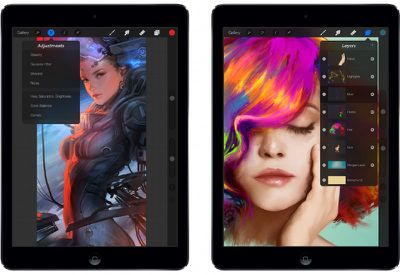
procreate2_ios72

Procreate is the most powerful and intuitive digital illustration App available for iPad. It’s packed with features artists love, from true-to-life sets of pencils, inks and brushes, through to advanced layer compositing, 64-bit performance and unique digital tools.

Procreate now includes game-changing GPU accelerated filters and adjustments, offering a whole new dimension of expression. Artists can now apply colour adjustments, gaussian blur, sharpen – and more – all in real time.

The app saw its last major update in August, bringing 1080p HD canvas recording, and was also notable for winning an Apple Design Award at WWDC 2013. Procreate is $5.99 and can be downloaded from the App Store. [Direct Link]


Top Rated Comments

164 months ago
Storyboarding

Good that they're offering a larger canvas, but why specifically 4K? It's an illustration app and 4K is a video standard. Just seems like a way to integrate a buzzword.

Might have been a better idea to choose a resolution that's a multiple of the iPad's screen resolution in order to maintain fidelity when you're looking at your illustration in full-screen.

I've been using ProCreate for a couple of years now. I work in advertising and it's great tool for storyboarding ideas for TV commercials. It's great to have preset canvas sizes for 16X9 and 4K for this very reason. I'm looking forward to getting stuck into ProCreate 2. The blurring and sharpening alone will be a great help. This app is on the way to becoming a great all-round image editor.

Best app on the iPad.

Pie

:apple:
Score: 4 Votes (Like | Disagree)
pgiguere1 Avatar
164 months ago
Good that they're offering a larger canvas, but why specifically 4K? It's an illustration app and 4K is a video standard. Just seems like a way to integrate a buzzword.

Might have been a better idea to choose a resolution that's a multiple of the iPad's screen resolution in order to maintain fidelity when you're looking at your illustration in full-screen.
Score: 4 Votes (Like | Disagree)
AngerDanger Avatar
164 months ago
I can see why people would want to Procreate with the women in the pictures.

No, seriously, what an odd name.
Score: 4 Votes (Like | Disagree)
nagromme Avatar
164 months ago
A terrific app--an example of the quality app selection that makes every other touch platform unacceptable.
Score: 3 Votes (Like | Disagree)
Zepaw Avatar
164 months ago
Solid app with a really good interface, I recommend it.

----------

I can see why people would want to Procreate with the women in the pictures.

No, seriously, what an odd name.

Agreed, though the stylization of it is always something like Procreate.
Score: 2 Votes (Like | Disagree)
163 months ago
No comparison. Even the base model Wacom pad beats the Intuos / iPad combination. The Wacom pad wins every time.

If you're looking for extreme portability / on the fly use; then yes, the intuos pen is your friend. Otherwise, you may be better off with an MBA 11" and a small Wacom pad.
Actually portability is handy but if I use the actual machine on the site, clients will attempt to make changes there so I've learned its best to do the real work in the studio or home office and use the tablet as a preview device for clients to see if meeting in person. That prevents them from manipulating the creative into making changes on the spot without the alteration fees they like to get away with.

Something to think about. However I love the Cintiq portable device and think its handy for "on the go" conceptual work and flesh it out at the studio. I mean would you be doing secret projects on an NDA at a coffeeshop with the tablet? But MBA with a standard tablet hooked to it is an idea and even though I've an iMac already. My PowerBook g4 titanium is way outdated for this work now :/.

But if I take my Wacom tablet for the MBA then that's not a bad idea. I would have to copy and install apps on it and both machines would have the same files.

One reason I use Dropbox with my 1g iPad to store my conceptual art via sketchbook pro or procreate.
Score: 1 Votes (Like | Disagree)

Popular Stories

iphone 18 pro blue%402x

iPhone 18 Pro: Dark Cherry, Light Blue, and Dark Gray Chassis Leaked [Update]

Thursday June 4, 2026 5:18 am PDT by
Update: Since publication, new information has come to light suggesting the images have been AI-manipulated and are not in fact iPhone 18 Pro chassis parts. The original article follows. The color options Apple is reportedly planning for the upcoming iPhone 18 Pro and ‌iPhone 18 Pro‌ Max have appeared online today in the form of images of chassis parts of unknown authenticity....
Aston Martin CarPlay Ultra Screen

Apple Says CarPlay Ultra is Coming to These Vehicle Brands

Thursday May 21, 2026 11:53 am PDT by
Last year, Apple launched CarPlay Ultra, the long-awaited next-generation version of its CarPlay software system for vehicles. Nearly a year later, CarPlay Ultra is still limited to Aston Martin's latest luxury vehicles, but that should change fairly soon. In May 2025, Apple said many other vehicle brands planned to offer CarPlay Ultra, including Hyundai, Kia, and Genesis. CarPlay Ultra...
iOS 27 All the New App Features

iOS 27: All the Rumored App Features

Wednesday June 3, 2026 3:48 pm PDT by
Siri is getting a major overhaul in iOS 27, but Apple also has some big updates planned for apps like Camera, Photos, and Wallet. There are multiple new AI features in the works, plus some non-AI upgrades. Camera Apple is moving Visual Intelligence from the Camera Control button to the Camera app in iOS 27, according to Bloomberg. There will be a Siri mode that will be available alongside...













