Philips Hue App Updated With Redesign, New Sidebar Interface - MacRumorsOpen MenuShow RoundupsShow Forums menuVisit ForumsOpen Sidebar
Skip to Content

Philips Hue App Updated With Redesign, New Sidebar Interface

by

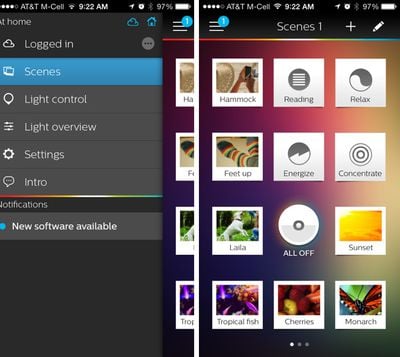
Philips today updated its Philips Hue app to version 1.2, adding a much needed iOS 7-style redesign to the app. Along with a new look, the Philips Hue app has gained a new sidebar that allows users to quickly select various in-app options like Light Control.

Previously, Light Control, which allows users to change the colors of lights individually, was accessed by swiping upwards on the screen to access the Light Overview and then turning the iPhone to landscape mode for a control view. The new sidebar simplifies the light manipulating process with easy access menus.
philipshue
The app now lets users save the current status of lights as a scene directly from the Light Control menu with the "save" button and lights can also be reordered from within the app settings. Sidebar notifications have been added as well, to let users know when an update is available.

What's New in Version 1.2.0
Introducing the new look hue app:

- New iOS 7 style design
- Added sidebar navigation to make functionality easier to find
- Added introduction demo
- Lights can now be reordered from the app settings
- Save current status of lights as a scene from light control
- Added sidebar notifications

First introduced in late 2012, Philips' Hue lighting system provides users with wireless-enabled LED lightbulbs that can be controlled remotely via an iPhone app. The lights have several variations of white and can also be changed into a rainbow of colors, also supporting themes, scheduling, and dimming.

The Philips Hue starter set can be purchased from Apple for $199.95. The accompanying Philips Hue app can be downloaded from the App Store for free. [Direct Link]


Top Rated Comments

163 months ago
It's a pretty neat idea, but I hate how long it takes to 'connect' to the app. It's rather tedious when I can just flip the light switch on. :p
Score: 4 Votes (Like | Disagree)
Bistroengine Avatar
163 months ago
Wonderful! To control the color of individual bulbs on a simple spectrum now takes 3 taps where it used to take 2! Progress in Action!

Yes, 1 more tap, but I honestly hated having to rotate my phone to change the color of a light. Now you can adjust the color and brightness from the same screen. In my opinion, that's an improvement.
Score: 4 Votes (Like | Disagree)
163 months ago
OK. First off, I love these lights. They are awesome. The IFTTT integration, the party apps, etc. Awesome. I've got 15 lights across 6 rooms. LOVE EM.

The Philips application is a JOKE. It has big promises. Sync, Scenes, etc. I set up my app with one page of scenes per room. highlight colors, all the philips whitelight modes, etc. Every time the app updates, i have to re-do pages and pages of scenes. Re-login to the site? Yup. It tries to sync. It brings back test scenes from a year ago. It deletes scenes that i use daily. I get it sync is hard. I have 5 iOS devices connecting. It is complex to sync them in race conditions. But I upgraded one device and re-logged in to scene sharing, and it drops a nuke on my setup. Every. Single. Time. Whoever wrote the sync code should be taken and forced to read about how to resolve shared resource conflicts. Or held underwater. I'm not sure which would be better.

I am sure I own every single app in the app store for Hue bulbs and none of them do exactly what I want.
The lights have great potential, but the software is a real pain. Want to have them fade in over half an hour to simulate a sunrise? This should be one of the #1 features of the Hue. Nope, you can't set a fade longer than 9 minutes. And the whole paradigm of creating scenes using your favorite photos is a gimmick that seriously gets in the way. Just give me a color wheel and let me save the colors I pick.
Score: 3 Votes (Like | Disagree)
163 months ago
Wonderful! To control the color of individual bulbs on a simple spectrum now takes 3 taps where it used to take 2! Progress in Action!
Score: 3 Votes (Like | Disagree)
163 months ago
OK. First off, I love these lights. They are awesome. The IFTTT integration, the party apps, etc. Awesome. I've got 15 lights across 6 rooms. LOVE EM.

The Philips application is a JOKE. It has big promises. Sync, Scenes, etc. I set up my app with one page of scenes per room. highlight colors, all the philips whitelight modes, etc. Every time the app updates, i have to re-do pages and pages of scenes. Re-login to the site? Yup. It tries to sync. It brings back test scenes from a year ago. It deletes scenes that i use daily. I get it sync is hard. I have 5 iOS devices connecting. It is complex to sync them in race conditions. But I upgraded one device and re-logged in to scene sharing, and it drops a nuke on my setup. Every. Single. Time. Whoever wrote the sync code should be taken and forced to read about how to resolve shared resource conflicts. Or held underwater. I'm not sure which would be better.

I am sure I own every single app in the app store for Hue bulbs and none of them do exactly what I want.
Score: 2 Votes (Like | Disagree)
163 months ago
So glad they replaced that awful handwritten font for the scene names.

Still kind of an awkward UI, but an overall improvement in my opinion.
Score: 2 Votes (Like | Disagree)

Popular Stories

Aston Martin CarPlay Ultra Screen

Apple Says CarPlay Ultra is Coming to These Vehicle Brands

Thursday May 21, 2026 11:53 am PDT by
Last year, Apple launched CarPlay Ultra, the long-awaited next-generation version of its CarPlay software system for vehicles. Nearly a year later, CarPlay Ultra is still limited to Aston Martin's latest luxury vehicles, but that should change fairly soon. In May 2025, Apple said many other vehicle brands planned to offer CarPlay Ultra, including Hyundai, Kia, and Genesis. CarPlay Ultra...
iphone 18 pro blue%402x

iPhone 18 Pro: Dark Cherry, Light Blue, and Dark Gray Chassis Leaked [Update]

Thursday June 4, 2026 5:18 am PDT by
Update: Since publication, new information has come to light suggesting the images have been AI-manipulated and are not in fact iPhone 18 Pro chassis parts. The original article follows. The color options Apple is reportedly planning for the upcoming iPhone 18 Pro and ‌iPhone 18 Pro‌ Max have appeared online today in the form of images of chassis parts of unknown authenticity....
iOS 27 All the New App Features

iOS 27: All the Rumored App Features

Wednesday June 3, 2026 3:48 pm PDT by
Siri is getting a major overhaul in iOS 27, but Apple also has some big updates planned for apps like Camera, Photos, and Wallet. There are multiple new AI features in the works, plus some non-AI upgrades. Camera Apple is moving Visual Intelligence from the Camera Control button to the Camera app in iOS 27, according to Bloomberg. There will be a Siri mode that will be available alongside...