Former Apple Engineer Recalls Steve Jobs' Great Displeasure with Multi-Button Mouse Concepts - MacRumorsOpen MenuShow RoundupsShow Forums menuVisit ForumsOpen Sidebar
Skip to Content

Former Apple Engineer Recalls Steve Jobs' Great Displeasure with Multi-Button Mouse Concepts

by

Steve Jobs' great displeasure about the the idea of a multi-button mouse was apparently the driving force behind Apple's push to greatly innovate in the area of input devices, according to a new interview with Apple's former Senior Mechanical Engineer of Product Design Abraham Farag (via Cult of Mac).

Farag, who is the current owner of product development firm Sparkfactor Design, says that he was brought onboard to Apple in 1999 to design a successor to the original Apple USB "hockey puck" mouse, which shipped with the iMac G3 in 1998 and garnered heavy criticism for its small size, short cord, and tendency to rotate in a user's hand.
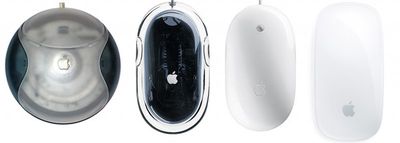
apple_mice_evolution

From left to right: Apple's USB "Hockey Puck" Mouse, Pro Mouse, Mighty Mouse, and Magic Mouse

The designer said that Apple's design team had worked on five complete prototypes to show Jobs, complete with lines cut for buttons and different plastic parts. Farag noted that the team made a last-minute choice to work on one more prototype model, which resembled the Apple Desktop Bus Mouse II.

However, that last prototype was not finished as Jobs entered the room to look at the group of potential mice, which led to an encounter between the CEO and the design team:

“It looked like a grey blob,” Farag says. “We were going to put that model into a box so people wouldn’t see it.” However, when Jobs turned up things went awry.

“Steve looked at the lineup of potential forms and made straight for the unfinished one,” Farag says.

“That’s genius,” he said. “We don’t want to have any buttons.”
“That’s right, Steve,” someone else piped up. “No buttons at all.”
The meeting, it seemed, was over.

“[Afterwards], Bart Andre, Brian Huppi and I left the room and huddled outside with each other, [saying] ‘how are we going to do that?’” Farag recalls. “Because of that unfinished model we had to invent a way to make a mouse with no buttons.”

The unfinished model that Jobs designated as his choice eventually became the Apple Pro Mouse, and began shipping in 2000. Farag believed Apple was the first to create a mouse that used an LED for optical tracking in place of a rubber ball, as the team looked toward building a successor worthy of the Apple Pro Mouse. Once again, Apple's design team wanted to create a mouse with multiple buttons, as Farag recalled a meeting with Apple design chief Jony Ive in which multiple prototypes were being discussed.

“Steve wasn’t invited to the meeting,” Farag recalls. “Not because he wasn’t allowed — he could go anywhere in the company — but just because it wasn’t something we were pitching to him yet.

...Suddenly Jobs happened to walk by, on his way back from another meeting. Seeing prototypes on the table, he stopped and came over.
“What morons have you working on this project?” he asked as he realized what he was looking at.

“There was just a total hush,” Farag recalls. “No one was going to fess up to being the moron in the room. Eventually I said, ‘Well, this was asked for by the marketing division. It’s a multi-button mouse. It’s been approved through Apple’s process channels, and so we’ve been working on it.”

Jobs stared at him.

“I’m Marketing,” he said. “It’s a marketing team of one. And we’re not doing that product.” With that, he turned and stalked off.

Farag notes that it was Jobs' persistence to create a mouse unlike anything on the market that helped Apple in the long run, and that the concept of built-in capacitive sensors to emulate the presence of multiple buttons eventually changed the former CEO's mind about multi-function mice.

Apple then went on to produce the Mighty Mouse, which was the company's first mouse to ditch the one-button philosophy, and followed it up with the Magic Mouse, which features multi-touch gesture controls and is currently included with every new iMac.


Top Rated Comments

165 months ago
For me personally, Apple has never made a mouse I enjoy using.

Score: 41 Votes (Like | Disagree)
165 months ago
Both windows and OSX use the right mouse button click to bring up a contextual menu. Its silly to only have a one button mouse which forces the second button to the keyboard only.

There is a significant difference: on OS X, you don't have to. You are absolutely not forced to use the second button. It is an Apple UI guideline that no commands should be in the contextual menu that are not available somewhere else. The Mac has always been designed to be approachable by anyone. That means, if you have never used a mouse before, you don't have to think about main- or secondary-clicking, what each means and why, or aiming with a weaker finger. You point. You click. You start with the simplest methods - click once, click a menu in the menubar, click a command. When you get proficient, you can do fancier stuff. Action menus in the Finder window. Trackpad multi-touch gestures. It's the entire reason the menubar still exists. I'm sure Adobe could come up with a way of using Photoshop that required no menubar at all, á la X Window. Why don't they? Because that menubar is the foundation of the Mac UI, and has been from the very beginning. And the mouse is designed to accompany it. (I recall the outcry when the original proposal was to place the Apple symbol in the middle of the menubar (http://www.guidebookgallery.org/pics/gui/desktop/firstrun/macosxdp4.png), symbolically shining over all on the screen - they were forced to put it back on the left and give it a purpose.) How many commands on Windows can you not do without a secondary-click? A bunch of the desktop organisational ones for starters. Does your grandma know how to clean up her desktop?

And yes, I realise in this day and age, people who have never used a mouse before a thin on the ground (although the number is probably on the upturn with iPads and other touchable interfaces).

Whether you agree or not, that's why it is the way it is. Which is not the same as Windows. Secondary-clicking is an option for Mac (among several). It's required on Windows.
Score: 16 Votes (Like | Disagree)
BornAgainMac Avatar
165 months ago
So Steve thought it would be better to hold down the control key on a separate keyboard "device" instead of just adding a right mouse mutton?
Score: 11 Votes (Like | Disagree)
flottenheimer Avatar
165 months ago
For me personally, Apple has never made a mouse I enjoy using.
I feel the very same way. To me Apple mice (every single one of them) are all form over function/ergonomics. As an Apple purist I have really tried. But I have ultimately given up on all of them.

On the other hand our friends at Apple have seriously nailed the trackpad (all laptops+magic trackpad).
Big in size. No need to physically click when using 'Tab to click'. Multitouch. And that oh so perfect surface.
It is trackpad heaven.
Score: 11 Votes (Like | Disagree)
165 months ago
Windows or Android that have to emulate those hidden buttons devs won't let go of.

Both windows and OSX use the right mouse button click to bring up a contextual menu. Its silly to only have a one button mouse which forces the second button to the keyboard only.
Score: 10 Votes (Like | Disagree)
yuenadan Avatar
165 months ago
Interesting piece of history. I'd also like to hear more development about Apple's modern-day trackpad. It's a joy to use on my MacBook Air, and for productive work I think it blows a touch a touchscreen right out of the water. It makes using my a mouse on my Windows PC painful to use by comparison.
Score: 9 Votes (Like | Disagree)

Popular Stories

duo aquarium

More Fun iPhone Duo Apps: 30 New Picks to Try

Friday November 6, 2026 3:27 pm PST by
When the iPhone Duo launched, we shared a list of some of the fun apps developers created for the new form factor. Two weeks out, developers are continuing to come up with fresh ideas, so we thought we'd share some of our favorites. Games Marbles Unhinged ($2.99) - Marbles Unhinged is a marble maze designed for the Duo. When you fold it, the floor turns into a ramp. If you stand the top...
iOS 28 AI

Apple Taking New Approach to Developing iOS 28 and macOS 28

Sunday November 8, 2026 7:42 am PST by
Apple has made a change to its development process for iOS 28, macOS 28, and corresponding software updates, according to Bloomberg's Mark Gurman. In his Power On newsletter today, he said Apple separates development of each year's new operating systems into three major stages. Typically, he said each stage consists of four weeks of coding followed by a four-week "convergence" period where...
apple pro tell logo

Apple Launching Five New Products Today

Thursday November 5, 2026 12:59 am PST by
Apple is launching five new products on Friday, November 6, following pre-orders that opened last week, including its first touchscreen MacBook Pro models. The following new products will be available from today: iPad mini with OLED display and A20 Pro chip iMac with M6 chip 14-inch MacBook Pro with M6 chip 14-inch MacBook Pro with OLED touchscreen 16-inch MacBook Pro with OLED...
Latest Stories
Apple Store Subscription Sign-Up Controversy Exposed
8 hours ago
Siri AI Rumored to Become 'More Like an Agent' as Early as Next Year
18 hours ago
Apple Taking New Approach to Developing iOS 28 and macOS 28
20 hours ago
Early Apple Black Friday Deals on Apple Watch, MacBook Air, and More
2 days ago
'Backglow' Lets You Customize New MacBook Pro's Glowing Apple Logo
2 days ago
Top Stories: Apple Product Launches, iOS 27.3 Beta, and More
2 days ago
More Fun iPhone Duo Apps: 30 New Picks to Try
3 days ago
Hands-On With Apple's New OLED Touchscreen MacBook Pro
3 days ago
Apple Store With All-New Design Opening Soon in Southern California
3 days ago
Control the Glowing Apple Logo on Your New MacBook Pro
3 days ago
Apple Shares New 'Apple Card: Apply and Use in Minutes' Ad
3 days ago
Apple Says More Than 100,000 Apps Optimized for iPhone Duo, Here's What's Still Missing
3 days ago
Early Black Friday Deals Kickoff With Steep Discounts on Apple Watch Ultras and More
3 days ago
The MacRumors Show: iOS 27.3 Looks Like a Huge Update
3 days ago
Best Buy's Black Friday Event Begins With Sitewide Savings on Apple, TVs, More
3 days ago
Apple Releasing Yet Another Two New Products Next Week
3 days ago
MacBook Air Drops to Lowest Price in Months With Amazon's $250 Discount
3 days ago
Apple Rumored to Drop the iPhone's Action Button Next Year
3 days ago
Apple's Extended Return Policy Now in Effect for 2026 Holiday Season
3 days ago
Apple Music Classical Updated With New Icon and Refreshed Design
3 days ago
OLED iPad Mini, M6 iMac, and New MacBook Pros Available From Today
3 days ago
Apple Surveys iPhone Duo Buyers About Crease and Camera
3 days ago
Apple's First Touchscreen Mac is Now Arriving to Customers
4 days ago
Claude Gets Personal Finance Feature With Bank Account Linking
4 days ago
Apple Arcade Adds Crossy Road Rush and NBA 2K27
4 days ago
Apple's New HomeView Smart Home Hub: Here's How Much RAM It Has
4 days ago
iPad Mini vs. iPad Air Buyer's Guide: Now Just $50 Apart
4 days ago
First iOS 27.3 and macOS Golden Gate 27.3 Public Betas Now Available
4 days ago
Apple Announces a New Mac Sales Record
4 days ago
Paid $200 for Logic Pro? Apple Says You Won't Get This New Feature
4 days ago









































