Belkin's Ultra-Slim QODE Thin Type Keyboard Now Available for iPad Air - MacRumorsOpen MenuShow RoundupsShow Forums menuVisit ForumsOpen Sidebar
Skip to Content

Belkin's Ultra-Slim QODE Thin Type Keyboard Now Available for iPad Air

by

Belkin today announced the availability of the QODE Thin Type for iPad Air, adding an ultra-slim keyboard option to its popular QODE line of tablet keyboards. QODE Thin Type for iPad Air features an anodized aluminum design, 79 hours of battery life and iOS specific keys that pair nicely with the iPad. The keyboard's main selling point is its 4mm thin profile that barely adds any heft to the already slender iPad Air.
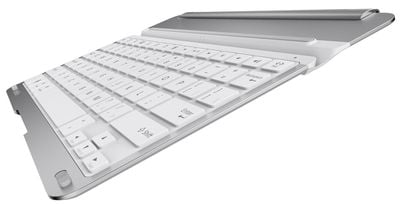
Belkin-QODE-Thin-Type
An early review of the device from ZDNet's James Kendrick is favorable, noting that the keyboard is "different in a good way" from competing iPad tablets from Logitech, Kensington and Annker.

The Belkin is a simple cover with a keyboard on one side. The metal cover is not flat like the competitors' models. There is a hump toward the back of the cover that gives the Belkin three advantages over the competition. The hump houses a large battery that Belkin claims gives six months of use on a charge. This is double that of other iPad keyboards. Having this hump on the cover provides an ergonomic tilt to the keyboard, perfect for typing. Last but not least, the protrusion provides a secure grip for handling the tablet in the cover.

The QODE Thin Type keyboard for iPad Air is available now for $99.99 at Belkin.com and will land soon at select retailers worldwide.


Top Rated Comments

oneMadRssn Avatar
163 months ago
It seems to me that an iPad + keyboard would weigh about as much as a Macbook Air 11", would be about as thick, if not thicker in some cases, than a Macbook Air, and would cost about as much total as a Macbook Air. Yet, it won't be able to run 2 or more apps side by side.

I like iPads; but I don't understand why anyone would prefer this keyboard + iPad route over a proper laptop.
Score: 7 Votes (Like | Disagree)
c0ppo Avatar
163 months ago
Nice keyboard. But 100$ is way to much. By the time this thing hits EU countries, it will cost about 150€. For that kinda of money I can pay someone to write things for me :D
Score: 7 Votes (Like | Disagree)
163 months ago
$100 for a keyboard for iPad? I'll pass.

Even the $70 one from Apple is too much money. It's a freakin basic keyboard.
Score: 6 Votes (Like | Disagree)
nagromme Avatar
163 months ago
If it didn't have those goofy / and ? key locations I'd ditch my backlit ZAGGkeys Cover Keyboard (http://www.zagg.com/ipad-air-keyboard/8534) for this. But those non-standard locations would drive me insane.

A new video from Belkin shows the keys are indeed re-arranged badly, including number-row keys being just a bit narrow, placing the "1" and "=" keys a little oddly. But mainly the punctuation keys are all messed up. Too bad.

Logitech's new unit's layout still looks fully standard—and now with full-height number keys that earlier Ultrathins lacked..
Score: 1 Votes (Like | Disagree)
nagromme Avatar
163 months ago
It seems to me that an iPad + keyboard would weigh about as much as a Macbook Air 11", would be about as thick, if not thicker in some cases, than a Macbook Air, and would cost about as much total as a Macbook Air. Yet, it won't be able to run 2 or more apps side by side.

I like iPads; but I don't understand why anyone would prefer this keyboard + iPad route over a proper laptop.
I love my 11" MB Air, but an iPad keyboard is worth the money to me too:

- It is WAY thinner, lighter, and smaller in both flat dimensions than the MBA. I don't need that--I could survive with a bulky MB Pro even--but I very much like it. Plus, I can draw on the iPad (when keyboard is detached) better than on the laptop. And I'm a fan of touch gaming (though I haven't abandoned AAA Mac shooters).

- Not a factor for me, clearly, but an iPad plus keyboard usually comes to much less cost than a low-end MBA.

- MacBooks don't currently have an internal, nothing-to-carry cell modem. A niche option maybe, but one available on iPad for cheaper (pay only you when you need) than I can get tethering.

- OS X has many strengths, and multiple-app workflows are one, as you say (for those like you and I who need that). But iOS has other strengths. It's quicker, easier, simpler, and even downright fun to do a lot of very common and useful computing functions. My Mac and my iPad are usually both in reach, but it's the iPad I find myself grabbing much of the time. For many people, the difference is even more stark: Windows/OS X was never the best tool for them, and iOS opens up more computing and productivity--including text creation--than traditional laptops ever did.


- The top reason: the keyboard detaches. Most of the time I do NOT want it, and it just makes a handy video stand next to my couch. The Air alone is super light and has direct touch, and this style of keyboard doesn't clamp on annoyingly: one hand can grab the tablet and go. But when I do want to type a long email or an endless droning forum post or a text document, the keyboard is there to make an "iOS laptop" at the times I want that.

Keyboards are not for everyone, but they have their place.

The Tab and Q key are combined on the Ultrathin Folio case for the iPad Air. So to use the tab key you have to do Fn+Tab. I use the tab key a lot and it's a PITA when switching between a desktop/laptop and the iPad. A piece of the case also broke off, but I was happy to return it for the keyboard issue alone.
I see--I only looked at the Ultrathin Cover which is akin to this Belkin. I had forgotten Logitech even used the Ultrathin brand for their folios. Those folios also have different/worse key feel than the cover does, apparently. I'd have returned it too.

To clarify, then: Logitech's Ultrathin Cover for iPad Air (old Ultrathin models and the new one just coming out) appears to use a fully standard layout with a real Tab key, similar to this Belkin. I had one of the 2013 Air Ultrathin Keyboard Covers and although the construction was flawed, the keys were great!
Score: 1 Votes (Like | Disagree)
163 months ago

Logitech's Ultrathin keyboards for Air (not Mini) have a standard layout, don't they? What keys are different?

The Tab and Q key are combined on the Ultrathin Folio case for the iPad Air. So to use the tab key you have to do Fn+Tab. I use the tab key a lot and it's a PITA when switching between a desktop/laptop and the iPad. A piece of the case also broke off, but I was happy to return it for the keyboard issue alone.
Score: 1 Votes (Like | Disagree)

Popular Stories

duo aquarium

More Fun iPhone Duo Apps: 30 New Picks to Try

Friday November 6, 2026 3:27 pm PST by
When the iPhone Duo launched, we shared a list of some of the fun apps developers created for the new form factor. Two weeks out, developers are continuing to come up with fresh ideas, so we thought we'd share some of our favorites. Games Marbles Unhinged ($2.99) - Marbles Unhinged is a marble maze designed for the Duo. When you fold it, the floor turns into a ramp. If you stand the top...
iOS 28 AI

Apple Taking New Approach to Developing iOS 28 and macOS 28

Sunday November 8, 2026 7:42 am PST by
Apple has made a change to its development process for iOS 28, macOS 28, and corresponding software updates, according to Bloomberg's Mark Gurman. In his Power On newsletter today, he said Apple separates development of each year's new operating systems into three major stages. Typically, he said each stage consists of four weeks of coding followed by a four-week "convergence" period where...
apple pro tell logo

Apple Launching Five New Products Today

Thursday November 5, 2026 12:59 am PST by
Apple is launching five new products on Friday, November 6, following pre-orders that opened last week, including its first touchscreen MacBook Pro models. The following new products will be available from today: iPad mini with OLED display and A20 Pro chip iMac with M6 chip 14-inch MacBook Pro with M6 chip 14-inch MacBook Pro with OLED touchscreen 16-inch MacBook Pro with OLED...
Latest Stories
Apple Store Subscription Sign-Up Controversy Exposed
8 hours ago
Siri AI Rumored to Become 'More Like an Agent' as Early as Next Year
18 hours ago
Apple Taking New Approach to Developing iOS 28 and macOS 28
20 hours ago
Early Apple Black Friday Deals on Apple Watch, MacBook Air, and More
2 days ago
'Backglow' Lets You Customize New MacBook Pro's Glowing Apple Logo
2 days ago
Top Stories: Apple Product Launches, iOS 27.3 Beta, and More
2 days ago
More Fun iPhone Duo Apps: 30 New Picks to Try
3 days ago
Hands-On With Apple's New OLED Touchscreen MacBook Pro
3 days ago
Apple Store With All-New Design Opening Soon in Southern California
3 days ago
Control the Glowing Apple Logo on Your New MacBook Pro
3 days ago
Apple Shares New 'Apple Card: Apply and Use in Minutes' Ad
3 days ago
Apple Says More Than 100,000 Apps Optimized for iPhone Duo, Here's What's Still Missing
3 days ago
Early Black Friday Deals Kickoff With Steep Discounts on Apple Watch Ultras and More
3 days ago
The MacRumors Show: iOS 27.3 Looks Like a Huge Update
3 days ago
Best Buy's Black Friday Event Begins With Sitewide Savings on Apple, TVs, More
3 days ago
Apple Releasing Yet Another Two New Products Next Week
3 days ago
MacBook Air Drops to Lowest Price in Months With Amazon's $250 Discount
3 days ago
Apple Rumored to Drop the iPhone's Action Button Next Year
3 days ago
Apple's Extended Return Policy Now in Effect for 2026 Holiday Season
3 days ago
Apple Music Classical Updated With New Icon and Refreshed Design
3 days ago
OLED iPad Mini, M6 iMac, and New MacBook Pros Available From Today
3 days ago
Apple Surveys iPhone Duo Buyers About Crease and Camera
3 days ago
Apple's First Touchscreen Mac is Now Arriving to Customers
4 days ago
Claude Gets Personal Finance Feature With Bank Account Linking
4 days ago
Apple Arcade Adds Crossy Road Rush and NBA 2K27
4 days ago
Apple's New HomeView Smart Home Hub: Here's How Much RAM It Has
4 days ago
iPad Mini vs. iPad Air Buyer's Guide: Now Just $50 Apart
4 days ago
First iOS 27.3 and macOS Golden Gate 27.3 Public Betas Now Available
4 days ago
Apple Announces a New Mac Sales Record
4 days ago
Paid $200 for Logic Pro? Apple Says You Won't Get This New Feature
4 days ago






































