Apple May Adopt 1704 x 960 Resolution Display for Upcoming iPhone 6 - MacRumorsOpen MenuShow RoundupsShow Forums menuVisit ForumsOpen Sidebar
Skip to Content

Apple May Adopt 1704 x 960 Resolution Display for Upcoming iPhone 6

Apple's next generation iPhone 6 may adopt a higher resolution display, jumping from the current iPhone 5s resolution of 1136 x 640 to a sharper 1704 x 960 resolution, reports 9to5Mac. On the rumored 4.7-inch model, this would result in a display with 416 ppi and the same 16:9 ratio of the iPhone 5/5s/5c, while a 5.5-inch model at the same resolution would carry a density of 356 ppi.
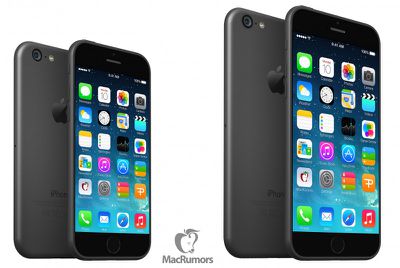
iphone6
With Apple's rumored move to larger displays in the iPhone 6, much discussion has been centered around what resolution Apple will use and how any changes would affect developers. Some speculation had suggested Apple might simply maintain the same resolution as on the iPhone 5s, making a seamless transition for developers. This stretch process would, however, drop the pixel density of the display below Apple's criteria for a "Retina" display.

Alternatively, Apple could boost the resolution to maintain or increase the pixel density, although this move would require work from app developers to maintain compatibility with the new devices. KGI Securities analyst Ming-Chi Kuo suggested last month that Apple would maintain the current 326 ppi density, which could be achieved by bumping a 4.7-inch display to 1334 x 750, and we previously explored how that might work.

But according to 9to5Mac, Apple may adopt an even higher-resolution display that triples the base number of pixels of the iPhone screen in both length and width. This "3x" mode would take the base "1x" resolution of 568 x 320 and expand it to 1704 x 960. Using this method, Apple would retain the Retina branding at 416 ppi and keep the current 16:9 ratio of the iPhone 5/5s/5c.

This means that Apple will likely be tripling the aforementioned “base resolution” (568 x 320) of the iPhone screen in both directions, and that the iPhone screen resolution will be scaled with an increase of 150% from the current 2X resolution of 1136 x 640. Of course, Apple tests several different iPhones and display technologies, so it is possible that Apple chooses to take another route for display specifications for the 2014 iPhone upgrade.

Apple has allegedly been testing this 1704 x 960 resolution and while the design specs for the iPhone 6 are undoubtedly complete, it is not known for sure if Apple has elected to proceed with this resolution. Apple may be preparing to launch the 4.7-inch iPhone 6 sometime this fall with a faster A8 processor and improved camera technology.


Tag: 9to5Mac
Related Forum: iPhone

Popular Stories

apple pro tell logo

Apple Launching Five New Products Today

Thursday November 5, 2026 12:59 am PST by
Apple is launching five new products on Friday, November 6, following pre-orders that opened last week, including its first touchscreen MacBook Pro models. The following new products will be available from today: iPad mini with OLED display and A20 Pro chip iMac with M6 chip 14-inch MacBook Pro with M6 chip 14-inch MacBook Pro with OLED touchscreen 16-inch MacBook Pro with OLED...

duo aquarium

More Fun iPhone Duo Apps: 30 New Picks to Try

Friday November 6, 2026 3:27 pm PST by
When the iPhone Duo launched, we shared a list of some of the fun apps developers created for the new form factor. Two weeks out, developers are continuing to come up with fresh ideas, so we thought we'd share some of our favorites. Games Marbles Unhinged ($2.99) - Marbles Unhinged is a marble maze designed for the Duo. When you fold it, the floor turns into a ramp. If you stand the top...
silver iphone 18 pro

Apple Rumored to Drop the iPhone's Action Button Next Year

Friday November 6, 2026 6:07 am PST by
Apple plans to merge the iPhone's Action button with the Camera Control starting next year, according to the leaker known as "Instant Digital." In a new post on Weibo, the leaker claimed that a single press of the combined button would open the camera, while a long press would trigger the function assigned to the Action button. They explicitly clarified that the dedicated Action button would ...

Top Rated Comments

pgiguere1 Avatar
163 months ago
It’s been a year since I started speculating that the iPhone 6 would have an @3x display, and so far a common reaction is always “But Steve Jobs said pixel-doubling was necessary when introducing the iPhone 4!”.

It’s important to understand why @2x made sense to also understand why @3x does:

1) It was an integer scaling multiplier.

Xcode/Cocoa use a “points” system for every possible coordinate/dimension. Those don’t represent pixel values unless you’re using a non-Retina display (@1x). For everything else, the pixel dimensions of elements are found using points * scaling multiplier. For example, an iPhone 5 is seen as being 568x320 points * @2x = 1136x640 pixels.

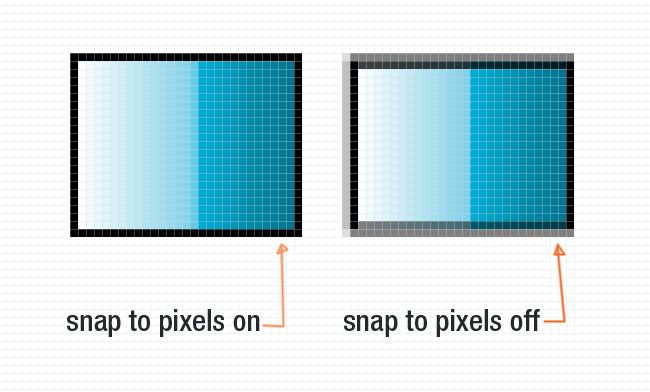
If you had a floating point scaling multiplier, say @2.5x, you’d end up with floating point pixel dimensions as well. For example, a 85x45 points UI element * @2.5x = 212.5 x 112.5 pixels. Oops, fractions of pixels! Since the screen can’t render those directly, multisampling will be applied to “blend” fractions of pixels (think of anti-aliasing). What it would look like is this (on the right):

MacRumors content image

You don’t want this blurry mess. Therefore, you don’t want your UI elements to end up with non-integer pixel dimensions. That’s why you want an integer scaling multiplier. In 2010 with the iPhone 4, @2x was chosen in large part because it was the next integer after 1, not because it’s the double. That means @3x would be an equally good scaling multiplier as far as keeping integer pixel dimensions goes.

2) It didn’t require scaling interpolation on older displays

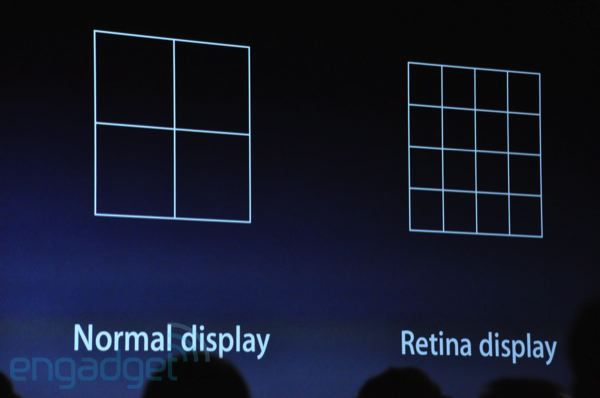
Steve Jobs explained that one pretty clearly at WWDC.

MacRumors content image

One pixel would become a 2x2 pixel grid. No fancy math had to be done to “scale” older apps on the iPhone 4. But why does this matter? Because scaling interpolations often reduce quality (not for performance reasons, that’s insignificant). Keep in mind however that unlike with the @1x -> @2x transition we had in 2010, this time we’d only have a 50% enlargement rather than 100%.

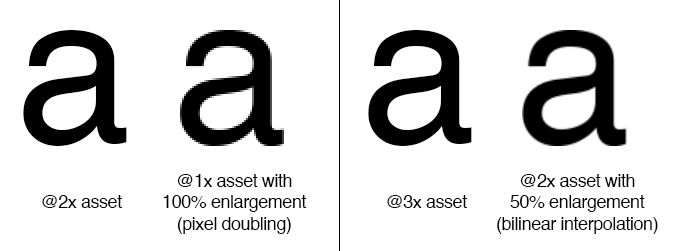
The thing is, a 50% enlargement with interpolation doesn’t look worse than a 100% enlargement with pixel-doubling, despite the loss of details due to the interpolation.

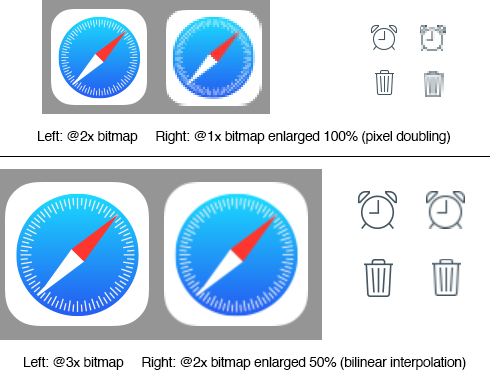
See those examples I made with bilinear interpolation (iOS’ default interpolation when scaling images):
MacRumors content image

As you can see, older non-@3x-optimized apps would actually look better on an @3x iPhone than non-@2x-opitmized apps did on an @2x iPhone. Add to this the fact that the screen's pixel density would be higher this time around, and the perceived image quality difference would be even smaller.

Another common comment has been "But shouldn't developers be using AutoLayout constraints, which make apps pretty much resolution-independent? Therefore, who cares about the exact resolution?"

Yes, they should. But the reality is that most apps (even those using AutoLayout) wouldn't magically scale well to a bigger display like it was a responsive website. They would require significant tweaking before they could do that, and I can't see Apple forcing AutoLayout everywhere just yet. That would essentially force developers to redesign/test their app in around a month, unless which their app would probably look like crap on the iPhone 6. Since that's kind of an unrealistic timeframe, it's the consumers that would end up paying in the end. I think Apple will go through a smoother transition than that.

With the recent introduction of Asset Catalogs (https://developer.apple.com/library/ios/recipes/xcode_help-image_catalog-1.0/Recipe.html) in Xcode, I think it's pretty clear that Apple wants to introduce a new resolution. The fact images are still labeled by "@1x" and "@2x" also leads me to believe they're not ready to drop the points system just yet.
Score: 64 Votes (Like | Disagree)
regkilla Avatar
163 months ago
No 1080p at least? Come on Apple get it together!
Score: 15 Votes (Like | Disagree)
163 months ago
Just look at how much space is wasted in the iPad and you'll have the answer.

Ios on ipad is just pathetic waste of screen space it's purely blown up iPhone os. Terrible.
Score: 13 Votes (Like | Disagree)
furi0usbee Avatar
163 months ago
I won't be happy until I have 1000ppi. Anything less than 1000 won't impress me at all. I want *really* crisp.
Score: 10 Votes (Like | Disagree)
sualpine Avatar
163 months ago
Who cares what the resolution is?

All I want to know is how iOS is going to scale up. I don't want a pathetic new row of icons again.
Score: 10 Votes (Like | Disagree)
163 months ago
It’s been a year since I started speculating that the iPhone 6 would have an @3x display, and so far a common reaction is always “But Steve Jobs said pixel-doubling was necessary when introducing the iPhone 4!”.

It’s important to understand why @2x made sense to also understand why @3x does:

1) It was an integer scaling multiplier.
......

Yes, they should. But the reality is that most apps (even those using AutoLayout) wouldn't magically scale well to a bigger display like it was a responsive website. They would require significant tweaking before they can do that, and I can't see Apple forcing AutoLayout everywhere just yet. That would essentially force developers to redesign/test their app in around a month, unless which their app would probably look like crap on the iPhone 6. Since that's kind of an unrealistic timeframe, it's the consumers that would end up paying in the end. I think Apple will go through a smoother transition than that.
this is probably one of the most professional comments that i have seen in MR for a very very long time! thank you! :D
Score: 9 Votes (Like | Disagree)
Latest Stories
Siri AI Rumored to Become 'More Like an Agent' as Early as Next Year
6 hours ago
Apple Taking New Approach to Developing iOS 28 and macOS 28
7 hours ago
Early Apple Black Friday Deals on Apple Watch, MacBook Air, and More
1 day ago
'Backglow' Lets You Customize New MacBook Pro's Glowing Apple Logo
1 day ago
Top Stories: Apple Product Launches, iOS 27.3 Beta, and More
1 day ago
More Fun iPhone Duo Apps: 30 New Picks to Try
2 days ago
Hands-On With Apple's New OLED Touchscreen MacBook Pro
2 days ago
Apple Store With All-New Design Opening Soon in Southern California
2 days ago
Control the Glowing Apple Logo on Your New MacBook Pro
2 days ago
Apple Shares New 'Apple Card: Apply and Use in Minutes' Ad
2 days ago
Apple Says More Than 100,000 Apps Optimized for iPhone Duo, Here's What's Still Missing
2 days ago
Early Black Friday Deals Kickoff With Steep Discounts on Apple Watch Ultras and More
2 days ago
The MacRumors Show: iOS 27.3 Looks Like a Huge Update
2 days ago
Best Buy's Black Friday Event Begins With Sitewide Savings on Apple, TVs, More
2 days ago
Apple Releasing Yet Another Two New Products Next Week
2 days ago
MacBook Air Drops to Lowest Price in Months With Amazon's $250 Discount
2 days ago
Apple Rumored to Drop the iPhone's Action Button Next Year
2 days ago
Apple's Extended Return Policy Now in Effect for 2026 Holiday Season
2 days ago
Apple Music Classical Updated With New Icon and Refreshed Design
2 days ago
OLED iPad Mini, M6 iMac, and New MacBook Pros Available From Today
3 days ago
Apple Surveys iPhone Duo Buyers About Crease and Camera
3 days ago
Apple's First Touchscreen Mac is Now Arriving to Customers
3 days ago
Claude Gets Personal Finance Feature With Bank Account Linking
3 days ago
Apple Arcade Adds Crossy Road Rush and NBA 2K27
3 days ago
Apple's New HomeView Smart Home Hub: Here's How Much RAM It Has
3 days ago
iPad Mini vs. iPad Air Buyer's Guide: Now Just $50 Apart
3 days ago
First iOS 27.3 and macOS Golden Gate 27.3 Public Betas Now Available
3 days ago
Apple Announces a New Mac Sales Record
3 days ago
Paid $200 for Logic Pro? Apple Says You Won't Get This New Feature
3 days ago
Instagram's Edits Video Editor is Now Available on Mac
3 days ago