

OS X 10.9.3 Bug Hides '/Users' Folder for Some Users [Updated] - MacRumorsOpen MenuShow RoundupsShow Forums menuVisit ForumsOpen Sidebar
Skip to Content

OS X 10.9.3 Bug Hides '/Users' Folder for Some Users [Updated]

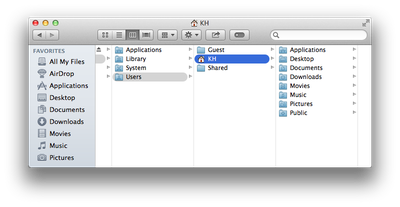
Apple yesterday released OS X 10.9.3 with support for 4K displays, contact and calendar syncing improvements, and more. Many (but not all) users are, however, experiencing a bug in the update that hides the /Users folder.

The /Users folder is a top-level folder that contains the home folder and personal files for each user on a Mac. It's not clear why only some OS X users lose access to the /Users folder, but the inability to browse this folder could be problematic for some Mac owners affected by the glitch.

A range of solutions for the bug have been suggested with varying degrees of complexity, with perhaps the simplest noted by Kirk McElhearn and Chris Breen of Macworld:

Launch Terminal (/Applications/Utilities), enter "sudo chflags nohidden /Users", and press the Return key. You’ll be prompted for your user password. Enter it, press Return again, and the Users folder will be visible as it once was.

This solution is not, however, a permanent one, as the issue will reappear if the machine is restarted and the fix will need to be applied again.

Breen goes on to outline a more permanent solution that involves creating an AppleScript for running the Terminal command and saving it as an application to run at login.
users-folder-main
Another recommendation comes from The Loop's Dave Mark, who suggests creating an alias for the folder that will remain accessible even with the folder itself hidden.

For a more permanent solution, [after manually navigating to the hidden folder] control-click on the /Users folder and select Make Alias from the contextual menu that appears. Though the /Users folder will become hidden again when you close your Finder window, the alias will stick around.

For many users, the bug will not have a significant impact on their Mac usage, as they can still access their own home folders through shortcuts in the Finder sidebar. Consequently, some users who are not inconvenienced by the bug may prefer to simply wait for Apple to address it in a future update.

Update 10:30 AM PT: As noted by MacObserver, the issue may be caused by a combination of iTunes 11.2 and Find My Mac rather than OS X 10.9.3. The site tested each update released yesterday and found the /Users and /Users/Shared folders only disappeared after iTunes 11.2 was installed on a Mac with Find My Mac enabled.


Related Forum: OS X Mavericks

Popular Stories

iPhone 18 Pro and Pro Max Feature

'Apple Upgrade' Program Reportedly Launching Next Week

Tuesday July 21, 2026 8:30 am PDT by
Apple and Klarna are partnering on a new "Apple Upgrade" leasing program set to launch in the U.S. on Tuesday, July 28, according to Bloomberg's Mark Gurman. The program will allow you to finance most iPhone, iPad, Mac, and Apple Watch models, with a 24-month term for iPhones and Apple Watches and a 36-month term for iPads and Macs. Customers will be able to pay off the device early during...
iPhone 18 Pro Deep Red Feature

iPhone 18 Pro Launching in Two Months With These 12 New Features

Friday July 17, 2026 10:39 am PDT by
It is now mid-July, and that means the iPhone 18 Pro and iPhone 18 Pro Max are now just two months away. The devices are expected to look similar to the iPhone 17 Pro and iPhone 17 Pro Max, but there will still be many year-over-year changes, with rumored features including a smaller Dynamic Island, 5G via satellite, and more. Apple is expected to unveil the iPhone 18 Pro, iPhone 18 Pro Max, ...
iPhone 18 Pro Deep Red Feature

iPhone 18 Pro Launching in Two Months With These 12 New Features

Tuesday July 21, 2026 6:22 am PDT by
It is now mid-July, and that means the iPhone 18 Pro and iPhone 18 Pro Max are now just two months away. The devices are expected to look similar to the iPhone 17 Pro and iPhone 17 Pro Max, but there will still be many year-over-year changes, with rumored features including a smaller Dynamic Island, 5G via satellite, and more. Apple is expected to unveil the iPhone 18 Pro, iPhone 18 Pro Max, ...

Top Rated Comments

mojolicious Avatar
159 months ago
It would be nice to hear something from Apple, would it not?
Score: 8 Votes (Like | Disagree)
Nunyabinez Avatar
159 months ago
HD on the desktop.
Wow. That's really old-school. Virtually pointless at this point. Very easy to get to in any case. Anybody who would ever have actual need to access it, would know how to do it in less than 1 second. Meanwhile, it's kept out of way of less knowledgable users who could muck it up.
(same with Library)

I bow in the shadow of your obvious superiority. You are so awesome. I wish I could be like you.
Score: 6 Votes (Like | Disagree)
alexandr Avatar
159 months ago
Pretty. first they hide the library folder, now this.
Score: 6 Votes (Like | Disagree)
159 months ago
Mmmm, attractive...

Image (http://i.imgur.com/yHPr6uu.jpg)

It's a list of directories, subdirectories, and files on a computer. It's not supposed to be pretty, princess.
Score: 5 Votes (Like | Disagree)
ghall Avatar
159 months ago
I suspect (hope) some utility developer such as Onyx, Cocktail, TinkerTool, MacPilot, etc., will soon have a setting/preference to (re)enable the showing of one's Users Folder (to include the proper Permissions so that it is available after restart). Or, perhaps a small freeware app/script...

Or is that just wishful thinking?

It's a bug! They're not intentionally hiding the Users folder, why would they do that but keep the System folder unhidden? Use some basic logic people.
Score: 5 Votes (Like | Disagree)
Nunyabinez Avatar
159 months ago
One suggestion is that people were deleting the folder and borking their machine, so Apple was hiding it to prevent that. However, I find that highly unlikely. I think it is some strange glitch. There are many reasons to have that folder visible.

However, I am always baffled at how Macs are configured out of the box. I always spend the first few minutes on a new machine putting an alias of the documents folder, apps folder, downloads folder and utilities folder on the dock so that I can get to stuff quickly. And I always show my HD on the desktop. The standard setup makes me feel like they don't want me to get to anything.

One thing I have noticed is how much variety there is among Mac users in how they access various things. I always think my way is the only way and then I get on someone else's Mac and things are all different, but it works for them.
Score: 5 Votes (Like | Disagree)















