Home Screen Widget 'Blocks' Imagined in New iOS Concept - MacRumorsOpen MenuShow RoundupsShow Forums menuVisit ForumsOpen Sidebar
Skip to Content

Home Screen Widget 'Blocks' Imagined in New iOS Concept

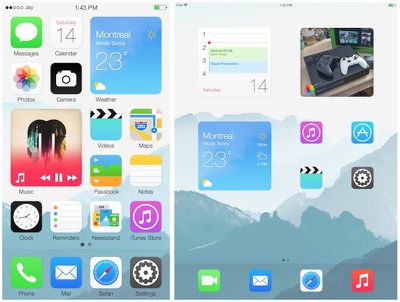
One of the more popular feature requests from iOS users has been live widgets for the home screen, similar to Live Tiles on Windows Phone and Widgets on Android. While there have been no specific rumors of widgets actually coming to iOS 8, a new concept from Jay Machalani (via The Verge) offers an excellent vision of how this could be implemented on iOS with the "iOS Block".

Here’s how it works. On your iOS device you have your list of icons like you know and love. They work and look the same way as before. But, if you want more information about an app, you can simply pinch the app icon bigger and it will now become an iOS Block. There’s no menu, no hidden options and no weird gestures to do. You literally make the icon bigger with your finger if you want more; it can’t be simpler and more intuitive than that.

When you pinch the icon, you will see the transformation/transition into a Block and at that point you have two choices: Either you pinch it back to an icon since you got the information you need or you release your fingers and the icon will remain a Block on your iOS screen.

Malachani imagines three possible sizes for Blocks, designed to take up the space of a 2x2 grid of icons on the home screen for iPhone, iPad portrait, and iPad landscape.
ios_blocks_concept_screens
Malachani goes on to outline more details on how the Blocks would be constructed with a relative uniform layout consisting of an app icon in the lower left, a tap zone along the remainder of the bottom edge where buttons could be placed, and a content zone taking up the remainder of the Block. As examples, Malachani walks through how the stock Weather, Music, Calendar, Messages, and Photos apps might look as Blocks.

As Malachani notes, the concept is still a work in progress, as he is unsure exactly how iOS would handle moving other home screen icons to accommodate a new Block on a full home screen, as the normal method of pushing icons to the next page could be disruptive depending on how frequently Blocks are opened and closed.


Popular Stories

iOS 27 Next to iPhone

Here's When iOS 27 Rolls Out Today in Every Time Zone [Update: It's Out]

Sunday September 13, 2026 3:00 am PDT by
Update 10:04 a.m.: iOS 27 is rolling out now, though it may take a bit for all users to see it, so keep checking! Apple is about to release iOS 27, which will finally deliver more advanced Siri AI capabilities as well as a variety of other refinements, improvements, and new features to iPhones. It's Apple's biggest software update of the year, and Apple announced at Wednesday's iPhone event...
iOS 27 Icon iPhone

iOS 27 Available Now With These 8 New Features

Monday September 14, 2026 9:00 am PDT by
Update — 10 a.m. Pacific Time: Apple has released iOS 27. During its iPhone 18 Pro and iPhone Duo event last week, Apple announced that iOS 27 will be released widely on Monday, September 14. iOS 27 should be available around 10 a.m. Pacific Time / 1 p.m. Eastern Time today via the Settings app, under General → Software Update. Below, we have highlighted eight new features and...
Apple iCloud Plus expansion hero

iCloud+ Now Includes Apple TV, Apple Arcade, and Curated Apple Music Stations in Over 100 Countries

Tuesday September 15, 2026 1:43 am PDT by
Apple today announced a new subscription initiative that turns paid iCloud+ subscriptions into a broader services bundle in more than 100 countries. In select countries, Apple says every paid iCloud+ plan, including the cheapest 50GB tier, now includes Apple TV and Apple Arcade "at no additional cost," while family sharing extends the storage, TV and Arcade access to up to five people....

Top Rated Comments

sualpine Avatar
161 months ago
Should have been this way by now. You don't go through 7 VERSIONS without changing the homescreen. And I don't mean the icons.
Score: 55 Votes (Like | Disagree)
eric_n_dfw Avatar
161 months ago
I like it
Score: 34 Votes (Like | Disagree)
Populus Avatar
161 months ago
MacRumors content image

Someone said Windows phone?
Score: 30 Votes (Like | Disagree)
jrswizzle Avatar
161 months ago
Holy crap that looks terrible.....

At least center the wording under the "block".....
Score: 26 Votes (Like | Disagree)
161 months ago
I think it looks pretty nice.
Score: 15 Votes (Like | Disagree)
161 months ago
No, please no.

No.
Score: 15 Votes (Like | Disagree)