

iOS 8 Offers Quick Access to Apps Based on Location - MacRumorsOpen MenuShow RoundupsShow Forums menuVisit ForumsOpen Sidebar
Skip to Content

iOS 8 Offers Quick Access to Apps Based on Location

Apple outlined several of iOS 8's major features during yesterday's WWDC keynote, but with the operating system now in the hands of developers, details on several lesser known features have been leaking out.

One new feature sees the iPhone displaying apps on the lock screen based on location. For example, MacRumors readers have seen relevant app icons pop up while at or near brick and mortar locations like Starbucks and the Apple Store. While at a Starbucks, for example, the Starbucks app icon is displayed in the lower left corner of the iPhone's lock screen, which allows the Starbucks app to be easily accessed.
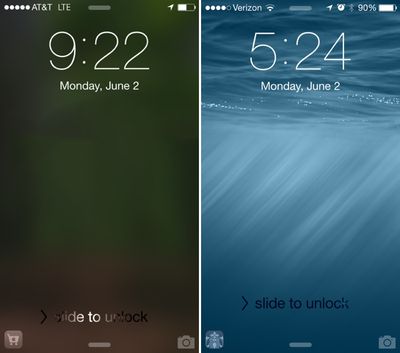
locationalerts
This feature isn't limited to Apple's own stores or to major retailers, either, as one Twitter user has also seen an app for a train station on the lock screen while at that particular location.

Displaying location-based apps on the lock screen is particularly useful at Starbucks and the Apple Store as both locations allow users to make purchases using their iOS devices. In fact, a common theme between the apps that have demonstrated this functionality is a specific on-site function like the ability to make a purchase or display a ticket.

It is not clear how this feature works, or which apps are compatible at this point, but the iOS 8 release notes mention the location based apps as a facet of Location Services. "When Location Services is turned on, the device's current location is used to recommend relevant apps on the lock screen." Based on the description of the feature, it appears to work through both the App Store and physical location and will eventually be able to be turned off by turning off location services for the App Store.

As we approach the public release of iOS 8, it's likely we'll hear more about this new location-based alert feature. iOS 8 is expected to be available to the public in the fall, following a developer-oriented beta testing period.

(Thanks, Kyle!)

Update 11:55 PM PT: It appears that Apple will also suggest apps that are not installed when visiting certain locations. For example, a Twitter user who did not have the Costco app installed had a Costco app icon pop up when at local Costco, which took him to the App Store where he could download the app. He was not able to access the rest of the App Store after tapping the icon; only the Costco app was available.


Related Forum: iOS 8

Popular Stories

macOS 27 on MacBook Pro

Apple Says macOS 27 Won't Be Compatible With These Macs

Wednesday June 3, 2026 8:29 am PDT by
During WWDC 2025, Apple revealed that macOS 26 Tahoe would be the final major macOS version for Intel-based Macs. macOS 27 will be compatible with Apple silicon Macs only, meaning that you will need a Mac with an M-series chip or a MacBook Neo with an A18 Pro chip in order to install the software update. Apple will unveil macOS 27 during its WWDC 2026 keynote this Monday, June 8, and the...
MacBook Neo on Yellow Feature

MacBook Neo is So Popular That Apple Reportedly Doubled Production

Wednesday June 3, 2026 9:24 am PDT by
On an earnings call in late April, Apple's CEO Tim Cook said that customer response to the MacBook Neo was "off the charts," and the popularity of the laptop has reportedly led the company to significantly boost production. Apple supply chain analyst Ming-Chi Kuo this week said he believes that MacBook Neo shipments to Apple were doubled from an initial target of 5 million units to 10...
iphone 18 pro blue%402x

iPhone 18 Pro: Dark Cherry, Light Blue, and Dark Gray Chassis Leaked [Update]

Thursday June 4, 2026 5:18 am PDT by
Update: Since publication, new information has come to light suggesting the images have been AI-manipulated and are not in fact iPhone 18 Pro chassis parts. The original article follows. The color options Apple is reportedly planning for the upcoming iPhone 18 Pro and ‌iPhone 18 Pro‌ Max have appeared online today in the form of images of chassis parts of unknown authenticity....

Top Rated Comments

doelcm82 Avatar
157 months ago
This will suck the life out of that already horrible (as on 7.1) battery.
If you don't like it (for battery reasons or privacy reasons, or any other reasons), you can turn off location services, or carry your phone in a lead case.
Score: 19 Votes (Like | Disagree)
157 months ago
Is there a way to turn this off without killing location services for the app? I want my apps to be able to access my location only when I say so, not continually in the background. And the last thing on earth I want is for apps to be able to spontaneously advertise their products on my launch screen. Yeech.

(Again, you don't have to agree with me, if you like advertunities. Just give us the option to disable them without crippling the app or the phone with such crude measures as turning off location services altogether.)
Score: 17 Votes (Like | Disagree)
Vinamra Avatar
157 months ago
This will suck the life out of that already horrible (as on 7.1) battery.
Score: 16 Votes (Like | Disagree)
157 months ago
This will be awesome for Starbucks! I always hate my phone auto-locking when i am in the drive-through and when I pull my phone out of the cup holder for the girl to scan my barcode. There is a 6 or so step process to get back to that barcode after unlocking.


Ideal yet secure use.
--------------------------
Step 1) Tap StarBucks icon in the lower left corner

Step 2) Be prompted to authenticate with TouchID

result) My Starbucks gift card barcode is displayed


Yes, I drink way too much expensive coffee.

Yes, I am too lazy to get out of my truck and walk inside.
Score: 13 Votes (Like | Disagree)
157 months ago
Thats awesome! I wish they didn't F up OS X so much though :(

OS X is amazing, I have no clue what you are talking about...
Score: 12 Votes (Like | Disagree)
doelcm82 Avatar
157 months ago
Sweeet!
Or savory, depending on where you are!
Score: 10 Votes (Like | Disagree)














