

New 'Send Last Location to Apple' Feature Added to Find My iPhone in iOS 8 - MacRumorsOpen MenuShow RoundupsShow Forums menuVisit ForumsOpen Sidebar
Skip to Content

New 'Send Last Location to Apple' Feature Added to Find My iPhone in iOS 8

by

iOS 8 introduces a new feature to the Find my iPhone and Find my iPad functionality on iOS devices, allowing users to select a "Send Last Location" option that will notify Apple of a device's last known location when the battery drains to a critical level.

Currently, if a device is lost with Find My iPhone on and the battery drains and it cannot be located, iCloud will display the last known location for up to 24 hours, but after that, there is no way for end users to determine the last location of a device.
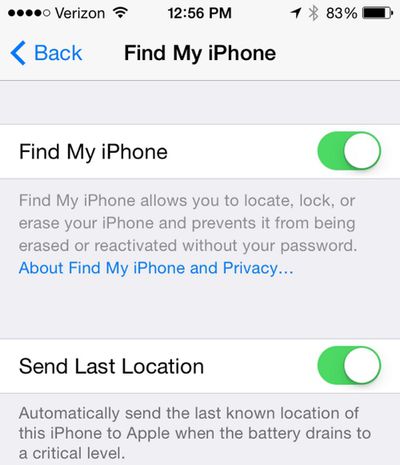
findmyiphoneupdate
It appears this new Find My iPhone feature will authorize Apple to store the last known location of an iOS device after 24 hours have passed, potentially allowing customers to contact the company for location information after it is no longer available on iCloud.

The new option can be found in the iCloud section of the Settings app, listed under a new entry for Find My iPhone (or iPad). Tapping on Find My iPhone gives an option to enable the feature and to enable Send Last Location. With iOS 7, Find My iPhone was bundled into the rest of the iCloud settings, with a simple toggle to turn the feature on and off.

(Thanks, John!)

Related Forum: iOS 8

Top Rated Comments

Nermal Avatar
158 months ago
That's impossible if the phone is off.

Yes, but presumably he meant as part of the shutdown process :)
Score: 11 Votes (Like | Disagree)
larrylaffer Avatar
158 months ago
It should also do it when the phone is turned off.

I was mugged a couple of years ago and my iPhone 4 was taken. By the time I got to a computer to look up where it went, it was nowhere to be found. We always figured the crook was smart and turned the phone off as soon as he took it.

I set a "notify when found" alert 2 years ago, and nothing. :mad:
Score: 8 Votes (Like | Disagree)
LordQ Avatar
158 months ago
That's impossible if the phone is off.

Perhaps send the last known location as soon as the iPhone detects the hold of the sleep button to shut down? While the shutdown screen appears and the thief slides to power off it's plenty of time to finish the sending process.

A nice feature indeed!
Score: 6 Votes (Like | Disagree)
158 months ago
Or how about allowing the user to set a timer, so that when they do intentionally turn on Airplane Mode (ie: actually on an Airplane, or in a meeting, or whatever) that Airplane Mode will turn itself off? I've had a friend or two lose their iPhone on an flight, and because they turned on Airplane Mode, they had no chance to get it back.

There should also be an option to remove the "Airplane Mode" button from the lockscreen. Because a thief turning on Airplane Mode means "Find My iPhone" won't work.

Yes, I've already sent these suggestions to Apple.
Score: 5 Votes (Like | Disagree)
CrimsonKnight Avatar
158 months ago
Sweet, that is pretty awesome. Will come in handy.
Score: 5 Votes (Like | Disagree)
ctdonath Avatar
158 months ago
Does this mean Apple can track a dead device? Or is that silly?

It reports where the device was just before it died.

Having spent months looking for an iPod Touch (long after it died), only to find it slipped between bed frame & mattress, having "last known location" would have been very helpful, or at least comforting to know it was somewhere in the house.

----------

define critical level? 20% the battery warning comes on and the battery indicator goes red.

"Critical" is "battery is about to die, system has about 1 minute left to shut everything down safely, report last known location, and enter deep hibernation; user interaction is now disallowed in favor of maintaining system integrity; uncooperative threads will be terminated immediately."
Score: 3 Votes (Like | Disagree)

Popular Stories

iCloud iPhone 17 Pro

iPhone Users Who Pay for iCloud Storage Get Two New Perks on iOS 27

Thursday July 2, 2026 6:10 am PDT by
If you pay for certain iCloud+ storage plans beyond the 5GB that Apple offers for free, you will receive two more perks on iOS 27 at no additional cost. A summary of the two new iCloud+ perks on iOS 27:Increased daily usage limits for some new Apple Intelligence features, including image generation in the revamped Image Playground app. HomeKit Secure Video cameras receive generated video...
iPhone 4 on Black Feature

Apple Facing One of Its Worst Leaks Since the iPhone 4

Thursday July 2, 2026 9:53 am PDT by
Apple supplier Tata Electronics recently suffered a cyberattack that resulted in thousands of confidential files being published on the dark web, and this reportedly included some photos and documents related to the upcoming iPhone 18 Pro. We have elected not to share any of the leaked photos in this story due to the illegal nature in which they were obtained, but they can easily be found...
American Express Gold Apple Pay Feature

American Express Announces New Apple Pay Feature

Tuesday June 30, 2026 10:27 am PDT by
American Express today announced that you can now redeem Membership Rewards points when checking out with Apple Pay on the web and in apps on the iPhone and iPad. When checking out with Apple Pay on iOS 18 or iPadOS 18 or later, tap on your eligible American Express card (Platinum, Gold, Green, and others) and select the Membership Rewards points option. You can use points to cover all or...














