

'Air Stylus' Turns Your iPad Into a Drawing Tablet for Your Mac - MacRumorsOpen MenuShow RoundupsShow Forums menuVisit ForumsOpen Sidebar
Skip to Content

'Air Stylus' Turns Your iPad Into a Drawing Tablet for Your Mac

by

Air Display developer Avatron Software today launched Air Stylus, an app that allows users to utilize the iPad as a pressure-sensitive, wireless drawing surface for over 30 graphics programs on the Mac.
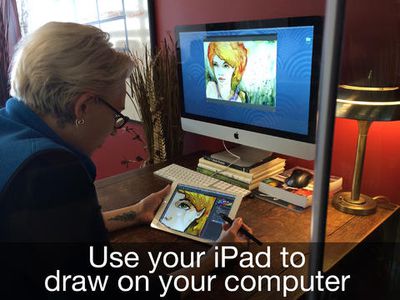
air_stylus_1
The app is compatible with a number of pressure sensitive styli, including the Wacom Intuos Creative Stylus and the Adonit Jot Touch 4, and works with popular programs such as Adobe Photoshop and Pixelmator. Air Stylus also includes support for pinch-to-zoom and two finger gestures while drawing, and features the ability to toggle palm rejection on and off.

- Make Your Mark - With palm rejection and multi-touch support, Air Stylus lets you draw naturally and makes your stylus do all the work.
- Quick On The Draw - Air Stylus creates a fast, reliable wireless link so you can immerse yourself in your art without distraction.
- Draw The Line - Pen-based pressure sensitivity means your lines are accurate, whether they’re paintbrush bold or feather light.
- Best Of All - Compatible with 30+ graphics apps so you can incorporate your iPad into your existing workflow (support for Windows and Android imminent!)


Air Stylus can be purchased from the App Store for $19.99 and is available now. [Direct Link]

Top Rated Comments

NightFox Avatar
158 months ago
iWatch will make this a relic of the past. Just pick up any object and draw with it. iWatch translates to screen. Job done, game over by :apple:

But when I draw or paint most of my detailed movement is in the hand or fingers - my wrist hardly moves at all
Score: 4 Votes (Like | Disagree)
158 months ago
For those poo-pooing the ideal of a stylus for art on a iPad, I beg to differ. From a person who actually DRAWS on an iPad (and has since 2011), bluetooth stylii have come a LONG WAY from the crummy rubber tipped ones introduced back since 2010. Of course, it's no way as elegant as a Cintiq, the trade offs are becoming less of a nuisance. I draw with procreate and a Jot Touch 4 from time to time (my Cintiq 13HD is my primary tool for digital art) and it's quite a blast for drawing.

I'm eager to hear from people who have actually used Air Stylus and are not talking out of their ass about bluetooth limitations and lag.
Score: 3 Votes (Like | Disagree)
158 months ago
brush. lag.

Brush. lag. brush lag. brush lag. brush lag. brush lag.

You get my point.

Unusable as a daily tool. Even the promotional video can't hide that (and they try). But, perhaps it would be worth it for quick retouches and and fixes that require a brush or pen.

Let's be serious, drawing on the iPad is already a challenge. I've tried all styli and apps and no matter what (yes even with advanced bluetooth versions) there are palm rejection issues and most importantly a lag when using any type of fast gesture with a pen or brush. Very annoying unless you are this snail-like artist in the video.

Add the additional lag from iPad to Mac and, boom, instant drawing hell.

I read the one review on the app store claiming it "draws smooth and updates quickly". There is no way with the technology involved that this isn't anything more than a fun novelty app that would lose it's appeal once you try to be productive as an artist.

Let's wait and see when the real reviews start rolling in. I don't wish bad things for Avatron, I just don't know how this can actually work in the real world.
Score: 3 Votes (Like | Disagree)
ArtOfWarfare Avatar
158 months ago
no palm rest = fatigue --> death
Well that excalated quickly.

MacRumors content image
Score: 3 Votes (Like | Disagree)
robertosh Avatar
158 months ago
no palm rest = fatigue.

no palm rest = fatigue --> death
Score: 3 Votes (Like | Disagree)
Pakaku Avatar
158 months ago
iWatch will make this a relic of the past. Just pick up any object and draw with it. iWatch translates to screen. Job done, game over by :apple:
Maybe if you hold your hand absolutely rigid... Otherwise no, I can't see that working at all, speaking as an artist and tech enthusiast.
Score: 2 Votes (Like | Disagree)

Popular Stories

iPhone 18 Pro and Pro Max Feature

'Apple Upgrade' Program Reportedly Launching Next Week

Tuesday July 21, 2026 8:30 am PDT by
Apple and Klarna are partnering on a new "Apple Upgrade" leasing program set to launch in the U.S. on Tuesday, July 28, according to Bloomberg's Mark Gurman. The program will allow you to finance most iPhone, iPad, Mac, and Apple Watch models, with a 24-month term for iPhones and Apple Watches and a 36-month term for iPads and Macs. Customers will be able to pay off the device early during...
iPhone 18 Pro Deep Red Feature

iPhone 18 Pro Launching in Two Months With These 12 New Features

Friday July 17, 2026 10:39 am PDT by
It is now mid-July, and that means the iPhone 18 Pro and iPhone 18 Pro Max are now just two months away. The devices are expected to look similar to the iPhone 17 Pro and iPhone 17 Pro Max, but there will still be many year-over-year changes, with rumored features including a smaller Dynamic Island, 5G via satellite, and more. Apple is expected to unveil the iPhone 18 Pro, iPhone 18 Pro Max, ...
iPhone 18 Pro Deep Red Feature

iPhone 18 Pro Launching in Two Months With These 12 New Features

Tuesday July 21, 2026 6:22 am PDT by
It is now mid-July, and that means the iPhone 18 Pro and iPhone 18 Pro Max are now just two months away. The devices are expected to look similar to the iPhone 17 Pro and iPhone 17 Pro Max, but there will still be many year-over-year changes, with rumored features including a smaller Dynamic Island, 5G via satellite, and more. Apple is expected to unveil the iPhone 18 Pro, iPhone 18 Pro Max, ...
















