

Hands-On Installation and Usage of TouchPal's Gesture Keyboard for iOS 8 - MacRumorsOpen MenuShow RoundupsShow Forums menuVisit ForumsOpen Sidebar
Skip to Content

Hands-On Installation and Usage of TouchPal's Gesture Keyboard for iOS 8

Following Apple's announcement at its Worldwide Developers Conference earlier this month that iOS 8 would include support for third-party keyboards on a systemwide basis, a number of companies working on the technology indicated that they would be moving forward with plans to support iOS. Among those companies was TouchPal, with quickly released a video showing an early version of its sliding gesture keyboard in action.

TouchPal has now released its first alpha version of its keyboard for iOS 8 to select media outlets, giving a good look at how third-party keyboard will work on iOS 8.
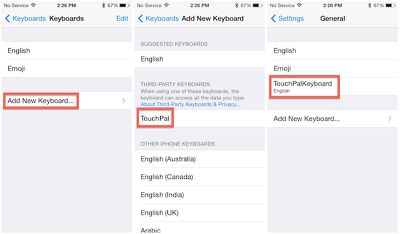
touchpal_installation
Installation is straightforward, leveraging a traditional App Store app to add TouchPal as an option when adding new keyboard in the Settings app. Once TouchPal is added, users can simply rearrange their installed keyboards in their preferred order, and rotate through each one while in use by tapping the globe key. Users who have activated the emoji keyboard on their devices will be familiar with that process.

Once activated, TouchPal is available anywhere a keyboard is traditionally used, such as in Mail, Messages, Safari, Notes, iWork apps, and third-party apps.
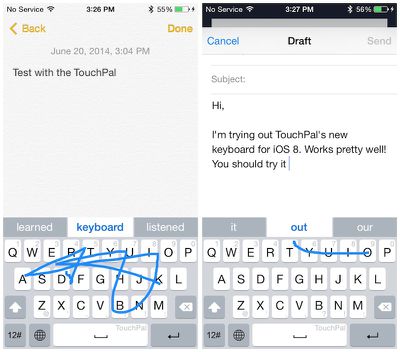
touchpal_usage
TouchPal's keyboard is similar to the perhaps more well-known one from Swype, allowing users to drag a finger in one continuous motion as they spell out the word. Based on the pattern drawn by the user, TouchPal suggests several options for the intended word, with highest-ranked option highlighted in the middle of the suggestions bar. Hitting the space bar or touching the word accepts the suggestion.

Numbers and common punctuation marks are input right from the main keyboard screen simply by flicking up or down on the proper key. Additional punctuation marks and emoticons are available by tapping the "12#" key at the lower left.

In our testing, there were definitely some glitches, particularly when switching between keyboards, but it is still early in the development process and Apple and third-party keyboard companies will continue to refine their implementations in the coming months leading up to the public release of iOS 8 this fall.


Related Forum: iOS 8

Popular Stories

iCloud iPhone 17 Pro

iPhone Users Who Pay for iCloud Storage Get Two New Perks on iOS 27

Thursday July 2, 2026 6:10 am PDT by
If you pay for certain iCloud+ storage plans beyond the 5GB that Apple offers for free, you will receive two more perks on iOS 27 at no additional cost. A summary of the two new iCloud+ perks on iOS 27:Increased daily usage limits for some new Apple Intelligence features, including image generation in the revamped Image Playground app. HomeKit Secure Video cameras receive generated video...
American Express Gold Apple Pay Feature

American Express Announces New Apple Pay Feature

Tuesday June 30, 2026 10:27 am PDT by
American Express today announced that you can now redeem Membership Rewards points when checking out with Apple Pay on the web and in apps on the iPhone and iPad. When checking out with Apple Pay on iOS 18 or iPadOS 18 or later, tap on your eligible American Express card (Platinum, Gold, Green, and others) and select the Membership Rewards points option. You can use points to cover all or...
series 10 apple watch titanium digital crown

Report: Apple Watch Redesign Coming Next Year With New Band System

Tuesday June 30, 2026 8:45 am PDT by
A "major overhaul" of the Apple Watch's design is due to arrive next year with a new system for connecting bands, according to a known Weibo leaker. In a set of recent posts, the leaker known as "Instant Digital" linked the new claim to older rumors about an "Apple Watch X" model, which was said to introduce a fresh design and break compatibility with the existing watch band system. Citing...

Top Rated Comments

Lapidus Avatar
157 months ago
Don't know why, but I never seemed interested in this feature.
Score: 10 Votes (Like | Disagree)
157 months ago
Don't know why, but I never seemed interested in this feature.

Then honestly, you have no idea what you are missing. Once you get used to it, old school single key typing seems prehistoric.
Score: 9 Votes (Like | Disagree)
Jalopybox Avatar
157 months ago
Had this on Android. Worked well, used it twice. Never used it again. Feels unnatural.
Score: 6 Votes (Like | Disagree)
157 months ago
Then honestly, you have no idea what you are missing. Once you get used to it, old school single key typing seems prehistoric.

Agreed. Swype is probably one of the coolest features of Android.
Score: 3 Votes (Like | Disagree)
WildCowboy Avatar
157 months ago
about freaking time! but i hate that it requires to download an actual "app" (even if its an obvious choice by apple) i hate the thought of having all those "apps" on my springboard just to get a feature activated and no longer actually need the "icon". wonder if the keyboard would stick even if i delete the app "icon" from the springboard?

If you delete the app, it stops working. An entry for it remains in the Settings section for keyboards, but it's blank and you can't use the keyboard.

At least that's how it currently works through beta.
Score: 3 Votes (Like | Disagree)
157 months ago
about freaking time! but i hate that it requires to download an actual "app" (even if its an obvious choice by apple) i hate the thought of having all those "apps" on my springboard just to get a feature activated and no longer actually need the "icon". wonder if the keyboard would stick even if i delete the app "icon" from the springboard?
You can probably delete those apps after installing the keyboard, as was the case with Emoji.
Score: 3 Votes (Like | Disagree)













