

Microsoft's Office for iPad apps, including Word, Excel, and PowerPoint received a major update today that adds several new user-requested features to each app. All three apps have gained the ability to export files as PDFs, and each one has also gained new Picture Tools that let users crop to focus on the right part of an image. Third-party fonts have also been added to each app.
Excel now includes improved external keyboard support to make the experience of using Excel on the iPad more like a desktop usage experience. There are more print options available, and a new "Flick to Select" feature lets users flick to select all data in a row or column.
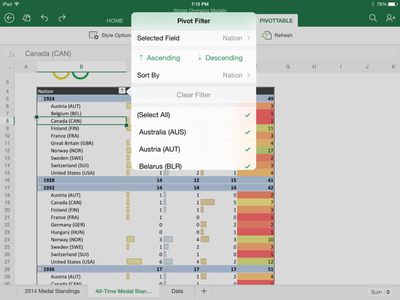
Excel is all about interacting with, consuming, and manipulating your data. When it comes to interacting with data, PivotTables are key to helping explore that data. With Excel for iPad you can now sort, filter, expand and collapse, show details, and even refresh PivotTables whose data is all contained within the workbook. You can even change how your PivotTables look and feel by changing both their visual style and layout.
We’ve also made it easier to consume workbooks and select data, including a large data range, with the introduction of a new flick gesture. Simply grab the selection handle, flick it in any direction, and Excel will automatically select from where you started to the next blank cell. Say you’re at the top of a column of data and want to select all the way to the bottom. Just flick down and the column is selected automatically.
Word didn't gain new features beyond the Picture Tools, Fonts, and ability to send PDFs, but PowerPoint has seen some improvements. The app has a new Presenter View that lets users view and edit speaker notes, see next slides, and jump to other slides while presenting. Presenter tools allow for highlights and drawings to be erased within presentations, while new media features make it possible for users to play videos, sound effects, and background music while presenting. There are also new tools to insert videos from the Camera Roll and add/edit hyperlinks.

With this update you can also make your presentations more rich and interactive than ever by more easily including video and sound to help get your point across. Not only do all of your embedded videos and sound recordings now play right from PowerPoint for iPad, but you can insert video directly from your Camera Roll as well. This allows you to quickly record, embed, and present interactive content more quickly than ever, and all from one device.
Today's update is the second major update the Office software has gotten since its March release. Back in April, the three apps gained some important features that had been missing since launch, including the ability to print directly from the apps.
Microsoft's Office for iPad apps have proven to be highly successful for the company. During its Q4 earnings call in July, Microsoft announced that its Office for iPad software had been downloaded more than 35 million times.
Microsoft has committed to continually improving its Office for iPad apps, which now directly compete with Apple's own iWork suite including Numbers, Keynote, and Pages. "As this wave of updates hopefully shows, we're making good on our commitment to delivering continuous updates and improvements to the Office for iPad apps," read's the company's blog post on the new update.
All of the updates to the new Office apps are currently available and can be downloaded from the App Store for free. While the apps can be accessed for free, unlocking full capabilities, including editing and creating documents, requires an Office 365 subscription.
- Microsoft Word for iPad [Direct Link]
- Microsoft Excel for iPad [Direct Link]
- Microsoft PowerPoint for iPad [Direct Link]




















