1Password Updated With iPhone 6 and 6 Plus Support, Improved Touch ID Functionality - MacRumorsOpen MenuShow RoundupsShow Forums menuVisit ForumsOpen Sidebar
Skip to Content

1Password Updated With iPhone 6 and 6 Plus Support, Improved Touch ID Functionality

by

AgileBits today updated its 1Password app for iOS to version 5.1, adding support for the larger-screened iPhone 6 and the iPhone 6 Plus. With native support for the two new devices, the app is no longer zoomed in and is now able to display more information on the screen.

Along with built-in support for the iPhone 6 and 6 Plus, 1Password has also been updated with improved Touch ID and PIN functionality. Before the update, it was unclear why the Master Password would often be requested when Touch ID integration was enabled, but the Auto-Lock settings have now been retuned to remove confusion.
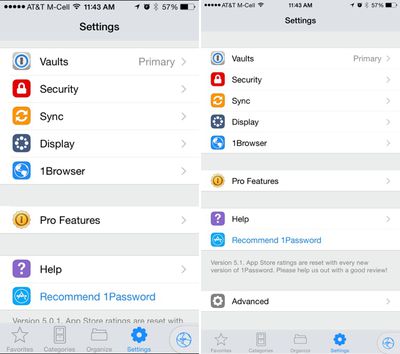
1passwordupdate

1Password on iPhone 6 Plus Before 5.1 update on left, after 5.1 update on right

The app has gained a new setting that allows users to disable third-party keyboards within 1Password to keep passwords more secure, and several bug fixes have been implemented.

- The iPhone 6 and iPhone 6 Plus are out. Were you one of the lucky millions who got one already? 1Password 5.1 has been updated to give you a beautiful experience on these new devices with 3x images and improved rich icons.

- Touch ID and the PIN Code have been significantly improved. The Auto-Lock timeout will now function across both the Master Password and Touch ID/PIN Code, removing the confusion the separate settings caused. The iOS Keychain will be used to store the Master Password when Touch ID/PIN Code is enabled, allowing Touch ID/PIN Code to be used reliably in the 1Password Extension. Configure what works best for you in Settings->Security.

- Tag you're it. You can now add brand new tags to your items.

- Customer keyboard preference. Choose to enable or disable 3rd party custom keyboards within the Advanced Settings.

- Many fixes for the most popular issues and crashes

1Password can be downloaded from the App Store for free, with the app's full functionality unlockable through a $9.99 in-app purchase. [Direct Link]


Top Rated Comments

158 months ago
Lastpass is much better. https://lastpass.com (https://lastpass.com)

LastPass is a PITA. I prefer 1Password.

I love the update. It looks so much better with 1080p resolution on my Plus. It's a wonder what's taking developers so long to update for higher resolutions, as it stands, most apps look terrible when blownup.
Score: 16 Votes (Like | Disagree)
158 months ago
Lastpass is much better. https://lastpass.com (https://lastpass.com)

Do you have any objective reasons or is this basically, "I like Pepsi more."
Score: 11 Votes (Like | Disagree)
158 months ago

MacRumors.com has a boner for 1Password for some reason. This one app seems to get more articles than any other. Are they a sponsor or something?

We are not a sponsor. Perhaps the writers just use and enjoy 1Password?
Score: 9 Votes (Like | Disagree)
158 months ago
Lastpass is much better. https://lastpass.com (https://lastpass.com)

AFAIK, LastPass doesn't let you sync multiple devices with Wi-Fi like 1Password does.
Score: 7 Votes (Like | Disagree)
158 months ago
LOL! Security much?

iCloud, celebrity hack NSA PRISM anyone?
Dropbox, under the direction of Condoealiza Rice, former NSA.

It's the usual balance between "security and convenience". 1password does not force - or even endorse - the sync over any cloud service! That is completely up to everyone to decide!

Well, in cyber security circles, Lastpass is the most secure password management app. If you actually knew the details around Lastpass you'd might consider it. It was hacked once, and no ones data was was compromised, becauese not even Lastpass has access to the data it stores.

It was hacked? Data is actually stored there?

Now get this: with my current usage of 1password the AgileBits guys can be hacked as many times as it pleases the hackers. Not only have the AgileBits no access to my data, they do not even store it!

No one stores my encrypted "password safe" but me! On my devices! Under my control!

So the fact that you are saying that the "Lastpass people got hacked, but hey, the hackers could not access the encrypted data" is actually very scary! The hackers most likely now have the encrypted passwords, and who knows when a flaw in the implementation of Lastpass encryption will be found.

It is good to trust in the implementation and the actual encryption algorithm, it is better not to tempt any person to actually try to hack it (by not allowing access at all! Well, my opinion anyway...

Sync with iCloud and Dropbox is ridiculously insecure.

It is actually noteworthy what you say here: on the one hand you admit that Lastpass has been hacked and the hackers got access to the encrypted passwords. There you seem to perfectly trust the encryption and implementation thereof!

On the other hand there is no known case of people having actually hacked iCloud or Dropbox! And NO, the celeb photo case doesn't count, as the passwords and security questions have been guessed!

But even so: on the other hand you don't recognise that the 1password file is also encrypted! And all of a sudden that seems "ridiculously insecure"?

So we have a known case of hacking with Lastpass, and you completely trust their encryption, and we have no known case of hacking into neither iCloud or Dropbox (in order to access 1password files anyway) and all of a sudden that becomes "ridiculously insecure"? Rrrrrright...!


Huh? Lastpass is synced with all devices that are logged into Lastpass through any network connection. Obviously haven't used it.

I haven't used it, I admit. But what you say is a contradiction in itself: so you have to be "logged in into Lastpass" and at the same time "you can sync over any network connection"?

Why do I have to "log in" in order to sync via my LOCAL WiFi network only? Why does Lastpass have to know me when all I want is to move data in my LOCAL network?

Or is it not rather that the sync works VIA the LASTPASS server(s)? Just like "cloud sync"?


Mac Pro
Mac Book Pro
Mac Mini
Mac Mini Server
iMac
iPad
iPhone

All synced and working with LastPass...

What's your point here? Do you want me to enumerate all my devices which are synced among each other with 1password? Synced LOCALLY I should add - no encrypted data ever leaves my own local network! Unlike with Lastpass, as it seems...

----------

Can we use 1Password AND 2-step auth at the same time?

Yes.
Score: 6 Votes (Like | Disagree)
158 months ago
Question to 1Password users -

I bought 1Password about a year ago to easily save my website username and passwords, and credit card info, across devices.

Now that Apple has iCloud Keychain that saves usernames and passwords to Safari, and it can also save credit card info, and with Touch ID integration, I haven't used 1Password anymore.

Am I missing a certain use? Because this app seems to have remained popular. Or is it trusting 1Password more than Apple? That's a legitimate reason, but I am trying to find out if there is something more. Thanks.
I suppose you could compare 1Password and iCloud Keychain analogously to Microsoft Office and iWork. All cover the basics if that is what you need, but the former are far more sophisticated and powerful than the latter.

I use 1Password to manage all my accounts. I’ve added all the logins, software licences, banking details, Wi-Fi passwords, encryption keys (hard drives, FileVault, etc.), and other kind of secure data to 1Password and use it to manage everything, not just my website logins. It’s just a very powerful tool to store and organise your data. I use the security audits to check whether I should update my passwords and I’ve become a big fan of tagging and smart folders to arrange everything.
Score: 6 Votes (Like | Disagree)

Popular Stories

apple pro tell logo

Apple Launching Five New Products Today

Thursday November 5, 2026 12:59 am PST by
Apple is launching five new products on Friday, November 6, following pre-orders that opened last week, including its first touchscreen MacBook Pro models. The following new products will be available from today: iPad mini with OLED display and A20 Pro chip iMac with M6 chip 14-inch MacBook Pro with M6 chip 14-inch MacBook Pro with OLED touchscreen 16-inch MacBook Pro with OLED...
duo aquarium

More Fun iPhone Duo Apps: 30 New Picks to Try

Friday November 6, 2026 3:27 pm PST by
When the iPhone Duo launched, we shared a list of some of the fun apps developers created for the new form factor. Two weeks out, developers are continuing to come up with fresh ideas, so we thought we'd share some of our favorites. Games Marbles Unhinged ($2.99) - Marbles Unhinged is a marble maze designed for the Duo. When you fold it, the floor turns into a ramp. If you stand the top...
silver iphone 18 pro

Apple Rumored to Drop the iPhone's Action Button Next Year

Friday November 6, 2026 6:07 am PST by
Apple plans to merge the iPhone's Action button with the Camera Control starting next year, according to the leaker known as "Instant Digital." In a new post on Weibo, the leaker claimed that a single press of the combined button would open the camera, while a long press would trigger the function assigned to the Action button. They explicitly clarified that the dedicated Action button would ...
Latest Stories
Early Apple Black Friday Deals on Apple Watch, MacBook Air, and More
14 hours ago
'Backglow' Lets You Customize New MacBook Pro's Glowing Apple Logo
14 hours ago
Top Stories: Apple Product Launches, iOS 27.3 Beta, and More
21 hours ago
More Fun iPhone Duo Apps: 30 New Picks to Try
1 day ago
Hands-On With Apple's New OLED Touchscreen MacBook Pro
2 days ago
Apple Store With All-New Design Opening Soon in Southern California
2 days ago
Control the Glowing Apple Logo on Your New MacBook Pro
2 days ago
Apple Shares New 'Apple Card: Apply and Use in Minutes' Ad
2 days ago
Apple Says More Than 100,000 Apps Optimized for iPhone Duo, Here's What's Still Missing
2 days ago
Early Black Friday Deals Kickoff With Steep Discounts on Apple Watch Ultras and More
2 days ago
The MacRumors Show: iOS 27.3 Looks Like a Huge Update
2 days ago
Best Buy's Black Friday Event Begins With Sitewide Savings on Apple, TVs, More
2 days ago
Apple Releasing Yet Another Two New Products Next Week
2 days ago
MacBook Air Drops to Lowest Price in Months With Amazon's $250 Discount
2 days ago
Apple Rumored to Drop the iPhone's Action Button Next Year
2 days ago
Apple's Extended Return Policy Now in Effect for 2026 Holiday Season
2 days ago
Apple Music Classical Updated With New Icon and Refreshed Design
2 days ago
OLED iPad Mini, M6 iMac, and New MacBook Pros Available From Today
2 days ago
Apple Surveys iPhone Duo Buyers About Crease and Camera
2 days ago
Apple's First Touchscreen Mac is Now Arriving to Customers
3 days ago
Claude Gets Personal Finance Feature With Bank Account Linking
3 days ago
Apple Arcade Adds Crossy Road Rush and NBA 2K27
3 days ago
Apple's New HomeView Smart Home Hub: Here's How Much RAM It Has
3 days ago
iPad Mini vs. iPad Air Buyer's Guide: Now Just $50 Apart
3 days ago
First iOS 27.3 and macOS Golden Gate 27.3 Public Betas Now Available
3 days ago
Apple Announces a New Mac Sales Record
3 days ago
Paid $200 for Logic Pro? Apple Says You Won't Get This New Feature
3 days ago
Instagram's Edits Video Editor is Now Available on Mac
3 days ago
Prevent Siri and Search From Accessing Specific iPhone Apps
3 days ago
Best Early Black Friday Deals on iPhone 18 Pro and iPhone Duo
3 days ago










































