

Adobe Updates Line of iOS Apps With New Features, Enhanced Creative Cloud Syncing - MacRumorsOpen MenuShow RoundupsShow Forums menuVisit ForumsOpen Sidebar
Skip to Content

Adobe Updates Line of iOS Apps With New Features, Enhanced Creative Cloud Syncing

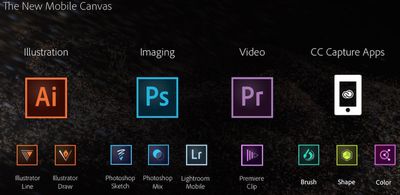
At its Adobe MAX conference today, Adobe is announcing updates for nearly all of its iOS apps, bringing new features that emphasize the creation of shapes and brushes along with enhanced syncing with the company's Creative Cloud services. The updates come alongside a new Creative SDK public beta to allow developers to build mobile apps connecting to Creative Cloud, as well as a number of enhancements to the core Creative Cloud apps.
adobe_mobile_lineup
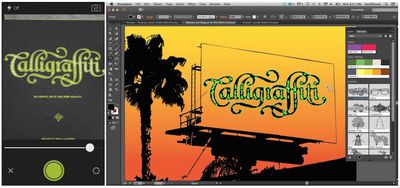
Building on its existing Adobe Kuler app, which allows users to create color palettes using any photo and which is now being rebranded Adobe Color CC, the company is now rolling out two additional "Capture" apps for mobile: Adobe Brush CC, which turns photos into brushes for use throughout Photoshop and Illustrator apps, and Adobe Shape CC, which automatically converts high-contrast photos of objects into vector art for use in Illustrator.
adobe_shape_cc_illustrator

Adobe Shape CC (left) capturing a shape to be used in Illustrator (right)

Meanwhile, the newest version of Adobe Photoshop Mix is now a universal app for both iPad and iPhone, while Adobe Photoshop Sketch brings new acrylic and pastel brushes and integration with brush sets created in Adobe Brush CC.

Adobe Illustrator Line now allows users to utilize content from the Creative Cloud Market and includes new smart spacing and grid tools. Adobe Lightroom for iOS now allows specified users to comment on photos shared through Lightroom's web interface, and includes additional language support in addition to the ability to sync GPS information from the iPhone with Lightroom desktop.

illustrator_line

Adobe Illustrator Line

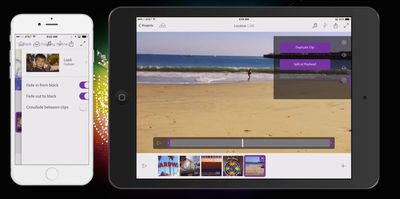
Finally, Adobe Premiere Clip lets users edit video shot on an iPhone or iPad right from the device, or send to the full Premiere Pro CC for more advanced editing.
adobe_premiere_clip

Adobe Premiere Clip

Core Creative Cloud apps are also seeing a number of updates today, including new 3D printing support for Photoshop CC, a new Curvature tool for Illustrator CC, interactive EPUB support for In Design CC, SVG and Synchronized Text support for Muse CC, and 4K/Ultra HD viewing support for Premiere Pro CC.

All of Adobe's updated iOS apps require a free membership to Adobe Creative Cloud, while desktop apps like Adobe Photoshop CC and Adobe Illustrator CC require separate subscriptions. Download links for all of the apps can be found below, while the full set of updates for Creative Cloud are expected to be available to members by the end of the day.

- Adobe Brush CC [Direct Link]
- Adobe Shape CC [Direct Link]
- Adobe Color CC [Direct Link]

- Adobe Photoshop Sketch [Direct Link]
- Adobe Photoshop Mix [Direct Link]
- Adobe Lightroom for iPad [Direct Link]
- Adobe Lightroom for iPhone [Direct Link]

- Adobe Illustrator Draw [Direct Link]
- Adobe Illustrator Line [Direct Link]

- Adobe Premiere Clip [Direct Link]

Popular Stories

Apple iCloud Plus expansion hero

iCloud+ Now Includes Apple TV, Apple Arcade, and Curated Apple Music Stations in Over 100 Countries

Tuesday September 15, 2026 1:43 am PDT by
Apple today announced a new subscription initiative that turns paid iCloud+ subscriptions into a broader services bundle in more than 100 countries. In select countries, Apple says every paid iCloud+ plan, including the cheapest 50GB tier, now includes Apple TV and Apple Arcade "at no additional cost," while family sharing extends the storage, TV and Arcade access to up to five people....
Everything New Your iPhone Can Do on iOS 27 Feature 1

50 New Things Your iPhone Can Do in iOS 27 - Out Now!

Monday September 14, 2026 10:48 pm PDT by
Apple released iOS 27 this week, and despite the company's focus this year on refining its flagship operating system and nixing bugs, there are still many additional features to explore, not least of which is Apple's new context-aware Siri, re-tooled for the generative AI era. Which iPhones Support Every iOS 27 Feature? This year's major iPhone software update isn't all about AI, though,...
iOS 27 Icon iPhone

iOS 27 Available Now With These 8 New Features

Monday September 14, 2026 9:00 am PDT by
Update — 10 a.m. Pacific Time: Apple has released iOS 27. During its iPhone 18 Pro and iPhone Duo event last week, Apple announced that iOS 27 will be released widely on Monday, September 14. iOS 27 should be available around 10 a.m. Pacific Time / 1 p.m. Eastern Time today via the Settings app, under General → Software Update. Below, we have highlighted eight new features and...

Top Rated Comments

156 months ago
I gave up on this company a while ago. No Adobe software of any kind on any of my devices.
Score: 11 Votes (Like | Disagree)
AppleInLVX Avatar
156 months ago
No option without subscription, no installations on any of my devices. It's really that simple.
Score: 10 Votes (Like | Disagree)
BJMRamage Avatar
156 months ago
I guess I am just not into the whole CC or mobile versions of these.

this seems ho-hum to me...but good to see others like it.
Score: 9 Votes (Like | Disagree)
c.s. Avatar
156 months ago
Your cynicism is misplaced. Why knock something BEFORE you even see it. Real professionals at least look at a tool to see if they could use it before moving on.

I just downloaded the new apps for that purpose. Here's a real-world scenario: a client needs a change to a web graphic while I'm away from my computer. I open it in Photoshop Mix on my phone. I need to edit the text. Can't do it. I need to alter a vector shape. Can't do it. But I can apply an instagrammy filter and post it to Facebook. It's still for kids.
Score: 7 Votes (Like | Disagree)
c.s. Avatar
156 months ago
More kiddie tools. I just don't think there are enough pro users (people who make a living from Adobe's software) to sustain the company. So they keep releasing this s--- for amateurs, hoping it will lead to CC subscriptions. They market it for professionals to "work on the go", but I don't see how it fits into any professional workflow. If I need to work "anywhere," I take my MacBook Pro.
Score: 7 Votes (Like | Disagree)
156 months ago
No option without subscription, no installations on any of my devices. It's really that simple.
Yep.

I used to give Adobe thousands a year to keep current, now I buy a font once in a while.

Subscription is saving me money, just not the way Adobe intended.
Score: 4 Votes (Like | Disagree)














