

OS X Yosemite Launch Brings Fully Functional iCloud Drive to Mac and iOS - MacRumorsOpen MenuShow RoundupsShow Forums menuVisit ForumsOpen Sidebar
Skip to Content

OS X Yosemite Launch Brings Fully Functional iCloud Drive to Mac and iOS

With yesterday's launch of OS X Yosemite, Apple's iCloud Drive file storage system is now functional across the company's products. Many users were frustrated following the launch of iOS 8 last month by the incompatibility between the new iCloud Drive system used with that operating system and the previous Documents in the Cloud system used on OS X Mavericks. The difference in launch dates between iOS 8 and OS X Yosemite temporarily left some users unable to sync their documents between devices if they elected to upgrade to iCloud Drive on their iOS devices.

That issue is now fixed with OS X Yosemite launching to the public, and Craig Federighi gave a very brief walkthrough of the feature at yesterday's media event, outlining how Mac and iOS apps can automatically generate their own folders for file storage accessible across devices and platforms.
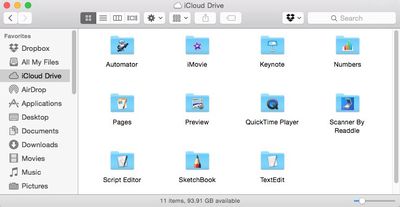
icloud_drive_yosemite_finder
iCloud Drive can also be used in a similar manner to Dropbox, Box, and other cloud storage services in that any type of file can simply be dragged and dropped into the iCloud Drive folder on Mac or iCloud.com and be synced across devices. Access is a bit more limited on iOS where there is no iCloud Drive app allowing access to all files, but the service still allows users of iCloud Drive-enabled apps to view and save files related to that app that are stored and synced with iCloud Drive.

Apple's iWork updates yesterday extend compatibility beyond the core OS X and iOS apps, and APIs are available to allow third-party developers to offer iCloud Drive support for their apps.

iCloud Drive taps into users' general iCloud storage allotments, with all users receiving 5 GB of space free of charge. But with iOS device backups and the upcoming iCloud Photo Library potentially requiring significant amounts of space, many users will find themselves looking to upgrade to paid storage tiers, which begin at $0.99 per month for 20 GB of space and go up to $19.99 per month for 1 TB.


Popular Stories

Apple iCloud Plus expansion hero

iCloud+ Now Includes Apple TV, Apple Arcade, and Curated Apple Music Stations in Over 100 Countries

Tuesday September 15, 2026 1:43 am PDT by
Apple today announced a new subscription initiative that turns paid iCloud+ subscriptions into a broader services bundle in more than 100 countries. In select countries, Apple says every paid iCloud+ plan, including the cheapest 50GB tier, now includes Apple TV and Apple Arcade "at no additional cost," while family sharing extends the storage, TV and Arcade access to up to five people....
Everything New Your iPhone Can Do on iOS 27 Feature 1

50 New Things Your iPhone Can Do in iOS 27 - Out Now!

Monday September 14, 2026 10:48 pm PDT by
Apple released iOS 27 this week, and despite the company's focus this year on refining its flagship operating system and nixing bugs, there are still many additional features to explore, not least of which is Apple's new context-aware Siri, re-tooled for the generative AI era. Which iPhones Support Every iOS 27 Feature? This year's major iPhone software update isn't all about AI, though,...
iOS 27 Icon iPhone

iOS 27 Available Now With These 8 New Features

Monday September 14, 2026 9:00 am PDT by
Update — 10 a.m. Pacific Time: Apple has released iOS 27. During its iPhone 18 Pro and iPhone Duo event last week, Apple announced that iOS 27 will be released widely on Monday, September 14. iOS 27 should be available around 10 a.m. Pacific Time / 1 p.m. Eastern Time today via the Settings app, under General → Software Update. Below, we have highlighted eight new features and...

Top Rated Comments

Lucky736 Avatar
156 months ago
What once was old is new again. Welcome back iDisk.
Score: 50 Votes (Like | Disagree)
sputnikv Avatar
156 months ago
I don't understand why you can't access your iCloud Drive on iOS without going through an app.
Score: 22 Votes (Like | Disagree)
156 months ago
I've been an Apple user since the 1980s, and this isn't to be snide, but I would never trust iCloud drive to store anything important. Apple shutters their services frequently. I can still access my freeservers.com and tripod data from the 1990s. But Apple has gone through iTools, .Mac, MobileMe, and now two iterations of storage for iCloud. I just don't trust it, and iDisk never worked reliably or quickly compared to Dropbox or Google Drive. iDisk would often crash the Finder. They do some things very well, but Internet services is not one of them (excluding the iTunes Store, which has been reliable for me).
Score: 18 Votes (Like | Disagree)
156 months ago
I was very disappointed to find out there is no way to share a link to a file in your iCloud Drive. I frequently use that Dropbox feature to share large files with people. Was looking forward to being able to divert all my funds into a big iCloud storage plan and cutting out Dropbox - but it looks like I can't do that. Big shortcoming of iCloud Drive IMO.

Yes, I'm aware of the new "Mail Drop" feature. However, that pigeonholes you into using the Apple Mail app, which is less than desirable. Also, it forces you to email, as opposed to being able to paste a link anywhere you'd like.

Lastly, yes, I'm aware of the potential security issues by having files on the open internet. This is a nonissue simply by adding a "Public" subfolder in iCloud Drive (like Dropbox).

Hoping to see this feature added in the future, but not holding my breath.
Score: 9 Votes (Like | Disagree)
OllyW Avatar
156 months ago
I've just installed Yosemite and I can't access iCloud Drive from Finder. I've tried clicking the icon but it doesn't respond. :confused:
Score: 7 Votes (Like | Disagree)
WRX-SRQ Avatar
156 months ago
Simple Fix

There is an app called Cloud Drive Explorer. It's free and works like a first party app should, in that it gives you access to your cloud drive, much like Dropbox or Box.

Give it a shot, may solve your issue.
Score: 6 Votes (Like | Disagree)













