

OS X Yosemite has brought some major changes to Apple's Mail app, and those changes aren't limited to a simple visual overhaul. Mail may have a new look, but it also has several new features like Mail Drop and Markup.
With Markup, you can annotate images and PDFs from directly within the Mail app. For example, when composing an email message and attaching a PDF, it's possible to use various tools to add signatures, emphasis, and more. The same is possible with an image -- simply attach a file in a message that's being composed and right click on it, selecting Markup.
Markup has a set of tools at the top that allow users to create shapes, write text words, and insert signatures. There are different brushes that can be used, along with a color palette and various font options.
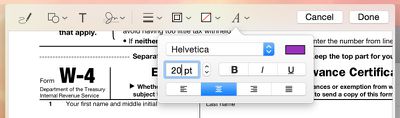
Users can enter various shapes, such as stars, circles, squares, speech bubbles and more, and there's a magnifying glass that will magnify sections of text or photos. A crop tool also allows for simple image edits, and there's a pen tool for free-handed writing or drawing.
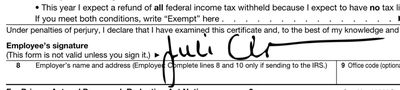
Markup's neatest feature is a signature tool that lets users insert a signature using the trackpad of a MacBook or a camera. With the trackpad, clicking begin and then signing a name with a finger on the trackpad will create a signature that's automatically entered into a document.
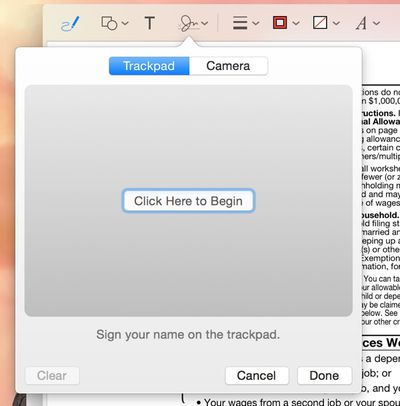
There's also an option that allows users to write a signature on a white piece of paper and use a Mac's FaceTime camera to import it into the document. It's a little bit finicky getting the camera to recognize the signature, but once it's lined up properly, the feature works well.
Along with Markup, Mail has a new feature called Mail Drop that lets users send large file attachments of up to 5GB using iCloud. Composing an email message and attaching a file that would normally be too large to send will prompt Mail to ask a user if they would like to use Mail Drop to deliver the message.
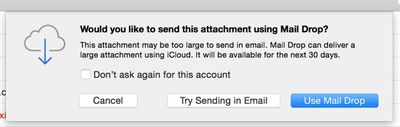
When the Mail Drop option is selected, the person receiving the email will receive the file attachment as normal if they're using Mail, while non-Mail users will receive a message with a download link that allows them to download the file directly from iCloud. Files are stored in iCloud for several days before being deleted.
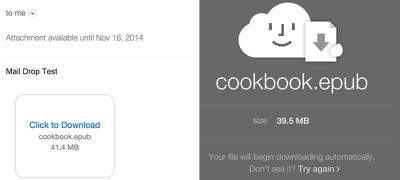
MacRumors did not experience any issues getting Mail Drop to function with files ranging in size from 10MB to over 1GB, but some users on the Apple Support forums have been having trouble with the feature. Because Mail Drop works based on a sender's file size limits rather than a receiver's, users have run into an issue where they can send a file that is below their own maximum file size threshold, but above a receiver's file size limits.
For example, sending a 10MB message from an email account that has a 30MB file size limit to an email account that has a 6MB file size limit will not activate Mail Drop and turn the file into a clickable link that can be downloaded from iCloud. Therefore, the person sending the message will get a bounce back reply that the user can't accept a message of that size, even if the receiver also has Mail Drop.
According to Apple, Mail Drop can only be used to send files that "exceed the maximum size allowed by the provider of your email account," which means there is no way for a user to select a custom file size threshold to activate Mail Drop to avoid the above situation. It is not clear if Apple has plans to implement manual size controls for Mail Drop, but for the time being, it appears that Mail Drop may not be useful for all users in certain situations.
Released to the public yesterday, OS X Yosemite can be downloaded from the Mac App Store at no cost. It runs on all machines that were capable of running OS X Mountain Lion and OS X Mavericks, and it requires 8GB of storage space and 2GB of RAM. [Direct Link]





















